
it’s gotta be this updater downloader to steam problem…
but how, just how we fix that
Can someone from the staff answer me this. Every single time you do a maintenance we’ll be having problems with the launcher or every other component of the game?
I launch the game, the game starts, I play 15 min and the game crashes. I launch the game (as admin, as anything you say we can try) and it says that I need to restart. I’ve done it 4 times and always happens the same.
I understand you have to make maintenance periodically, but if you’re going to have problems every time, make the maintenance longer, apparently in 4 hours you can’t solve everything, so take more time, 12 hours I don’t know
It’s an honest question
Its exatly the same problem , cant fix this ;-;
Pay to play and all I earn are problems and Error Bad game
ok the problem is tos.exe from folder release/patch if u delete and copying from your friend, you good to go man.
if not u can copying my >> tos.exe <<
Guys!
I just tried this last attempt and its works!
try this :
1,go to dlc tab on your steam lib properties.
2. uncheck the founder server pack
3. launch the game. it will download pack again
magically work. i dont know how.
i even try to delete all the patch-redownload before, and still now working
but this dlc trick works
3 Likes
it takes 4 hours to just add blue potion to quests and 10 to fix a bug that prevents people from playing, I hope we are rewarded for that, I’m wasting precious time of my founder acess trying to fix a bug that so far has no solution to many
really cool 
I can confirm that this actually works! TRY IT!!! i am now in game. thanks jack for the solution.
Its such a shame that players have to look for the solution of a bug that was created by the developers (and they rip us off on pricing)
you know the early stages things. i’m too tired to look for the screen shot but by buying founders pack you’ve agreed that you are playing in the early stages of the game. so whatever happens that are connected to bugs and technical errors are basically in the disclamer.
1 Like
the point is that I paid to play, so if I am unable to play during this period because of updates like this, I wish at least a reward
sorry for my bad english, and jacklanton01 solution worked, i love him
Yes its true that its in the disclaimer but as the game owners, you dont want this kind of things happening or if it does, provide a fast action in which case, it didnt happen.
1 Like
Everything runs on admin. So it loops around the MFC error and this one. Occasionally the missing .pak files show up.
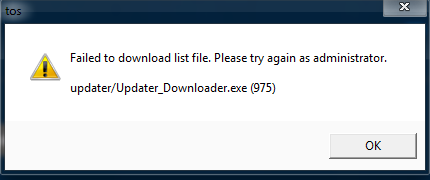
OMG TAKING OUT THE FOUNDER DLC WORKS… i think the ppl who have the 3rd founder pack are the ones getting this problem. Since IMC took out the 3rd founder pack, for the ppl who already bought it, the system might be confused that this is already gone but u still have it. idk, could be the possible reason?
this hasnt worked:
Disable Antivirus
Run ToS from patch folder
Run ToS as administrator
…
This has worked:
in the TreeOfSavior\release\patch folder, there should be another exe file, the updater.exe or something (it deletes itself after finishing). Run this as administrator, then start the game as usual.
Can confirm that removing the founder packs works. I tried everything else including practically reinstalling the game.
For me I’ve try the “jack solution” and it will work differently, for me (european player) I tried to deactivate the founder access n°3 => 9.99€ (I’ve the founder access n°2 too) and the patcher works normally.I think the founder access n°3 bugs for us.
awesome dude , thanks
yeap, by this time i conclude that this problem caused by founder access 3 things.
glad it help you
and most of people here
happy gaming!
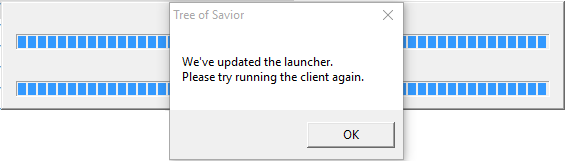
just for sharing… when i patch the tos launcher, a new update said the launcher has been update please start the client again and nothing happen… what i did is that i went to task manager, end task the tos launcher and then i went to C:\Program Files (x86)\Steam\steamapps\common\TreeOfSavior\release\patch . after that i run as administrator of the update launcher and i run as admistrator of tos.exe . then it works… hope this helps  im using windows 10 ^^
your welcome. i feel pretty bad reading your comment regarding you have to reinstall the game. but now, happy gaming!