
Unchecking the DLC on steam worked for me.
still getting the error all from steam>Client>Tos.exe are set to run as Admins and still getting this error. This is so frustrating already.
Same problem with updater, DLC 3, window 10 . When i run as admin on the file “Updater_Downloader.exe”, it said that this app cant run on window 10 ?!!
By the way, I have tried all the solutions so far, it didn’t work.
Me too. Tried every solution I saw. I even combined them all still no good. :’(
The problem really is that, after updating and loading up the client, whether its run as admin or run from the steam client. The client simply disappears and nothing happens, but if you look at task manager, you will see that the tos client is running in the background.
-Day 3 of being unable to play tos.
Please fix this. Tried all the solutions posted, and it still doesn’t work.
Getting both errors “updater/Updater_Downloader.exe (975)” and will shift to “updater/patcher.version.txt (975)” when I retry running tos.exe
It’s a really good game, just sad that we even bought DLC’s for something broken. 
I was able to play before, even after the 19th April patch.
then today got another small update. and… BAM i joined the cant play tos bandwagon. tried all possible “fix” i came across on the forum, unseccessful
Your solution worked for me. Thanks Sir.
Delete/Move all file in C:\Program Files (x86)\Steam\steamapps\common\TreeOfSavior\patch
Steam>TOS>Properties>Verify of Game Cache>Let Steam Download>Restart PC??>Patch TOS
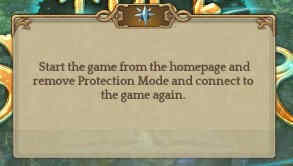
if anyone knows how to fix this please help
I repair it solution is this one Go for Steam folder > steamapps > common > TreeOfSavior > release > patch and delect 2 file name Patch then run administrator Tos and he download update againd and play…
I click 2 time in steam veriifc file integriti and that cause error to update and can;t play
BUT that solution work.
Thanks for the info i thought it was bug or something but yea my friends are like C’mon dude log in its hard to find pt LETS GO! im in like =__=" why god why this is happening to me. JAJA thanks i bet alot of us are in the same boat greeting from argentina best of luck for all players.
Thank so much! I finally got it to work again.
After this new patch today. I can’t run it even after I excluded it from scan. But if I turn off my firewall, it works perfectly fine.
Team Lacroste
Thanks, it works after the hotfix today.
No wonder there are only few players online coz none of the solutions are working.
♫ Feels like beta. ♫
After 3 hours of trying stuff out, still nothing. I notice that there is a new patch 11539, well on my release revision it has only stopped at 11533. It really isn’t patching or updating to the newest patch. [quote=“STAFF_Ines, post:1, topic:204835, full:true”]
###UPDATE - LAUNCHER UPDATED
The launcher has been updated. You can try and launch the game again.
###UPDATE - HOTFIX
We have now patched in a hotfix that should allow you to play the game after restarting the client. Please let us know if you are still unable to do so.
[/quote]
For these hotfix, are you suppose to just run the client from steam and it will automatically update itself? This never worked.