
do i just wait or i try changing my c++? just asking thanks
did you try installing x86 first? then x64 next? not sure if it’ll fix it though. try restarting your computer too.
Hello guys, I just wake up  so many comments but I will try to help everyone asap.
Thank you and don’t worry, they have rewarded me already  About the ticket, I think Letitia is right
Hi there, for this error, please update your windows 7 to build 7601 like I said in #1. Just turn on Windows update, check for update and download all patches then reboot. Then you will be able to install MS Visual C++ 2015. In case you still cannot install MS VC 2015, type “cmd” in the search box, then right click on “command prompt” and choose “run as admin” then type the following command: DISM /Online /Cleanup-Image /RestoreHealth
note: you may need to leave your pc for awhile to let windows find and fix bugs on your pc if has. Internet connection is required to download and replace corrupted files on windows.
I will take a look at your case. please send me ID and password of team viewer via message.  [quote=“inyux3, post:184, topic:353405”]
Since uninstalling and reinstalling, my game now crashes after attacking monsters.
[/quote]
I don’t think visual C++ 2015 causes your crash. Can you verify the game client and check again? As well as try to uninstall all addons and play first then install one by one, I have a feeling that some addons may cause this lag if the problem is still there, I think you should try to upgrade to windows 10 because as I see so far, players on windows 10 don’t have these problems. All the cases happened on windows 7 only.
I don’t know why, it happened to me also. Everytime I verify game client, there will be some files broken… Lastnight I worked on 1 pc has the same problem like you but his client had up to 47 broken files after verifying…I already tried to delete the game and downloaded it again from 0% but the arranging problem was still there. Finally I told him to upgrade to windows 10 lol. This arranging file bug is quite weird, if you can’t fix it by following stops on #1, let me take a look at your pc via team viewer. If I also can’t help, upgrading to windows 10 is highly suggested.
How about…upgrading to windows 10?  I will support you in activating windows Also try the addon I updated on Q&A 3. it may help
if your game is running well, you don’t need to change.
Oh and by the way everyone, for now you should not play TOS and open web browsers at the same time, it may cause VGA crash easier. Maybe something relates to visual memory or so…
Okay. So what are they doing with the data dumps you can send after every crash which has been happening for about half a year now or longer? Do they just favor placebo tickets over the actual collected data which is required to isolate and fix this problem? Or does the key to fixing the problem which is in those data dumps just been going into the trash for all this time?

As someone who has programmer knowledge and said earlier every system and case is different why would they opt to use support tickets rather than collect the information through an already set in place system?
4 Likes
Why don’t you ask them instead of asking me. For sure they have an answer better than anything I can say. Since I’m not like you I won’t bring up false claims or things I don’t know to my arguments.
But here’s a link for you to read a bit:
Crash Dump Analysis
Which contains a nice statement:
Not all bugs can be found prior to release, which means not all bugs that throw exceptions can be found before release.
Also it might be wise to say this:
Most of the “VGA errors” comes from something that happened on Lua side, afaik the game doesn’t capture exceptions on crash on the native code side. So I’d assume the error handling feature is implemented right on the game engine they use, which leads me to assume it’s exactly only what you see on the message:
The information that will be sent: error code, CPU, VGA and the memory driver information
For privacy reasons they shouldn’t be sending things they don’t say explicitly.
Which again leads to: What is a crash dump?
But first, let me say, crash dump = memory dump, source:
“memory dump files — also known as crash dumps” (https://www.howtogeek.com/196672/windows-memory-dumps-what-exactly-are-they-for/)
So now I can explain:
“These files contain a copy of the computer’s memory at the time of the crash. They can be used to help diagnose and identify the problem that led to the crash in the first place.”
So…
First, let me explain something:
You do not send memory dumps to the server after every crash. You send a small set of information that may or may not be enough to verify cause of complex errors.
That is why they need detailed tickets to track and reproduce the problem.
Plus 1: Not you nor I knows what is sent when you click yes. You might need the correct tools to extract detailed information to be able to say anything on what is sent or not.
Plus 2: Not every player clicks “Yes” to send. And one well explained test case is always simpler to track down the possible reasons of the error. Considering no extra information is asked to the player, it is safe to assume that any detail we send via tickets is useful.
Plus 3: Even Microsoft with their Windows Insider program asks for user input on errors along with memory information instead of dumps alone. The feature I’m talking about is Feedback Hub where it expects detailed information and test case from multiple users and as well group them to make it easier for the devs to have more details of what’s going on.
So, now will you stop pretending you know anything about systems and programming and stop bringing false claims to try to convince people? I brought all details to support my simple claim that you’re not correct in what you are saying and to justify the tickets.
I’m still waiting you post concrete things so we can have a valid discussion.
1 Like
My OS is Windows 10. I verified integrity, removed all addons, updated gpu drivers and reinstalled Visual C++ 64/x86 again, but still crash after attacking mobs.
Update warmode addon on Q&A number 3 on #1, please try to use it if you got crash too many times. This addon helped me with druid skills before. Not sure if it still can help now but should give a try.
I got this from my friend, she crashed alot while playing:
PlayAnim at [C](-1)
(null) at [string "function SCR_ATTACKER_TS_NONE(selfAi)..."](292)
1 Like
Actually, it should, but for some reason the memory dump files (FullDump_Client_tos[xxxxx].dmp) are 0 bytes long, probably because even that is bugged 
I wouldn’t call that bugged. At most disabled/not finished/not viable.
I updated the download links for MS VS C++ 2015 on #1 to the latest version (MS VS C++2015 update 3). You should uninstall the old version of VC 2015 before installing them.
But once again, I strongly believe that version of MS VC 2015 does nothing to VGA crash since 1 of my friend uses the old version of MS VC 2015 and still plays well without crash while the other friend installed the latest version and still gets crashed alot…
And the FAQ here is a bit confusing since windows already won’t allow you to install MS VC 64bit on 32bit OS but if you don’t install MS VC 32bit on 64bit OS, TOS won’t start since it is 32bit application.
1 Like
It voids the whole point of a report, since you can do trial and error even without that useless stack dump (and I bet whoever said they don’t use them was right).
If it’s not bugged, the report is a placebo. Or probably a “feature”
2 Likes

sadly we can’t do anything, only who wrote this game can fix it lol but it is too weird since some ppl don’t have crashed but others crashed alot.
2 Likes
VGA’d free users, what version of VS2015 are you using?
There are several other versions on microsoft.com. Please state. Thanks.

this is what I am using…crash free also
And here is one of forumer I helped before. He is using windows 8.1, no vga crash so far:
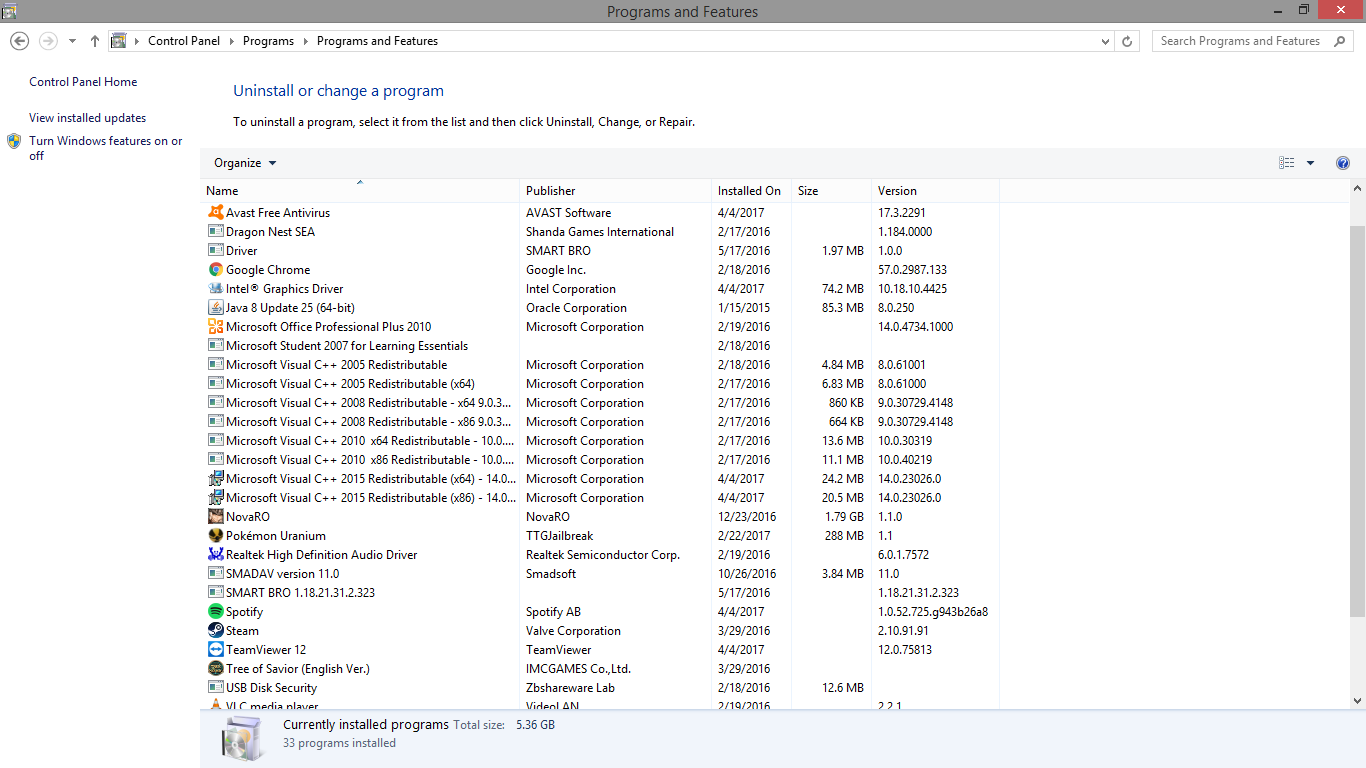
p/s: updated link download to 14.0.24215 already. I am thinking of uploading my whole TOS folder to here so VGA-crash player can try to overwrite on their game client LOL
I noticed somehow that when there is a high number of mobs and I will start to attack them, my client suddenly starts to freeze ( like 10 seconds ) then will resume…
@_@
then if im using windows 7 the instruction above will not help me or it can still be fixed without going to win 10? @Krystal
yeah, if those steps above can’t help, windows 10 will fix your problem for sure!