Tree of Savior Forum

šŸ”„ POST YOUR CRASH SCREENSHOTS AND MACHINE SPECS HERE! šŸ˜ž I think most new players won't have the patience do deal with the crashes

Please fill in as much as you can :

Date and Time(Please, specify the timezone) : today (April 6 GMT+8), see screenshots for exact times

Server Name: SEA Telsiai

Team Name: ZeroFoxGiven

Character Name: Any chars

Bug Description :
(letting us know what you were doing before, during, and after the bug happened will help us a lot)

Steps to reproduce the issue :

Login = crash

Enter Saalus mission = crash

Switch to other char who is in town = crash

Switch to another char in town with no other people around = crash

Logs in to check out GM meetup. Crashes.

Game Control Mode (Keyboard/Joypad/Mouse) : Mouse

System

  • CPU : Intel Core i5 4460 @ 3.20GHz
  • RAM : 8.00GB Single-Channel DDR3 @ 798MHz
  • Graphics Card : 2047MB NVIDIA GeForce GTX 960
  • Mainboard : Gigabyte Technology Co. Ltd. H97N-WIFI
  • Storage : 238GB Crucial_CT256MX100SSD1 (SSD)
  • OS : Windows 10 Pro 64-bit
  • Internet Connection : 2mbps ADSL Globe Telecom
  • Country, Region : Philippines, SEA

So much for first impressions.

Despite suggested fixes which I’ve already done here on the forums, reporting, and subsequent hotfix patches the game still crashes randomly or for some reason.

Happens when I’m alone somewhere on a field. Happens when I’m in the city.

Wasn’t a problem before the last few weekly patches came in.

@STAFF_Letitia @STAFF_Amy @STAFF_Yuri @STAFF_Ethan @GM_Sebastian @GM_Francis Please don’t stop working on the problem. It is still there and a lot of players are still having it.

7 Likes

Lies, IMC has the most organized developer department, they would never mix bad, non tested or properly fixed files in their patches…

Meanwhile at IMC…

2 Likes

When you realize implementation wasn’t as good as the update made you believe…

(also, when she’s 10/10 but you hear her talk sh~t)

7 Likes

Yes, I have this too. Moonwalk & skill.
Feels like dethrone is stronger and pushes your character back after the throw.

2 Likes

Seems to be a thing with stairs or being near stairs. Weird funny bug.

I thought it was my crappy controller doing that.

This is the response from my second ticket. I conveniently included pastebins of my dump files and there were several unique views on them. Here’s hoping they could make something out of them.

Unfortunately the optimization check/uncheck thingo did nothing at all for me (it’s more of a placebo effect).

My specs are i5 3570k and Intel HD Graphics 4000 (GPU died a while back and can’t be arsed to get a new real GPU just to play ToS)

2 Likes

And here I thought it has been patched. Well I was having it with a LOT of different things, fireballs, level ups, even JUMPS. Now it has been down to almost none for entire hours and then as soon as we got to Fedimian we got a VGA (me and both my friends at the same).
It’s just some kind of graphics/animation causing a problem on the archives and crashing.
Where can I find the logs so I can make a kindly and good ticket to try and help them?

1 Like

You can find them in the ToS release/dump folder. Just copy everything in the txt file and paste them on pastebin.

Really need more people doing this because it seems that we’re a minority here.

2 Likes

Do you guy have temporary fix for this? because its insane

I got this frequently in the loading screens, which is annoying you have to re-login back to the game when it crash…then repeat this 100 time until you give up to re-login and do something else.

I have already re-installed MS VS C++ 2015 (x86) and (X64) but the problem still persist.

I’m really impress you guys have the solution for sort of FEATURE that IMC implant for us. Kindly reply if you have solution instead waiting for IMC to fixed this issue (which on this time they haven’t figure out the solution) and I have not notice in the news if they aware of this problem.

PC Specs: i5-4460 3.20Ghz 4GB of RAM 64-bit OS

2 Likes

I cant play! :smiley:
Nice shot in the feet IMC! Now you are going to lose even more players. ahahaha
Damn… this company is a legend in terms of incompetence.

3 Likes

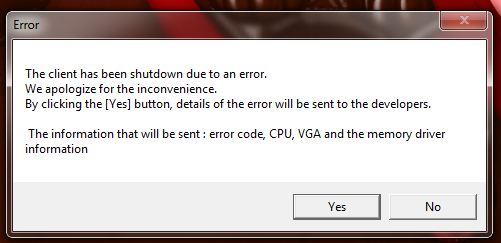
Doesn’t pressing the ā€œYesā€ button on the error prompt does that automatically? That at least was what I’ve been made aware of. Maybe I’m wrong.

2 Likes

I noticed the sliding effect too, happens in other places not just talking to NPCs. Bug or feature?

Sometimes when I press yes, the game freezes and I have to end the process manually. The logs shown after you pressed are sometimes incomplete so I usually dive through the dump folders for them.

^This is from a solo 290 Castle Dungeon vga error. Happened shortly after I killed a pack of mobs. I couldn’t make much out of it because I’m no programmer. The only thing that’s consistent is the error ID.

I’m also unable to reproduce the crashes but they typical happen when:

  • afk in town (usually couldn’t last more than 10 minutes)
  • first attack on anything (mobs/stamina crystals)
  • after loading completes
  • jump attack or something that goes with it
2 Likes

Ah, that explains it. Yeah IMC probably has the same problem with not being able to reproduce the issue since it seems to be very random. Even the 70% loading screen stuck bug has been there since forever.

1 Like

https://support.microsoft.com/en-us/help/189780/prb-symgetsymfromaddr-fails-with-error-487

Cause
By default, the symbol information for a module is found using the Win32 process current directory. A Windows NT, Windows 2000, and Windows XP service process does not have the same default current directory as a non-service Win32 process.

Status
This behavior is by design.


SyGetSysFromAddr is a debugging function that locates the symbol for a specified address.

In a summary, we’re not running debug builds thus we have no symbols to be mapped to that address which is were the crash happened. Basically, we only have the address of where the crash happened.

@ZeroFoxGiven some material for you to read, it is really random and hard to track if this is what’s happening:

With some quotes:

1 Like

Thanks, but not really interested to go indepth into this stuff. Simply, the thing is that the game used to work then suddenly it doesn’t for a lot of us.

We’re paying for the game already, we shouldn’t be doing the fixing for them (reporting/suggesting = yes, fixing it ourselves = no) especially when it used to work.

We help them correct the mistakes, not us fixing their mistakes. It’s their damn game.

1 Like

Totally agree. The game should work and they’re trying to fix it (at least should).

But when you said:

Seemed you sent some suggestions on this specific issue to fix it. If that’s not the case, sorry. Just sounded like it if you read it within the current report and context.

Sorry, you got it misinterpreted. I mean I tried the ā€œsuggested fixesā€ from other forumers here, @Krystal’s in particular.

1 Like

Oh, sorry. \o

But yeah, the issue imo seems to be related to multi-thread code which are indeed ā€œrandomā€ depending on the reason and hard to reproduce.

Hello Everyone,
We are working very very hard to correct this VGA error.
Please be patient and we will keep you updated. :sob:

5 Likes