
Hey. Bought a controller yesterday to play with this game since keyboard only is annoying on my hands and mouse mode is garbage compared to normal MMORPGs.
I knew I was gonna have to mess around in the txt files to set it up, I just didn’t expect it to be so damn complicated and messy, Errors left and right, no information about available commands outside of what we already have, no available pre-made setup, only half compatible with the hotkey changing program I found a while back. ( Can’t assign JOY_R1R2 / L1L2)
So I spent most of the day working on my config, going by trial and error to see what would break the game, what would work, what wouldn’t, and trying to figure out the easiest way to get it to do what I wanted it to do (Open menus).
I’m going to be posting my own config along with a img file I made in photoshop to track the changes I made to the config itself, along with any potential issues that I found while changing the settings.
I’m offering the file as-is. I can’t guarantee that modifying it won’t result in errors (and god knows I saw a lot). For any info on the config, check the picture.
Finally, here is everything wrong with playing the game with a (XBONE) controller.
- The Dpad can’t be bound (or unbound) to anything.
- The Rest function is incredibly buggy and doesn’t work well with some key combinations
- The BTN_12 (Right Joystick press) doesn’t work with combinations while the Left Joystick press does.
- Key Combinations like L1+R2, L2+R1 etc either don’t work, or I haven’t found a way to make them work.
- It isn’t possible to further increase the speed of the mouse cursor while in mouse mode further than it already is without causing errors.
- No idea what the OnEdit section is for, but it causes issues if messed with.
7. It is currently IMPOSSIBLE to light a bonfire with a controller. - There is no ingame settings to customize the Joystick controls. Additionally, it isn’t normally possible to open menus with the joystick outside of mouse mode, unless you manually add the menu lines in the config file.
- I haven’t found a way to open the Options Menu yet.
hotkey_joystick.xml (9.6 KB)
(XML file goes here Steam\steamapps\common\TreeOfSavior\release)
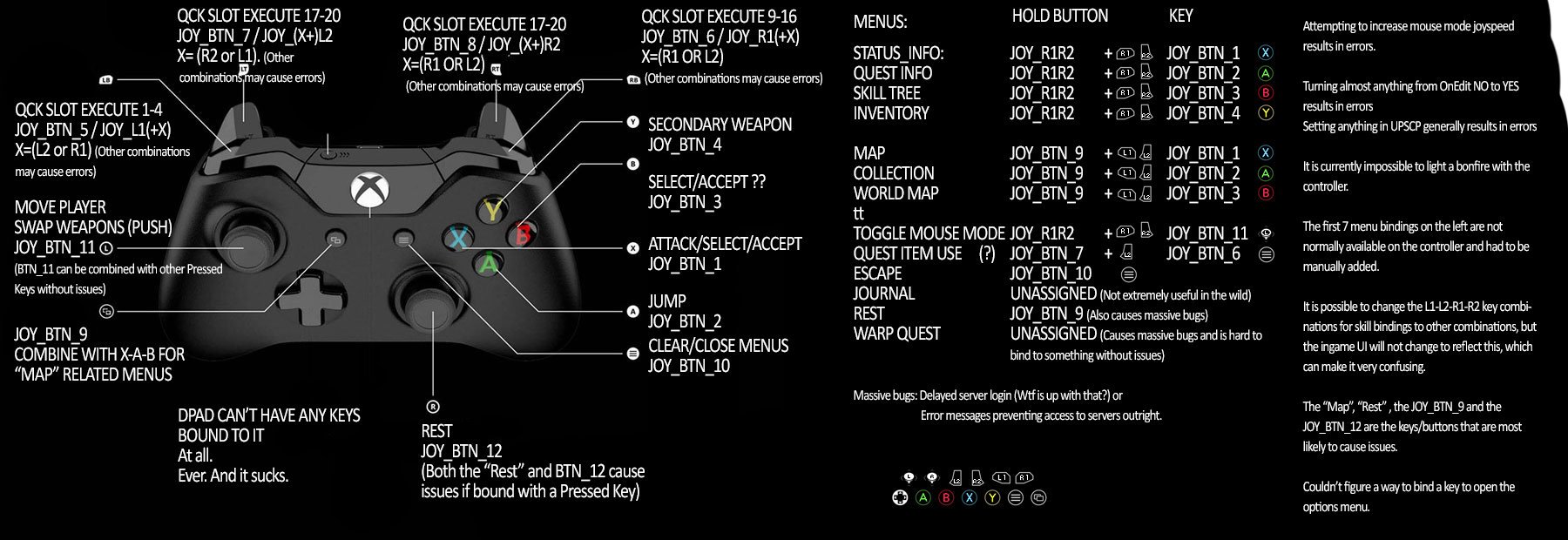
T’was a fun day.