Tree of Savior Forum

The client has been shutdown due to an error. Please Fix!

Please fill in as much as you can :

Date and Time : 6/2/2016 6:08 PM (GMT +8)

Game Control Mode (Keyboard/Joypad/Mouse) : Keyboard (Auto)

Bug Description :

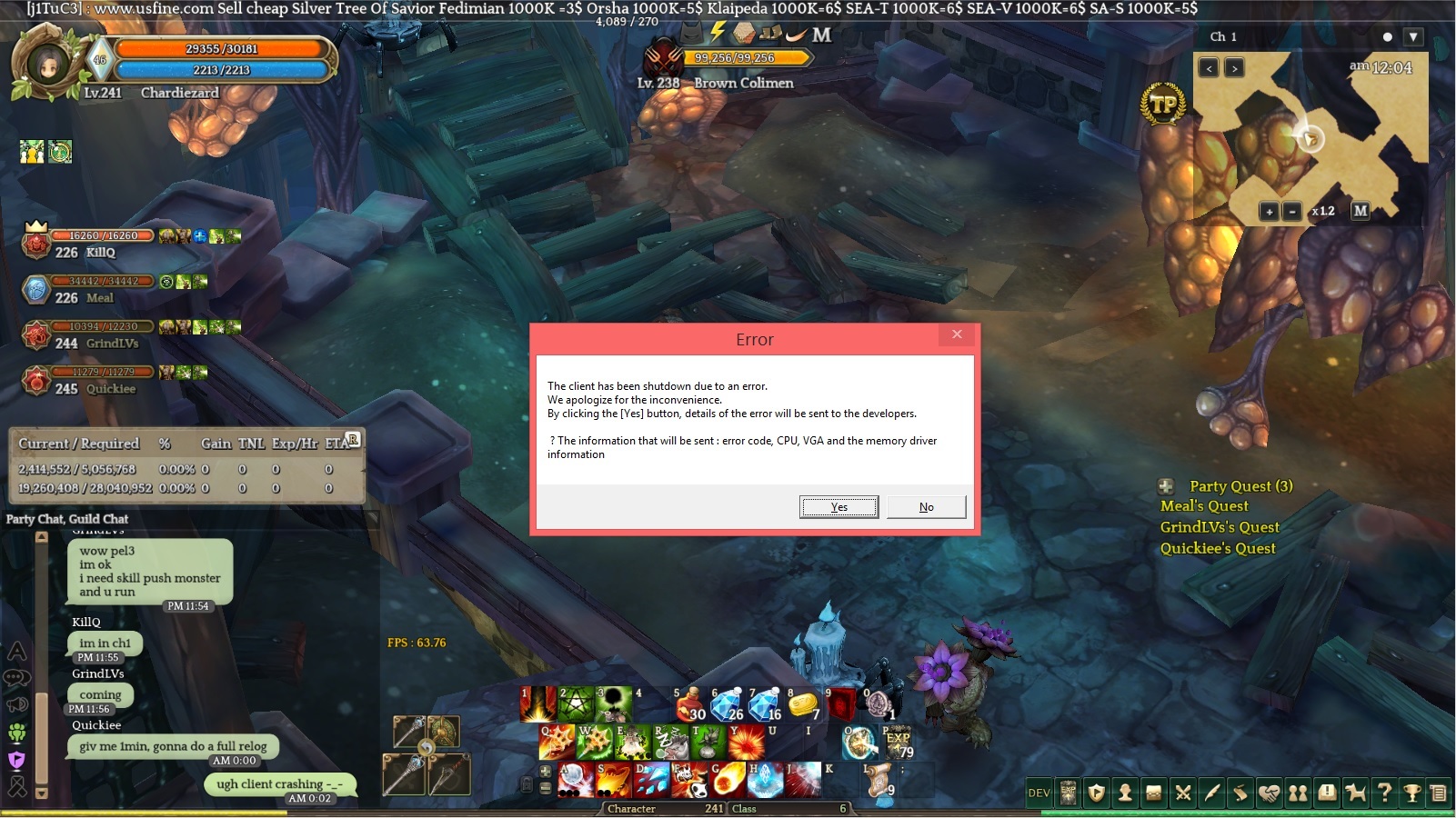
'The client has been shutdown due to an error.
We apologize for the inconvenience.
By clicking the [Yes] button, details of the error will be sent to the developers.

? The information that will be sent : error code, CPU, VGA and the memory driver information’

I am getting this error within 20-50 times a day and I had reach to a point wherein I am unable to play anymore. I have ignored this a few times before but now its just getting out of hand.

This happens almost everytime i play. When I go to dungeons, missions, grinding, or etc… This error message pops up twice and then it forces the client to close.

Steps to reproduce the issue :

  1. Going on missions.
  2. Going on dungeons.
  3. Going on quests.
  4. Going to anywhere, this error message appears.

Screenshots / Video :

Please see the screenshot:

System

  • CPU : Intel® Core ™ i5-3330 CPU @3.00Ghz (4CPUs), ~ 3.0GHz
  • RAM : 4GB DDR3
  • Graphics Card : NVIDIA GeForce GT630
  • Mainboard :
  • Storage :
  • OS : Win 8.1 PRO 64-bit
  • Internet Connection : 3 MBPS
  • Country, Region : Philippines
  • Direct X 11 Installed
2 Likes

I have same error too but its at the loading screen to enter the game after character selection.

Please HELP!

3 Likes

Same here. I experience this after entering any channel after my character select. I cant even play </3

Same here. And recieved an automatic answer. I’m pissed with IMC at this point.

This has still been happening to me like I said on my first post. (20-50 times a day).
I am getting frustrated every time this appears while I am enjoying the game.
Is there anyone (developers, support, etc) that could clarify as to why this is happening to us.

It seems that I am not the only one experiencing this issue.

1 Like

This is also happening to me recently, it’s extremely annoying.

Processor: Intel® Core™ i7-4790K CPU @ 4.00GHz (8 CPUs), ~4.0GHz
Memory: 16384MB RAM
Card name: NVIDIA GeForce GTX 970
DirectX Version: DirectX 11
Operating System: Windows 7 Professional 64-bit (6.1, Build 7601) Service Pack 1 (7601.win7sp1_ldr.160408-2045)

1 Like

Are you using addons?

I’m not using any addons,

But i manage to solve this problem, credits to Sixaxis.

Overwrite your current patch ->11894_001001.ipf & release -> Client_tos.exe with these ones (From my ToS folder): https://drive.google.com/open?id=0BwGTiTL88LtTUENwWV9xUWtMR0E

This method, worked for me.

I hope this method helps.

1 Like

I’ll try this out for a day and see if there are any changes.

i tested no fixed problem

same problem.
I’m not using any addons

Overwrite current patch and Client_tos.exe didn’t fix for me either.

  • CPU : Intel Core i7 3630QM
  • RAM : 12GB Dual-Channel DDR3
  • Graphics Card : NVIDIA GeForce GTX 680M (with GDDR5 4GB VRAM)
  • Mainboard : Micro-Star International Co. Ltd. MS-16F3
  • Storage : 240GB Samsung SSD 840 PRO Series
  • OS : Windows 10 Pro 64-bit
  • Internet Connection : 120Mbps
  • Country, Region : Brazil, Salute
  • DirectX 12

Also tried removing all addons.

@Administrator
@GM_Sebastian

@Tracking topic

I tried that fix above and received around 10-15 errors within the day. Still not fixed.

An admin or support or GM needs to address this issue and explain to us why these are happening to us! Ugh, this issue has been here for months now.


I love this game, but sadly, I have to quit.
I am unable to do anything anymore.
Trying to hunt materials for recipes, grinding, questing, helping a friend, this error keeps popping up and no one knows why and how to fix it! It is just too much to handle anymore.

If you can see the timeframe on the screenshots. I’ve experienced the error for 5 times within 10 mins of me playing.

1 Like

Credits to Sixaxis,

  1. Update your Nvidia drivers here if they’re not up-to-date: http://www.geforce.com/drivers

  2. Go to your Steam Library, right-click on “Tree of Savior”, go to ‘Properties’, go to ‘Set Launch Options’ under the [GENERAL] tab, and set the field to “-DX11” (Without the quotes)

  3. Overwrite your current patch ->11894_001001.ipf & release -> Client_tos.exe with these ones (From my ToS folder): https://drive.google.com/open?id=0BwGTiTL88LtTUENwWV9xUWtMR0E1

  4. In the C:\Program Files (x86)\Steam\steamapps\common\TreeOfSavior\release folder, open up the ‘release.revision’ file and make sure the number is: 11895

I hope of of the steps above is able to help you.

If not,i do not have any other solutions atm.

@JackC worked here, ty

this link is broken.

Sorry try this;

https://drive.google.com/file/d/0BwGTiTL88LtTUENwWV9xUWtMR0E/view

With the new patch up & etc, i’m not sure this is able to help or not.

Please feel free to try it.

I still have been experiencing some errors but i’ll give this a chance.
I’ll be back in 2-3 days of gaming. :slight_smile: Thank you for your replies.

I have tried your method.
It repatched once I did them then after 5 hours of straight gaming, the error popped up. Am I doing something wrong?