About Mercenary:
- Red Album = Catacombs Mission
- Blue Album = Siaulai Mission
- Green Album = Seven Valley Mission
- Purple Album = Crystal Mine Mission
Explanation: in Catacombs mission respawn bosses that give Red cards.

About Mercenary:
Explanation: in Catacombs mission respawn bosses that give Red cards.
See, that’s what I am confused about since nothing ever drops from me there.
They drops only its own card and all have the same low chance, but I think you got really unluck.
-I am not native English speaker too, sorry for bad explanation. x.x
Not really tho, these pieces where on my Falconer and it did dropped a lot of stuff, including albums.
The only possible thing I can think of is your windows user access, are you on an Administrator account in windows? If yes, then try change the folder from Read Only (you can right click in the folder and uncheck it, apply, it will ask if you want to do the same for the sub-folders, it’s fine to do it).
I take your Steam is installed on the default folder (Program Files), if that is the case I would suggest you to change it.
To do that, you have to do the follow:
Close Steam completely (that include killing the Steam service).
Copy (or move) the game folder somewhere outside of Program Files, you can create a Games folder in the Disk C.
Uninstall Steam (yes, uninstall).
Run the installation again, when it ask where you want to install, change the folder to C:\Games - I don’t remember now if the installation create the Steam folder automatically when you change the default path but you can check it before proceeding, if it creates click Next, if not, click in the Browse button and if it’s on the Games folder just create a new folder called Steam in it, click OK and proceed with the installation.
Before starting Steam, move the game backup (the one you did on the second step) into the folder C:\Games\Steam\steamapps\common.
Now run Steam, put your login, and install the game, Steam should see that the game files are in the machine and will only register the installation into itself and you should be able to play.
Merc missions are only for EXP (pretty bad after Lv 250) and the cube only rolls material, total waste of time rolling it tbh. And a rare chance of dropping cards.
Indeed it will increase a bit the temp, the card you are using is properly for games/3D design, different from the built-in that has limits and will try to stay cool causing bottleneck.
I will ask just to make sure, you aren’t using the laptop on top of the bad or cloth stuff right?
I will tell you one thing that many people don’t even bother to know, but most laptops, if not all of them, have their air flow entrance underneath them.
If you let it on top of the bad or something like that it will indeed overheat, also, since laptops have small “feets” the air flow is bad too in flat surfaces.
As I mentioned, the air flow entrance is underneath, and many times get clogged up with dust, fur and stuff like that, lowering even further the air flow, hence causing overheating, you can try put something in the rear area to lift up a bit to increase the air flow. and lessen the dust clogging up.
Other things to consider, but would need an IT to do for you is, the thermal paste that cool down the processor and GPU might dry with time losing it’s cooling properties, it’s a preventive maintenance you have to do periodically (around 4-5 months).
But how can they drop the cards like Helgasercle, Nuaele, Rexipher and so on then? The demon lords don’t spawn as bosses in there and since the legendary card update these cards are supposed to drop in there.
Guess RNG really just hates me then. 
Well, uh, it’s only one account on this computer, so I would assume it’s an administrator account.
And well, I’m not actually sure if it’s the “normal” folder. The thing is, steam installed every file in English and made a “Program Files” folder for that. In German - I’m from Germany - the “normal” folder is called “Programme” and this is where all my other stuff is in.
Also if I uninstall Steam… won’t it erase all my other games/the savefiles? I have a LOT of games on steam…
I really, really just want a Helgasercle card and therefore am stuck with doing merc missions, I’m afraid…
No, my laptop is sitting on top of the laptop cooler (which is on my table) with ventilators below it and it also has ANOTHER cooler which gets attached to its vents to suck the air out faster. This thing is cooled by TWO coolers. This laptop gets cooled as much as a laptop can get cooled without putting it in the fridge, really.
Also man, this all really seems like a LOT of effort and possible cost (I don’t know an IT personally, sadly, so I would have to bring my laptop into a shop) for one game…  I really don’t have any money to spend.
Ah I see, then there’s no need to change it I guess, also, if you plan on changing folder in the future, I didn’t know you had other games sorry on that, you can simple backup the whole common folder, it will bring all the games, and do the same as before after installing Steam on the desired folder.
I forgot to mention that most games store their save files into Documents or Documents\My Games, but there are some that store inside the game folder.
Ahh, then it should be fine, the high temp also is influenced by the laptop performance, as I said before, if you put more RAM it might improve it too, also HDD (hard disk drivers) heat up more than SSD (solid state drivers) but SSDs are hella expensive depending on the country.
About the periodical maintenance, it shouldn’t be expensive, and if the laptop is on warranty you can always ask if they cover this with a free maintenance, just say that it’s heating up too much and it may be the thermal system issue.
The best option to get cards, really is card events:3-5 parties with 5 album per person. You dont need to kill the boss, only one person in your party need to hit the boss for all members get cards. So you dont need to worry about lag of your pc specs.
Alright, I will try to make the setting stick again then. I will try the read-only change then.
Thank you for all the information! I am not very good with computers, I guess, because I never heard about any of these things before.
My issue is that the fans inside of my laptops - all I ever had - usually break after only a year or so. I’m not worried about the temperatures, really, the issue is my fans constantly running on overdrive and me desperately trying things to stop them from doing so. (Sadly, even with the coolers, ToS kicks my fan into overdrive).
And I really, really wish I could just buy more RAM. This isn’t the first game I had issues with because of the low RAM, but I really cannot afford it.
Sadly, warranty works a bit differently in Germany (or at least where I live? Who knows.) Basically, if a laptop gets opened up in a shop, the warranty is void. Warranty only applies if the laptop gets sent in to the manufacturer and it hasn’t been tampered with at all. A lot of manufacturers glue special caps to the backs of the screws so that they cannot be opened without those caps removed and therefore voiding all warranties. I had those issues before. Of course I could send it in to the manufacturer, but then I would be 2-3 weeks at least without a computer and that’s kinda crappy when you’re a disabled person who cannot go outside and only communicate through the internet.
Yeah, this is what I read in the patch notes… but how does that work if each boss only drops its own card and those guys don’t spawn in there? I really don’t understand what I must kill and what not to have a chance of those dropping. (Sorry if I cannot get my point across, I am probably phrasing things in a way that makes me not easy to understand.)
And again, sadly, card events don’t work for me. If another player is on the screen, I cannot do anything. The game freezes for the duration of the player on the screen. I can’t use items, I cannot click on anything, nothing. I have a frozen game until the player leaves my screen. It’s not lag or input delay. It’s basically freezing.
They have a chance to respawn in each mission, i dont know if its a low chance of these bosses respawn, but they can.
You should worry if the fans wasn’t at full speed lol. They are trying to keep the system cooled so it’s normal the loud sound of the fans.
Can you check somehow the temperature with the laptop in idle (not being used) and while in-game? If you don’t have a way there there are some softwares that can tell you, if I’m not mistaken CPU-z does that. I wish Nvidia implemented something like that on their drivers.
Yeah, well here on Brazil we have some authorized repair shops, it’s a normal computer parts shop but have authorization from the manufacturer to open and do maintenance without losing it’s warranty.
Huh, really? They DO spawn? I didn’t see any of these guys in my missions yet. Guess I will just check and if they aren’t there get out or something. Thanks for letting me know that! I had no clue that the demon lords could appear in there now as I have only seen the usual/normal bosses so far.
I have a temperature panel on one of my coolers, but it only measures the temperature of the air. I had a program to measure the internal control once, but my antivirus program kept insisting that it’s a virus so I deinstalled it after checking with a second antivirus.
Man, that sounds so much better than what we have. I’m jealous now.
Also I tried the thing with putting the folder out of read-only and it changed nothing. Number keeps resetting to “99”.
Really weird, btw, what AV you are using, Norton System Tools or something like that? I remember Norton love to use Ghost to redo what was changed in the system lol. A real pain in the ass, also, try to add the game folder (TreeofSavior) into the AV exceptions, one of the slow down into the game might be the AV scanning the files that the game open when you change map or cast something.
I used Avira before and now switched to Avast. Both detected the temperature program as virus.
I just googled for another one, though, which seems to have far less details, but at least some numbers. I’ll start the game up now and leave it running for five minutes and then take a look at the difference.
And ToS is already in the AV exceptions; Avast is very good at detecting games and adding them usually seconds after I booted them up for the first time. 
EDIT: Took a picture of the temperatures before and after starting the game. I didn’t do anything in the game - just sat around - and waited five minutes. There are TWO coolers running. Look at this (left without the game, right after five minutes):
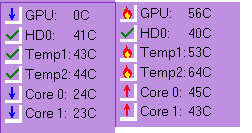
It looks really good, better than mine, my GPU generally hit the 90ºC and my CPU goes up to 64ºC.
Laptop is different from a desktop, it has less internal space so in idle it is really around that temp.
The GPU it is monitoring is the Nvidia right?
Sorry for disappearing, someone had put a miracle seed directly on top of me and I didn’t want to pass up the 50% exp bonus.  Still only got around a level. Guess 321 is where things start to get miserably slow. This means I can also report that the temperatures after half an hour in Alembique Cave are still around the level they were at in the screenshot.
And it does seem to monitor the Nvidia, or at least that’s what I get from this screen:
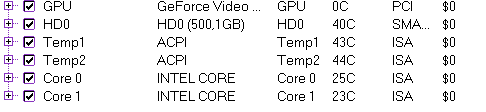
Is that in idle? It seems so, it may turn off the temp sensor when the gpu is not in use. That’s why it shows 0, the Intel built-in is inside the processor so it’s the CPU temp.
I have no idea - I just tab out of whatever I am doing (playing the game, writing here) and take a screenshot of the program. I shut down the game, so the temperatures are all back to good now.
With the game running still in 0?
No, when the game runs, it shows what it does on the right side of the first screenshot (where it says GPU: 56C). It only shows 0 when the game is off. So I do think you are right, right now the computer is using the intel again and therefore the Nvidia says 0.
Ah alright, it’s a good temp. if it raise like 10ºC from the normal it may be time for cleaning, but check underneath the laptop and see if the air entrance is clogged up with dust, you can use a brush to remove it, dust also tend to clog up inside on the air exit, exactly in the heat sink grid by the rear part of the laptop, that one you won’t be able to reach unless you disassemble it.
Don’t blow air to try remove it, you might cause the dust to lock up the fan causing even more issues.
If your house have barely any dust it will take time to that happen. Maybe around 8 months.