Tree of Savior Forum

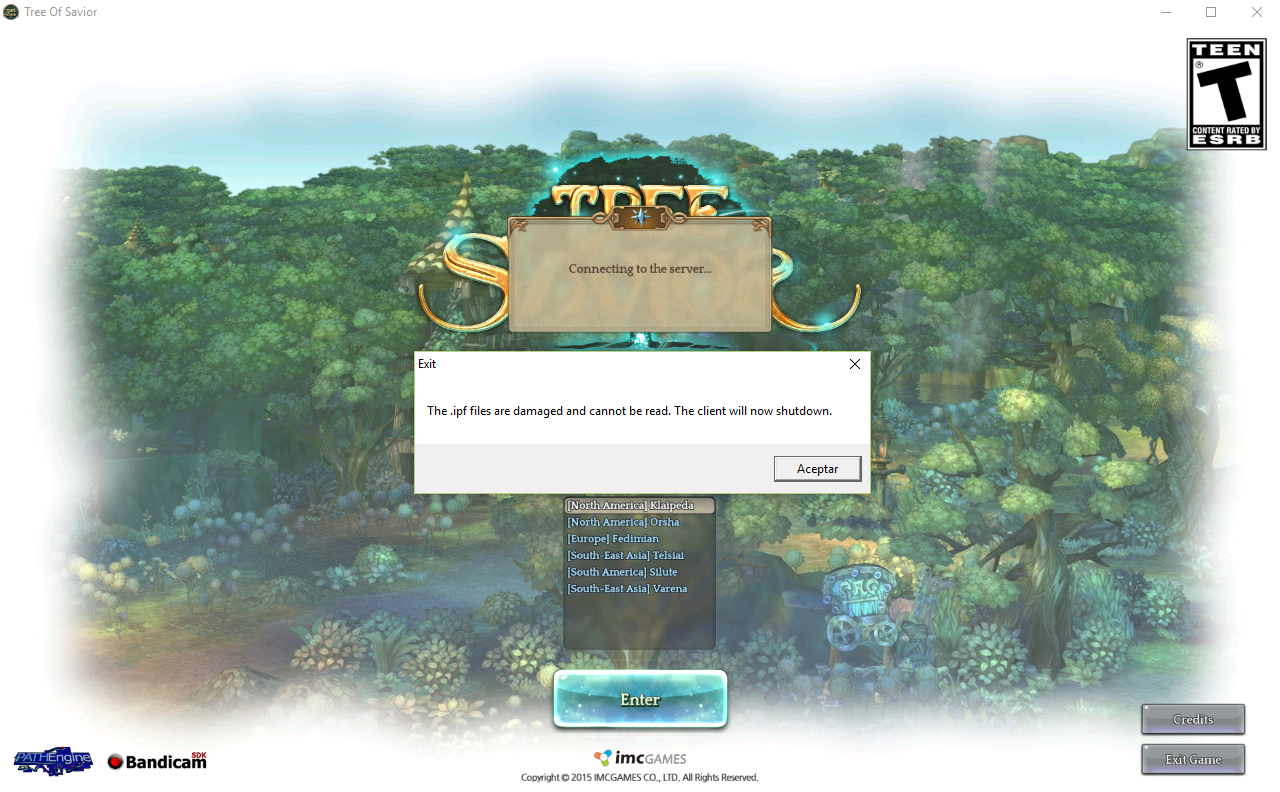
Damaged IPF files

Date and Time(Please, specify the timezone) : Tried to Log In at roughly 2 pm (-4 GMT), and 4 hours later I still can’t.

Server Name: Klaipedia

Team Name: Kinase

Character Name: Tyrosine

Bug Description :
Since we had a recent huge maintenance, I deleted all my Add-ons (the ones pre- add on manager) and SumAni.ipf files, then I tried to Log In after patching and the IPF files error appeared.
When I try to log in on Klaipedia server, I cannot see the Team Lodge, but I hear the usual sound.
I tried to log in on Orsha server, I could see the Team’s Lodge, but the error message appeared shortly after.

I also re-installed twice the game, to ensure a clean state, and verified multiple times the steam files to no avail.

Steps to reproduce the issue :

  1. Log in Klaipedia server.
  2. IPF files error
  3. ???
  4. Profit

Screenshots / Video :

I’m aware a similar problem happened yesterday, but I could play just fine until a few hours before maintenance.
Try to re-verify file integrity of the game files through the Steam app, let it re-download the needed files and re-patch.

As I mentioned, I tried to verify file integrity multiple times, and it redownloaded 6 needed files, but the problem persist.

I have the same problem, tried reinstalling from scratch deleting the ToS folder located in the steam folder after i uninstalled the game, uninstalled all addons, deleted addon manager, deleted the addon files under %appdata% and nothing, the only improvement i get from reinstalling like this is that the game takes me to an empty lodge, and if i try to verify the files with steam it starts crashing again.

After six hours or so, I tried to log in again and I could, the only different thing I noticed was that the patcher took a lot longer to complete, being stuck at 0% for some time.

I have the same problem… verified like more than 10 times… please look into this!

I just found something really important which is probably our problem, my steam or the patcher file aren’t actually updating to the last version of the game, my current game version is 127115 but my friend who can actually play got the version 128009, thanks to this im missing the following ipf files

128009_001001.ipf
128113_001001.ipf
128143_001001.ipf
128144_001001.ipf
128145_001001.ipf

verifying steam cache doesn’t help either as it leads to “damaged .ipf files” crash whenever i try to login. Also the file SumAni.ipf is different than my friend’s one, his is 4kb while mine is 2kb, besides all these differences all other .ipf files have the same values, i dont know if the other files that aren’t .ipf are different

@GM_Francis @GM_Sebastian @STAFF_Ethan @STAFF_John @STAFF_Ines help

All channels closed right now on Klaipeda…

Now that I remember, the last patch file I had was indeed 127115, the same number that was linked to yesterday’s problem, I guess it was solved when it decided to randomly patch correctly.

Mind sharing what did you do moments before it fixed itself? did you delete the release.revision.txt or something? kept verifying files? kept launching the game?

Well… after mindlessly re-verifying files, I left it alone for some time (About 2 hours, tried to get distracted by playing another game), after that I tried to log in again, the patcher took a lot of time to progress from 0%, and when it finished I could play.

The one other thing I did before leaving it alone was re-installing the Add Ons from the Add On Manager, but I don’t think it helped at all.

Okay i found a way to fix it, but needs someone else with a working game to send you a file.

Verifying the game cache it downloads everything except 1 ipf file, 128145_001001.ipf , without it i was getting crashes and the game proceeded to delete the following files that the cache verify downloaded:

128009_001001.ipf
128113_001001.ipf
128143_001001.ipf
128144_001001.ipf

This was keeping the game stuck at version 127115.
To fix this problem i verified the game cache once more and asked my friend to send the last ipf file i was missing, launched the game and the game revision changed and everything started working fine.

After spending all the day, the only way to bypass it was downloading manually the ipf files missing (128009, 128113, 128143, 128144 and 128145) in the link (reeplacing “numbeers” for the number of the ipf file.

So, u downloaded the 5 files, now make a copy of them in another folder (Folder A).
Go to the patch folder (the one with the ToS ipf files) and paste a new copy of the downloaded ipf files.
After doing that open the luncher. Doing this, the updater will delete your ipf files, when that happens, before the luncher finish u have to drag the copies in the Folder A to the patch folder, doing that the updater will finish and the game will run reading every ipf file in the folder.

Hooooopefully this could help anyone, it works with me but im just 1 in a million, so good luck~

http://drygkhncipyq8.cloudfront.net/toslive/patch/partial/data/numbeers_001001.ipf

1 Like

Sent 2 tickets to support and i get the same reply…zzzzz

Greetings Savior!

Thank you for contacting us.

We apologize for the inconvenience.

Please be advised that our development team is already looking into the issue. We appreciate your patience and understanding while they are investigating the matter.

Should you have any further concern, feel free to contact us again, and we will gladly help in any way we can.

Best Regards,
Tree of Savior Support Team

Hi, you can try out the solution suggested by eltira2k4 Client remove latest patch when using certain ISP
or

Step D, by Biskee

So far I’m able to play the game by either play the game with a VPN on, or use another ISP, my default ISP (maxis) will cause the ipf file damaged problem around 70% of the time I play the game, other 30% being the latest patch not apply to my game.

Can you upload the file somewhere and share it with us?

Edit: Nvm, got the link from yami_no_ame. And doing what he said worked for both computers at my home! I’m in the game, finally! Server Varena.

i cannot open your link

you have to replace the part where it says “numbeers” in the url, if you want the file 128145_001001.ipf for example, you’ll have to add 128145 like this

http://drygkhncipyq8.cloudfront.net/toslive/patch/partial/data/128145_001001.ipf

ahh,no wonder…thanks for help

Btw, this method seems to be only a quick fix as when I restart the launcher, the launcher will still delete all the 5 ipf files and I have to copy them back in the patch folder manually. Hope IMC will fix this soon.

2 Likes