Downloaded / installed the game 4x
…

dude i’ll tell what i do when this happens, i might not be the correct solution but it works for me.
this crash usually happens when i click on the game before the servers window appears.
so i start the game and dont touch it until the game really starts and the servers screen appears.
hope i helped
Continuing the discussion from I have done everything but the launcher keeps crashing [SOLVED]:
This is what me and ramiro found out about that DLL yesterday, we expend the whole day trying to fix his problem until we hit that dll, in his case there was no error messages the client just crash and close. Honestly, like me and ramiro discussed on the same topic, we dont usualy go and download dll files from websites, the risk of infection is high and it can cause more harm than help, what i can suggest is, install/repair the VC++ Runtimes (In this case is the 2010 version or so it seem, but in any case install/repair all versions).
I download the dll using “Dll-Files Fixer”, but not resolved
Install the VC runtimes from microsoft site, do a search on google with “vcredist 2010” and it will show 2 links, one is for 32 bits and other for 64 bits, if your OS is 64 bits install both, if its 32 bits install only the 32 bits. You can install the other versions too (2005, 2008, 2013 and so on) but only if its from microsoft site, dont get from suspicious places. And if when you install it says to repair or remove, use the repair function.
Dunno if it will help, but it probably wouldn’t hurt to try this: https://support.microsoft.com/en-us/kb/929833
Maybe help. but that DLL is the one in the game folder, i dont know if it could be conflict with the runtimes on the system or just corruption. I could upload the DLL have on my game folder but dont know how the forum rules view this kind of thing as.
Sorry for bad English.
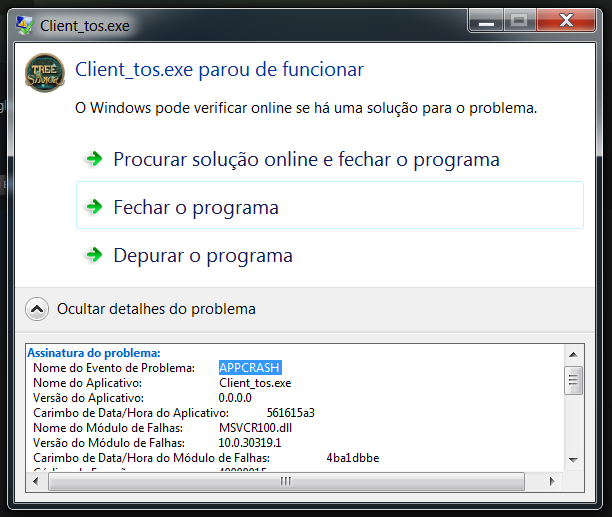
I have the same issue. Here he writes in the events:
Client_tos.exe
0.0.0.0
561615a3
MSVCR100.dll
10.0.30319.1
4ba1dbbe
40000015
0008d635
1474
01d10f059ac0d455
C: \ Program Files (x86) \ Steam \ steamapps \ common \ TreeOfSavior \ release \ Client_tos.exe
C: \ Program Files (x86) \ Steam \ steamapps \ common \ TreeOfSavior \ release \ MSVCR100.dll
dbed5af7-7af8-11e5-9f5c-001e101fe70e
Faulting application name: Client_tos.exe, Version: 0.0.0.0, time stamp: 0x561615a3
Name the failed module: MSVCR100.dll, version: 10.0.30319.1, timestamp 0x4ba1dbbe
Exception code: 0x40000015
Offset error: 0x0008d635
The ID of the failed process: 0x1474
Faulting application start time: 0x01d10f059ac0d455
Faulting application path: C: \ Program Files (x86) \ Steam \ steamapps \ common \ TreeOfSavior \ release \ Client_tos.exe
The path of the failed module: C: \ Program Files (x86) \ Steam \ steamapps \ common \ TreeOfSavior \ release \ MSVCR100.dll
Code Report: dbed5af7-7af8-11e5-9f5c-001e101fe70e
VC ++ Runtimes 2010 Installed (I’m a programmer and I work in visual studio 2010)
Msvcr100.dll I deleted the folder with the game (of both folder - the folder of the game and in “patch”). Used msvcr100.dll from the Windows folder
All the same, the same error
Try to verify the game cache on steam, if still happens try to uninstall the game and reinstall it.
I have visual studio 2010. When I click “repair”, the program opens but nothing happens
nando, please, send me a private message with the DLL?
The forum dont let us upload any kind of files except Image files.
Try these
http://www.microsoft.com/en-us/download/details.aspx?id=26999
Theres both 32 and 64 bits, Dont install the IA64.
hi im back i have been away from some days and i have some test so i couldn’t see this well the exception code is the same as mine. can you say me exactly what you do to fix your dll and if you got adobe, directx, visual, net framework,etc. in the latest version and all.
can you tell us your exactly specs and all?
1-Adobe Flash updated
2-Direct X 11 updated
3-Visual Studio 2005, 2008, 2010, 2012 (32 and 64 bits)
1- I tried re-installing the game 4 times.
2- I deleted the DLLs from all folders and launch the game
3- I downloaded the DLL from a website
4 - I tried clicking on “repair”. It opens visual studio 2010 and nothing happens.
The game work on DX10 not 11, theres a DX distribution on the Patcher folder. install that.
I do this, not resolved
I dont think this will solve but, rename the file user.xml in the game folder (TreeOfSavior/Release) to user.xml.old and launch the game again. If it dont work, rename the msvcr100.dll to msvcr100.dll.old and try launch the game, it dont work rename it back to .dll and try the same with the same dll on the folder TreeOfSavior/Release/Patch.
The dlls you hace to fix is not the one in tos folder is the one you usually have in your windows folder try downloading the fixer for that particular dll
DLL game version: 10.3 --> Error
DLL pc version 10.4 – > Error
updating the DLL game
DLL game/pc version 10.4 --> Error
Pls check your version in PC?
Mine is 10.0.30319.1