
Tree of Savior Forum

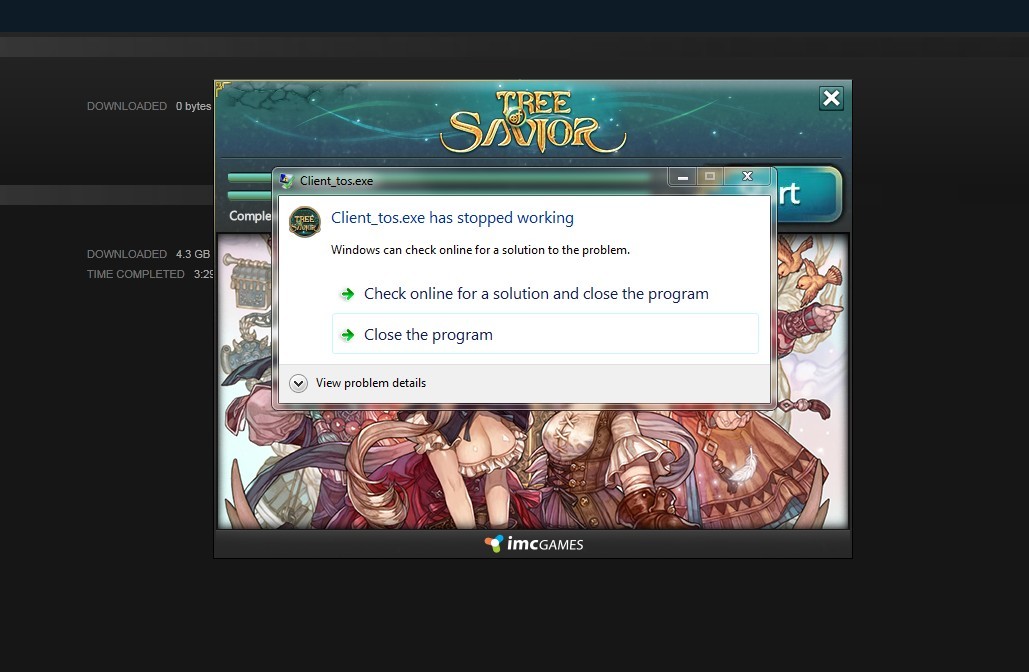
Client_tos.exe has stopped working error

Please fill in as much as you can :

Date and Time : August 8, 2015 - 4:00AM

Game Control Mode (Keyboard/Joypad/Mouse) : Keyboard

Bug Description : Client_tos.exe has stopped working error
(letting us know what you were doing before, during, and after the bug happened will help us a lot)

Steps to reproduce the issue :

  1. Launching the game from steam

Screenshots / Video :

(attach screenshots or videos regarding the bug)
System

  • CPU : i5-2500k
  • RAM : 12gb
  • Graphics Card : AMD Radeon R9 270X
  • Mainboard : H67M-D2-B3
  • Storage : 160gb with 40gb free
  • OS : Win 7
  • Internet Connection : DSL
  • Country, Region : Philippines, Manila

PS
I already installed flash, directx and updated my driver. Also, verified cache in steam.

1 Like

Hi, could you try reinstalling the game?

Hi! I just did but nothing changed. :frowning:

1 Like

I also updated my Internet Explorer and did the other solutions in other threads. (deleting patch, cmd, etc).

Is it graphic card issue?

1 Like

i have the same problem here.

No one has a solution to this? All my friends can get to the server screen and I can’t even get the game to boot.

Tried reinstalling, running as admin, deleting the patch folder and running as admin, all to no avail.
Each time I got the same crash after clicking the start button on the patcher. “Client_tos.exe has stopped working”

Problem signature:
Problem Event Name: APPCRASH
Application Name: Client_tos.exe
Application Version: 0.0.0.0
Application Timestamp: 562e26f0
Fault Module Name: MSVCR100.dll
Fault Module Version: 10.0.30319.1
Fault Module Timestamp: 4ba1dbbe
Exception Code: 40000015
Exception Offset: 0008d635
OS Version: 6.1.7601.2.1.0.256.1
Locale ID: 1033
Additional Information 1: 634d
Additional Information 2: 634d1191da44dd711cee596c8394229d
Additional Information 3: 617a
Additional Information 4: 617a06ab4c55c84f8f14dab26df6ca7d

1 Like

COMPUTER: Visual Studio C++ 2010 update = msvcr100 version 10.0.4

GAME: Visual Studio C++2010 = msvcr100 version 10.0.3

the error probably is here.

Have same problem, after clicking “start” button in launcher getting this “Client_tos.exe has stopped working” error.

Running it on Win 7 x64, core i5, 8gb ram, all runtimes/drivers updated.
After clicking ok launcher is closing but process client_tos.exe still hanging in memory.

From event viewer:
Faulting application name: Client_tos.exe, version: 0.0.0.0, time stamp: 0x561615a3
Faulting module name: MSVCR100.dll, version: 10.0.30319.1, time stamp: 0x4ba1dbbe
Exception code: 0x40000015
Fault offset: 0x0008d635
Faulting process id: 0x12b0
Faulting application start time: 0x01d10f9e5db6571d
Faulting application path: D:\games\Steam\steamapps\common\TreeOfSavior\release\Client_tos.exe
Faulting module path: D:\games\Steam\steamapps\common\TreeOfSavior\release\MSVCR100.dll
Report Id: 9ece8b18-7b91-11e5-aae9-94de807e4425

Will try to figure out problem, but open to any suggestions/solutions.
Thank you.

upd. Think I tried almost everything now, rebooting, reinstalling, replacing this msvcr100 dll , differently running , etc etc, still getting same message. Any solution? :

Tried uninstalling the 2010 C++ distributable, and reinstalling version 10.0.3. Now…

Problem Event Name: APPCRASH
Application Name: Client_tos.exe
Application Version: 0.0.0.0
Application Timestamp: 562e26f0
Fault Module Name: MSVCR100.dll
Fault Module Version: 10.0.30319.1
Fault Module Timestamp: 4ba1dbbe
Exception Code: 40000015
Exception Offset: 0008d635
OS Version: 6.1.7601.2.1.0.256.1
Locale ID: 1033
Additional Information 1: 634d
Additional Information 2: 634d1191da44dd711cee596c8394229d
Additional Information 3: 617a
Additional Information 4: 617a06ab4c55c84f8f14dab26df6ca7d

I think this actually nothing to do with reinstalling c++ runtimes, since this libraries are placed in system directory, but ToS using it’s own version, located inside game folder. I’m having same problem, and so far unlucky to find any workaround solution.

I get this error every time I try to start the game.

"Client_tos.exehas stopped working"

Problem signature:
Problem Event Name: APPCRASH
Application Name: Client_tos.exe
Application Version: 0.0.0.0
Application Timestamp: 562e26f0
Fault Module Name: MSVCR100.dll
Fault Module Version: 10.0.30319.1
Fault Module Timestamp: 4ba1dbbe
Exception Code: 40000015
Exception Offset: 0008d635
OS Version: 6.1.7601.2.1.0.768.3
Locale ID: 1033
Additional Information 1: 634d
Additional Information 2: 634d1191da44dd711cee596c8394229d
Additional Information 3: 617a
Additional Information 4: 617a06ab4c55c84f8f14dab26df6ca7d

I have already tryd having steam verify integrity of game cache.

and have tryd reinstalling and restarting my machine.

I have resolved the problem. try going to:

*right click ToS on Steam, then properties, go local files >>>>
*click on browse local files, Steam\steamapps\common\TreeOfSavior\patch >>>>
*delete everything, re-patch, right click ToS again, then properties, go back to local files >>
*Validate >>>
*Restart Steam, try patching, then PLAY. Hope it can solve your problems. :smile:

I tryd it but it didnt work for me

I have the very same error. Tried downloading visual C++, flash player, disabling anti virus, firewall, etc. nothing works ;-;

edit: also tried reinstalling it into different drivers and all, copying the msvcr100.dll (both 32 an 64 bit) to the game folder, renaming it to all caps like in the error, etc x.x

Still not working for me… to sad.

I think this problem needs more bumps. This seems like entirely a problem on imc’s end that involves the msvcr100.dll file. :confused:

I think error is “Client_tos” in TreeOfSavior\release. It isn’t opening the game. It starts and then immediately quits.

What do you do with program?

Download DLL?

This is a virus, it has nothing to do with the dll file itself.

You fix all Dll’s from your computer…

1 Like