Tree of Savior Forum

Can't open ToS via steam (read the bug desc.) [RESOLVED, partially]

Please fill in as much as you can :

Date and Time(Please, specify the timezone) :

Server Name: Telsiai

Team Name:

Character Name:

Bug Description : ToS won’t open after the patcher is done
(letting us know what you were doing before, during, and after the bug happened will help us a lot)

Steps to reproduce the issue :

  1. open ToS via steam
  2. wait for hours or even years
  3. verify integrity of game cache
  4. ToS will act just like nothing
  5. receive game of the year award for ‘hue hue hue’

Screenshots / Video :
(attach screenshots or videos regarding the bug)

Game Control Mode (Keyboard/Joypad/Mouse) :

System

  • CPU :
  • RAM :
  • Graphics Card :
  • Mainboard :
  • Storage :
  • OS :
  • Internet Connection :
  • Country, Region :

buy new laptop [FIXED]

jokes aside, same problem, someone halp pls.

@STAFF_Yuri @STAFF_John @STAFF_Ethan @STAFF_Amy @STAFF_Max @STAFF_Ines @GM_Francis @GM_Sebastian @moderators

kindly look up to this issue

note: already restarted my laptop and router and a member of mine is experiencing this kind of ‘feature’

Got it, But I can’t help with minimum information, can you provide us more? It will be boring but send us via Tickets to make sure about it.

got it, will do

/2020202020

1 Like

I have the exact same problem.
I open ToS from steam and the updater shows, but afterwards, ToS doesnt open. Checking the task manager, Client_tos dissapears and the game does not open at all.

Ive googled the problem and search the forum and could not find any fix for this, here are the things that came up in my search that ive already tried:

-verifying integrity of game cache
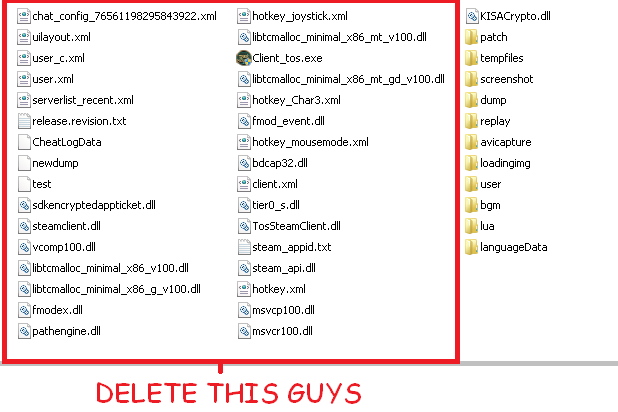
-deleting xml files then verifying integrity
-deleting client_tos then verifying
-deleting tos.exe then verifying
-doing the above but restarting afterwards
-reinstalling the game
-reinstalling then restarting afterwards

I may have forgotten some other stuffs i tried but yeah, none has worked so far, i really wish there was a fix to this as soon as possible, all those hours i wasted on trying to fix the game i could have done something productive… in the game… l0l.

looking forward for the fix. thanks!

[EDIT]: btw, the problem started for me when i was playing ToS and my laptop didnt shutdown correctly due to a little incident, this is about every relevant information i can think of.

I had this problem like 2-3 patches ago. What I did was completely turn off my antivirus (Kaspersky) and turn on steam guard. Then I completey re-installed and re-patch the game. Not sure if it will help.

tried that, turned off antivirus and firewall, even put tos in the exception list even tho the antivirus was off (i was so desperate i wasnt thinking straight) thanks for the effort of replying tho.

That is extreme… have you sent the Tickets about this too? :sweat:

Also had some issues like this before.

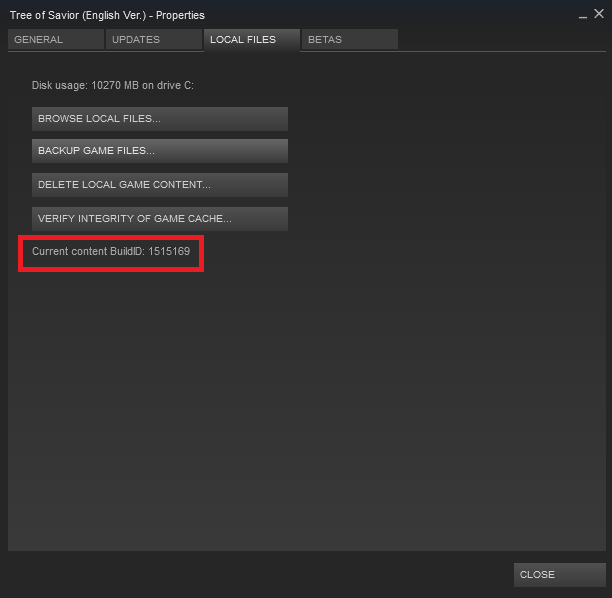
Then Verify Game Integrity again, after that dont forget to edit the new relese.revision.txt # into Steam ToS’s

Current Build ID #

or you might end up re downloading the whole game again.

did all of that, no result

and oh, just found a solution to it (good thing I have a back up)

if you have a backup of tos files, just delete your tos in steam folder and paste another one

Could potentially be a problem with Steam itself, try running Steam in administrator mode.

Same problem here, deleted the whole game folder but still having it… Just remembered now all my screenshots are gone too, damn…

Please help ASAP my token is running down, and I bet I won’t get compensated…

same problem
already re install all steam/game no working

I think some of things missing in game folder
and after verifying it shows 10 things missing
but when patch no download

game shows start and no window for game

and like upstairs when reinstall always patch stop working

try to use my solution @zyc2339

@0gustavovidal I couldn’t do anything about it, sorry mate
just hope for imc to fix it

I did a lot of things, one of them did the trick:

Reactivated windows updates, deactivated windows defender, runned steam as administrator, unchecked the dlc at tos page in steam… One of these worked or I just got lucky after opening the patch one thousand million trillion times.

Any solution? having this problem again…

I, too, am having a similar issue. Except that when my patcher ends, my screen goes white (like it normally does before loading in) then just ends without warning of any kind. I check the task manager and the program is nowhere to be found.