Tree of Savior Forum

Anyone buying a new PC? :)

Alternatively, if you don’t really want to build it yourself, you can check out memoryexpress.com (they’re based in Canada). You can build your own PC selecting each part you want, it shows only compatible parts and for 40$, they build it for you. Also, they offer price matching.

I used them in the past and can honestly recommend them. I plan on using them again soon to build a new rig since my current one is about 6 years old and getting quite dated.

2 Likes

Yep! I’ve saved for 5 years at about 75 dollars a month but I finally am getting a new PC. Only thing I can really splurge on for the next 4 years or so.

http://pcpartpicker.com/p/LBBYjX

It’s a bit much for most stuff but it’s a huge upgrade from my GeForce 9500gt from my last build 8 years or so ago and I plan on eventually streaming for my friends. Eventually I’ll be building a custom water cooling loop with blocks that go to the gpus as well as the water cooler on the cpu since the phantek case has slots for resevoirs to be mounted.

However you won’t really need anything crazy for ToS from what I can see. I think you might have a hard time staying in budget unless you have some monitors laying around since you’ll need to factor in case, motherboard, cpu, gpu, power supply unit, peripherals like mouse and keyboard plus two monitors.

I’d say use pcpartpicker.com and www.logicalincrements.com to look at what components will go together in a certain budget line and then add in the price for two monitors. Logicalincrements is one of the best since all the parts in a row are all going to be compatible with one another.

As for what you can get in terms of operating system, I’d say get a cheaper version of Windows if you can since 7/8.1 should get you free update to 10 in the near future and by then it won’t be super buggy and they’ll figure out the direct x issues.

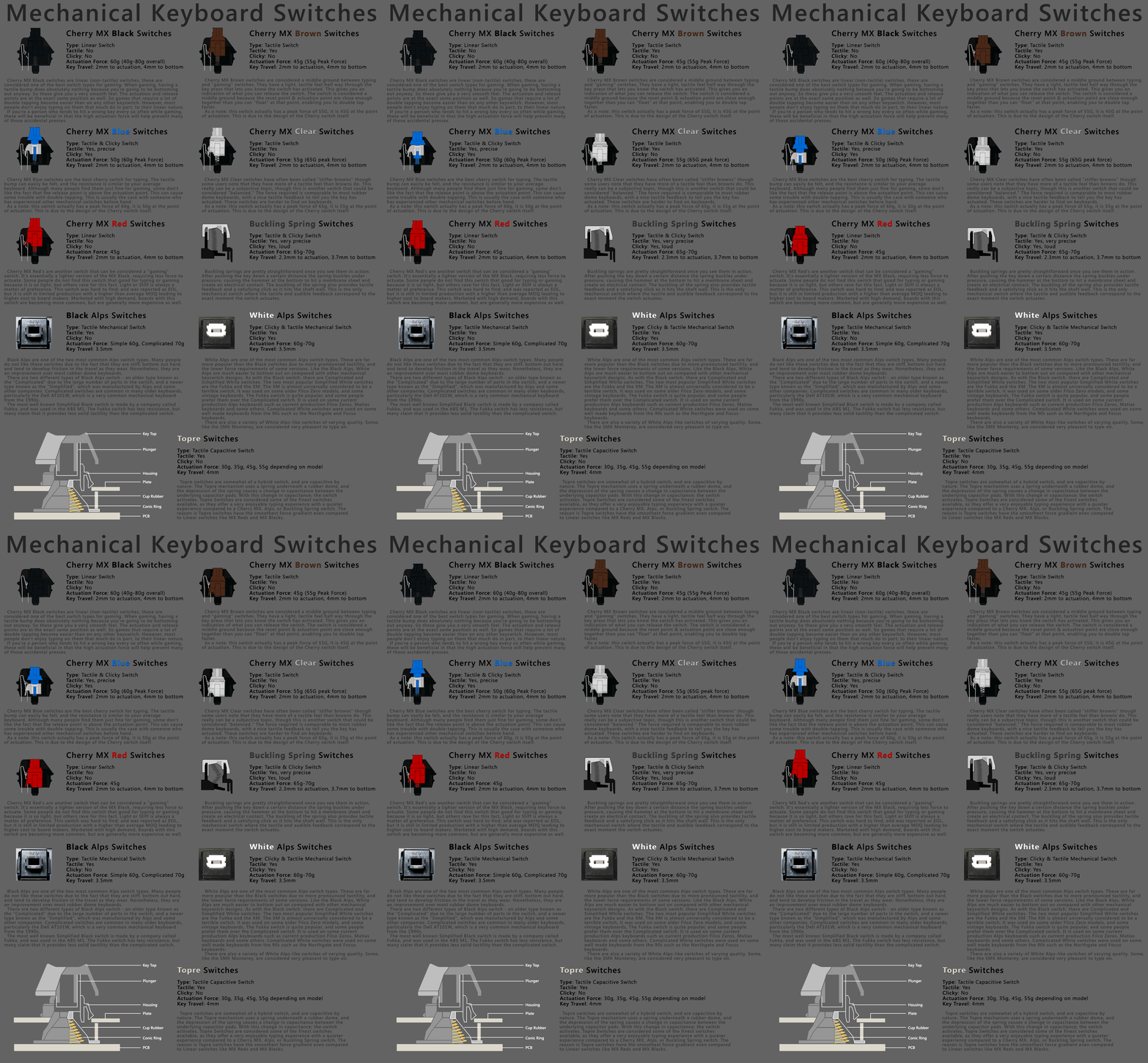
If you need any idea on what the different gaming keyboards “switch types” mean on mechanical keyboards here is a gif that should explain the differences pretty well. If you get a membrane keyboard they’re ok but over time the membranes can tear.
Hope that helps!

That’s pretty handy!

https://www.youtube.com/watch?v=0bUghCx9iso This will help you understand what the stuff you put in the computer does. It may take a lot of time and research, but being able to pick exactly what you want in a PC and saving money on it is great.

1 Like

I would but I honestly find it difficult when talking PC specs. I don’t really understand the workings of a computer enough to build one from scratch. That’s why I have all of you smart people to help me. Thanks a lot everyone. I really appreciate it. :heart:

Premade computers cost more and are generally considered the worst option when it comes to buying a new pc.

Buying parts and inviting a friend over that knows what he’s doing to help you out is the way to go if you’re scared of building it yourself.

2 Likes

Thanks! You read my mind.

-gently pats- There, there. Look at all this glorious information that’s being given to you.

NOW READ EVERYTHING. :blush:

1 Like

We were all like that at some point. I have a friend who isn’t very patient or tolerant and gets frustrated really easily and not always very smart. I told him I would help through a webcam but he figured it out himself by just watching videos.

I personally spent about 2 weeks doing research on computers because I was paranoid and skeptical. In the end, it’s literally just like building with legos. If it didn’t fit, it probably wasn’t meant to go there. You don’t need a bachelor’s in computer science to build one nor did you even need to play with toys when you were 3 for that matter.

The hardest part, is finding the necessary information. That’s what us “smart people” are for. Just make sure you don’t ask just one person and use people as your only source of information because humans make mistakes.

To get started, it’s best you learn how to build one (without actually doing it yet) before picking out the parts first. Picking the parts is actually the hardest part. Don’t force yourself to do it right away. Wait till you’re comfortable to the point where you feel at home when talking about computers. Then review to see if you’re ready. Also don’t buy the parts one at a time. Best to buy them all at once so if a part turns out to be DoA (dead on arrival) which is unlikely but in case it happens, you can return it for a new one with no cost. I don’t want to scare you, it’s just best to be prepared. The nice thing though is you’ll have to only switch out one part as opposed to sending back the whole machine. Assembled machines are more likely to get damaged in transit as opposed to separate parts.

Something to use as reference: https://www.reddit.com/r/pcmasterrace/wiki/assembly

1 Like

Tell me if you need any more help. You do have a lot to read, if you figure out a build for yourself I can rate it and give my opinion I guess, or I can give you my current build and you can see how much it costs and if it’s in your budget. U.S. pc prices are much better then UK ones after all.

1 Like

Windows 10 is a nice upgrade over 7 and 8 imo, its free to upgrade right now with a the option to revert back to 7 at any time without losing any files, if you wanted to give it a try id recommend doing it while its still free.

Definitely have someone help you the first time, the first computer i built almost overheated when i turned it on because one little connection was loose. Make sure you know how to find and install drivers too, just installing windows is not enough, without the proper drivers you won’t be able to do simple things like connecting to the internet even with an ethernet cable (the blue internet wire) plugged in, and you won’t be able to use any built-in wifi stuff either.

This actually just happened to me when i built my current computer a few months ago! The graphics card i picked out was about 1 inch too big for my case and i had to get a smaller one lol.

If anyone is curious about comparing parts just ask, i think i’ve built enough computers at home and at work to know which parts will be good enough for whichever games you plan to play on it :stuck_out_tongue_winking_eye:

2 Likes

If you need ANY help regarding how to build a computer, what a processor does, what type of memory you should get, graphics cards, etc. Let me know. I’ve been building computers since I was 6 years old…(1994) and just recently built the one in my thread here: Everyone’s Gaming Setups

Clearly that’s a super-enthusiast build and I doubt you’ll go that far, but do in-fact build your own. The $1200-$1500 price range is PERFECT for building your PC and having it come out as powerful as one that’s $2k.

If you would like to Skype or even have me post a few ghost builds to this site, I can do that for you as well…just understand, I’m also a little biased in terms of parts. (I lean Intel and nVidia for a lot of different reasons).

This post was flagged by the community and is temporarily hidden.

I’d recommend checking out Ironside if someone is looking for a prebuilt gaming PC that runs like a champ. Seriously, I’ve had it for over a year now and nothing has been too much for it yet. And I only got a $600 one. That’s all you need.

IDK if you’re interested in the oculus rift or not, but id get a pc that can run it just in case you do decide to get one. Here are the requirements for it.

NVIDIA GTX 970 / AMD 290 equivalent or greater
Intel i5-4590 equivalent or greater
8GB+ RAM

So one with at least those specs. Id go with an intel processor and nvidia video card. Another thing to consider is that nvidia is coming out with a new video card next year that is much faster than current ones. So if you wait til then to buy you might get it for alot cheaper than you can now. Thats why im waiting to build my next computer.

Just don’t buy prebuilt! Build it yourself. Its super easy and you can use your laptop to look up tutorials and stuff while you build it.

2 Likes

I have just upgraded my VGA card. My CPU still good as core i7 2nd Gen.

My friend actually made this same mistake with his heatsink. I keep making the mistake of not mentioning to check the dimensions because I assume everyone is just going to use stock parts and assuming cases are uniform when it comes to the inner frame. Even if the dimensions seem good, it still might not fit. I actually had to do a DIY on my front panel with tape to keep it from falling off because it kept stopping the rotation of the front intake fan due to insufficient space in spite of supporting that fan size.

I may be wrong here so double-check on your own but in my experience the option to revert your Windows installation from 10 back to 7 or 8 or 8.1 or whatever only stays around for one month after you upgrade so definitely make a decision on whether you want to stick with 10 before then.

You can still do a clean install back to your previous install of course if you’re familiar with backing up your entire install and installing Windows from a disc/USB or so on.

Also I didn’t do it but I imagine you could find where Windows 10 puts your old installation files and then copy it to somewhere else manually that way when 10 deletes it automatically after a month you would still have the files. Not sure if Windows 10 would cooperate and actually restore from the files even if you had them after a month though.

guys i have 4 gb ram, gt610 vram 1gb and dual core 2.6 processor. so keep calm xD