
i know, just put disclaimer “Use at your own risk”
Maybe is possible but maybe the game re-download the patch file because don’t recognize the data file or their code line
So… old japanese voice return in that place
So, even if I paste the file inside the patch&data folder it will delete it and replace the old one
you can’t just paste it inside the patch folder, because the game will delete all the files that not included in patch list.
so your hope is “insert it” somewhere in 1 of patch file
Need to editing entire folder and mask the new file with old.
This work goes beyond the extraction of ipf file
Change the data file is against the violation of terms

Oh poop 20////////////////
You can put unicode character in filename to prevent custom ipf from being deleted
yes it is maybe violated the EULA, but it’s not that hard either.
so use at your own risk
yes you can
so there is at least 2 method to use the new japanese voice
- rename the new sound file to something that contain unicode
- insert the new sound file to latest patch
Use at your own risk, OK
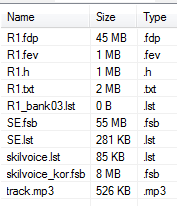
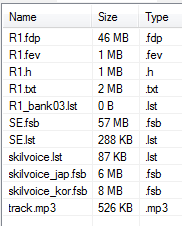
Also contents of the sound.ipf are a bit different.
iTOS
jTOS
yes, that’s why i say the patch override the data
the provided voice in iTOS is korea only, in jTOS the provided voice are korean and old japanese
is the old japanese voice file ? (first image)
the second is the new voice right ?
you can’t do a comparasion between Kr voice and japanese voice files lenght xD
I tried to read most of the discussion but got confused at some point, which file do I have to download, and do I have to rename something or not?
Like it doesn’t accept the sound.ipf file and uses the first sound.ipf from patches?
No, both are sound.ipf from different versions.
first image only contain korean voice (skilvoice_kor.fsb)
second image contain korean voice (skilvoice_kor.fsb) and old japanese voice (skilvoice_jap.fsb)
And this is what I extracted from JP patch:
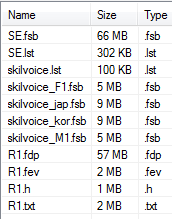
Totally different lol
IMC say: “you can’t change my files huehuehue”
Not totally. It’s just repacking totally messed up the order. Also maybe client wants a specific order.
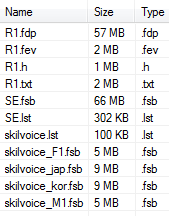
For example the file SE.fsb have 66 MB in J voice instead of 55 MB in iToS voice
and when client check file lenght see this difference
Maybe I founde a solution without change files
I try to make Language=“Japanese2” and I listen the new J voice