
Tree of Savior Forum

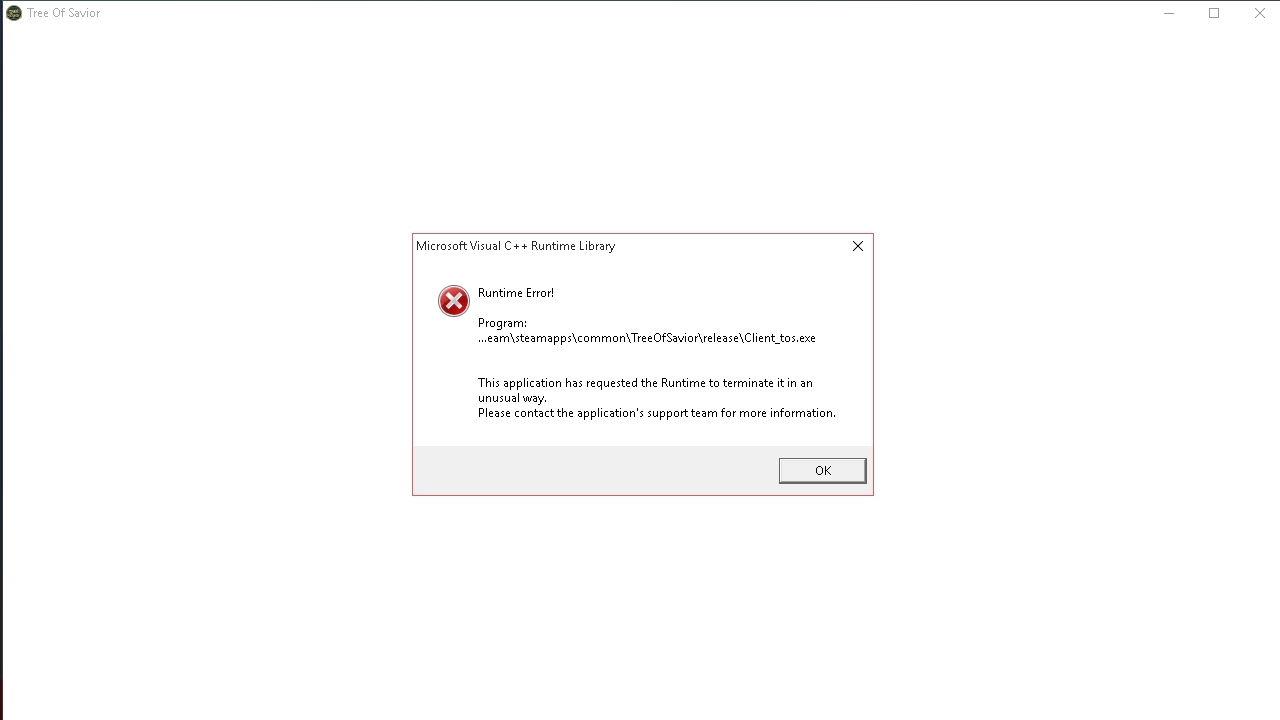
Visual C++ Runtime Library crashes

Please fill in as much as you can :

Date and Time : Every time starting from Open Beta

Bug Description :
When I play the game for a certain time (maybe after 5 minutes, maybe after 30 minutes straight), the game starts going crazy and replaces icon/screen/map/sprites with distorted noises image (really creepy). And after the next load (change map/channel), the game crashes with a “Visual C++ Runtime Library Error”. Some times, if running into a heavy players/mobs horde, the game also crashes.
The thing is, I ran the game perfectly in CBT 1 and 2 on this machine before. So, with the optimization you guys has been doing for these past months, there is no ways that “I don’t have a strong PC enough to play this” happens, unless the game hasn’t been optimized at all.

Screenshots / Video :
(attach screenshots or videos regarding the bug)
System

  • CPU : Intel core i5 2520M
  • RAM : 2048MB RAM
  • Graphics Card : Intel HD 3000
  • Storage : Internal HDD 250gb
  • OS : Windows 10
3 Likes

I’m having the same problem, and want to fix it.

Same problem here… :frowning:

Da same here. Fix it devs or u pussies.

Same problem.
Can’t get more annoying.

Hello!

How you guys, @STAFF_Ethan, and the rest of IMC; doing today?

Can someone from the moderation team, please acknowledge that they (or maybe someone from the devs) are recognizing this as a valid and outstanding issue about the game?

I’m pretty sure the information sent to the developer, as what the crash report stated; is sufficient enough for the devs to figure out and fix what’s happening.

Most of us can be frustrating and can be VERY annoying about situations like this. This is a new game and we understand that, but please; DON’T LEAVE US HANGING.

Please acknowledge that this is a recognized issue and provide us updates about the steps you (IMC) guys are taking to resolve this.

PS: I tried the reinstallation of all the Visual C++ Redist, I wasted almost one entire day of my life. But i’m not blaming anyone, I just want udpates.

This is game is fun.

2 Likes

So did I.
The thing is, I don’t see people talking about this bug that much. I don’t know why, but it seems like only few people are having trouble with this and unfortunately we’re one of them.

1 Like

I’ve got the same problem,everyone have windows 10?

nope. i have this problem on windows vista 32 bit. i believe this problem is because of 2gb ram on our PCs. This game eats memory too fast and when it runs out its choking with this stupid crash. Their programmers needs to work a little in a game code to optimize memory managment. otherwise this game will be unplayable for 2gb ram machines.

Yeah i have the same issue on windows 7 32 bit, worked perfectly fine during the first two betas but now i basically have to take in account that after a few areas the game will automatically crash. Pretty annoying.

Yeah, unfortunately; but atleast we did try our best to resolve this issue on our side.

Now, it’s IMC’s turn to fix this problem. And the first thing they need to do is to acknowledge to everyone that this is indeed, a known issue about the game or hopefully maybe just the client itself.

Yep, same on mine.

At first it was okay, I was really having fun with the Archer class. But, then; things started to get ugly. :frowning:

I guess you’re actually correct, that’s what i’ve been observing. Running Dota 2 on this puter is pretty much okay. But, with ToS; the memory consumption spikes up so high!

It’s like running multiple Google Chromes, while burning a disc with Nero. T__T

I use Windows 7 32bits with 4gb of RAM.
I don’t believe that memory is the issue, at least not only that.

It’s starting to get realy anoying for me. If i go to a loading screen there is a 95% chance the game crashes.
And yet we have no support!

1 Like

Same problem here , pls we need help … -_

iam not tech expert but as far as i know 32 bit OS dont use more than 2 gb ram. if u have more than 2 gb - your pc will not use it becasue 32 bit os simply dont know how to do this.

Update: Thanks for everyone reply. I just have to bought a new 4gb RAM and do a clean install windows 10 from 32 bit to 64 bit. The problem was gone for now, but I’m really frustrate about how the game handle our computer resource. I have a friend who toasted his Intel Xeon E5 because Tree of toaSt only use 1 of 16 cores available.
Dev need to optimize this game, not expanding this.

Thanks for the update. I think I’m going to change from 32bits Win7 to 64, it seems that the RAM is definetly the problem.
Yet I hope devs come up with a solution for people who can’t do that and make the game playable for people with 2gb of RAM.

Thanks for the info, after I read this I think that RAM is definitely the problem also using win 7 32 bit. with 2gb ram. hope they can fix this.