Tree of Savior Forum

Trying to launch on Steam error

Please fill in as much as you can :

Date and Time : Every time

Game Control Mode (Keyboard/Joypad/Mouse) : n/a

Bug Description : When I attempt to launch the game in Steam, I am met with an error; “Cannot find flash.ocx. File might damaged or removed, please reinstall. (58)”

I did a “Verify Game Cache” check with Steam and it did not find any errors. Some searches on Google for the problem points toward not having Macromedia Flash not installed, or an update that changes the Flash.ocx filename. However, I have Flash installed and the filename is Flash.ocx in my Macromed folder. Could it be because it is in WOWSYS64 instead of system32?

System

  • CPU :
  • RAM :
  • Graphics Card :
  • Mainboard :
  • Storage :
  • OS :
  • Internet Connection :
  • Country, Region :

After running DXSETUP.exe in release/patch/Directx10, I now get a different error message; Failed to create Flash Player, please restart. (47)

I fixed it. Installed Flash via Internet Explorer and now everything works.

I had same error, reinstalled flash on firefox but that didn’t work, so I opened up internet explorer and installed flash on that. Game launcher opens now.

“Cannot find flash.ocx. File might damaged or removed, please reinstall. (58)” I have the same problem. What to do?

Read the solutions that were posted. They are the posts with the green text that says “Solution”. Easy as that.

Summary for laziness-sake, Run DXSETUP in your ToS folder which is found in release/patch/Directx10. If you get the 47 error, download Flash Player in Internet Explorer https://get.adobe.com/flashplayer/

kids these days cant even think for themself…

Thank you)) Your advice helped

Hi Garrnett

When I try to start the game though steam, nothing happens, it just closes the launcher and won’t start the game…

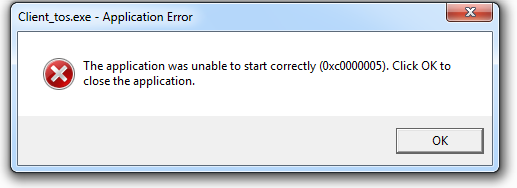
And when I try to start the game to its folder, I got this error

I don’t know what to do with this one…I’ve already installed the latest directx :worried:

I dunno. All I can say is to try to verify the integrity of the game cache through steam. Go to your steam library, right click Tree of Savior, click properties, go to the local files tab, and then verify the integrity of game cache. Then run the the game and wait a bit for either the game to download more stuff or to install the files.

If that doesn’t work, delete all of the game files from your computer and reinstall. You probably downloaded a corrupt file somewhere or you deleted the client somehow.

1 Like

Hi Garrnett :smile:

Thank you for replying!!! it is working now, I just verify the integrity of the game and now it’s working!!! thanks so much :smiley:

See you at oct 27 \m/

Garrnett, ur my freakin man!
I’d hug and kiss you a million times, if I could. But for now, take my ‘thanks’. <3