
Tree of Savior Forum

TOS keep taking screenshot automatically :(

So im trying to figure it out why am i get only 1-2 FPS on lodge, but i get like 50-60 in game. I checked screenshot folder and i got 9000 screenshots there no kidding its over 9000!!
Then i checked what is that pic about and all of that screenshot is from lodge. that’s why i got freaking 2 FPS there it constantly taking screenshot

Now why is this happening on lodge? on ingame i can play it normally not a single screenshot taken. my prtscrn button are normal
please can somebody help me out? :frowning:

edit : on both Lodge and Server list screen
edit : im stupid. prtscrn button are broken. still why is it different on ingame and lodge/ choosing server?
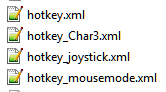
Is it on the game folder or Steam the SS are stored? Did you changed your keybindings or is using a controller with a key assignment software? (Pinnacle Game Profile or similar)

Check for malwares or virus just in case, not sure if there is any of this kind, but you never know.

What i can tell you is to try reset the key binding files (my guess is that they work like the user.xml file) so you can try rename the following files:

Change only the extension .xml to .bkp so if the game don’t recreate them after you rename you can rename them back to .xml, but i believe that they are the same as the user.xml, when you delete that file and start the game it recreate a defaul settings one.

it’s on steamapps-common-treeofsavior-release-screenshot

im not using any key assignment software. im using the default key from tos and im only changing the insert button cause my laptop doesn’t have one. But i believe this issue occured from the first time i installed tos. its when they open the early access
i checked with antivirus and antimalware, aand my pc is clean

i did what you told me and it’s still the same. i got 200 pictures by just choosing a server

Really a weird behavior, and you say it only happens at the Lodge?

The only thing i can think now is you trying reinstall the whole game, by going on the library, right click in the game and delete local files, after that, go to the steamapp/common/ and delete the folder treeofsavior for a full removal then install the game again.

First time i’ve heard of this issue. Can’t help you much on that tho.

Well im stupid, i checked and found that my prtscrn button are broken. But still why is it different between lodge and ingame?

It happens only on choosing server and lodge. After i go in game it starts normally. If my prtscrn button are broken why is it not taking screenshot ingame hmm