Tree of Savior Forum

' there may be a problem with the game. please install the latest version of directx '

Please fill in as much as you can :

Date and Time(Please, specify the timezone) : occurance right after the 26th dec 2016 patch

Server Name:Varena

Team Name:TeamCanggih

Character Name:Erulisse

Bug Description :
Description-
after the 26th dec 2016 update, the error ‘There may be a problem with the game. please install the latest version of directx’ popped out after downloading the patch files. the massage does not stop me from entering the game however at some areas ingame such as market , after killing the final bosses , killing mosters etc, the game crashed possibly due to very low fps. the error msg - ‘the client has been shut down due to an error’ VGA CPU BlaBLabla…

i couldnt find any solution for this issue in the internet. i hv a latest directx 12 … updated graphic card and fairly good cpu- ive tried verifying the caches, running as admin and nothing seems to work.

Steps to reproduce the issue : (crashed)

  1. enter market
  2. killing final bosses
  3. killing mosters

Screenshots / Video :
(attach screenshots or videos regarding the bug)

Game Control Mode (Keyboard/Joypad/Mouse) : controller joypd

System

  • CPU : INTEL core i7- 4510u CPU @ 2.00GHz 2.60GHz
  • RAM : 8GB
  • Graphics Card : NVidia 840M updated driver
    DIRECTX12
  • OS : windows 10
  • Internet Connection : fairly good
  • Country, Region : BN

HELP

Steam\steamapps\common\TreeOfSavior_CommonRedist\DirectX\Jun2010

This folder have the DX10 you need for the game.

Also, check if your NVCP is not in automatic instead of using high performance Nvidia Adapter.

hai @Nirimetus thanks for the quick response.

ive tried installing the dxsetup.exe at
Steam\steamapps\common\TreeOfSavior_CommonRedist\DirectX\Jun2010 as u mentioned and changing the nvcp to high performance NVidia adapter as u instructed. however the result remain unchanged.

Same problem here, having the same errors and crashing after final boss. Haven’t tried the market yet. My guess for the final boss is that they failed to load the graphic for fortune cookie, hence causing it to crash when it drops from the boss.

same problem here :/, I already have the latest version of DX. Any news on a fix for this?

@STAFF_John @STAFF_Yuri @STAFF_Ethan @STAFF_Amy @STAFF_Max @STAFF_Ines

@c.mindae811 @AstralRaker @masterblin46_9

Could you please try changing the number in the ‘release.revision.txt’ file to 147683?

You can find it here : Steam\steamapps\common\TreeOfSavior\release

I did it and it doesnt work even after reinstalling the whole client

hai @STAFF_Ethan thanks for the reply

unfortunately the numbers u gave is actually already there. still no luck :confused:

same error here, directx fails

Alright I think I found the cause. It seems like the launcher will automatically delete the new patches. However I don’t know how to stop it from doing that. :unamused:

Woah… That makes sense actually… Ive tried many possible cure. Still got nothing so far… Verifying caches million times . T.T

Because certify caches> redownload patch>open client> delete patch> etc etc @STAFF_Ethan any solution for this?

Alright this workaround solves the problem for me, albeit temporary. First, vertify the caches, next find the new patches that were downloaded and copy them to another folder , every time after restarting the client until it reach 100%, paste those files back to the original patch folder. Tadah, u can play the game. Every time u start the client again u will have to paste back the patch files after the client reach 100%. Hope this works.

1 Like

wow alright … imma give it a try… tho its temporary, better than nothing… hope itll be fixed soon.

can u explain with SS please, im fcking mad with this :frowning:

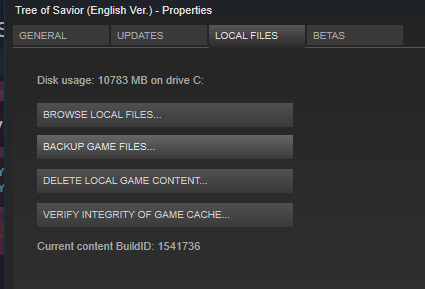
1.Vertify caches
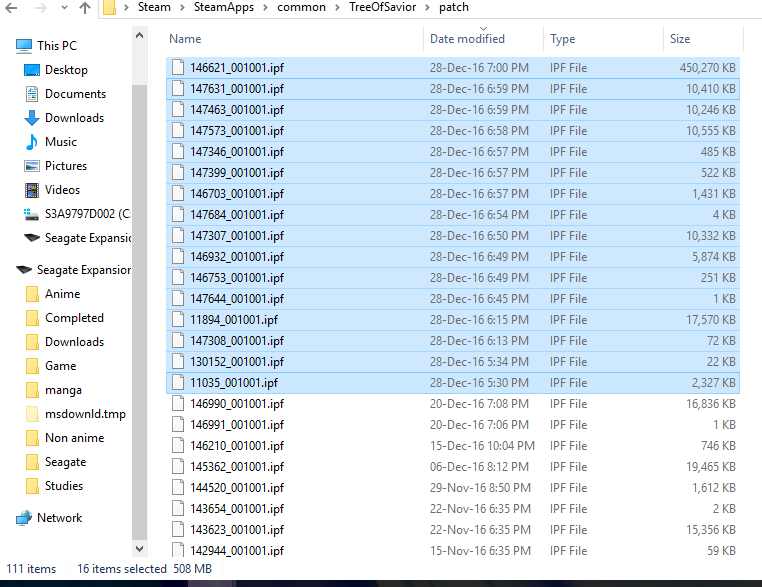
2.Find the patch folder at Steam/SteamApps/common/TreeOfSavior/patch Copy the latest files which in my case were 16 of them. Note that my total number of files are now 111.


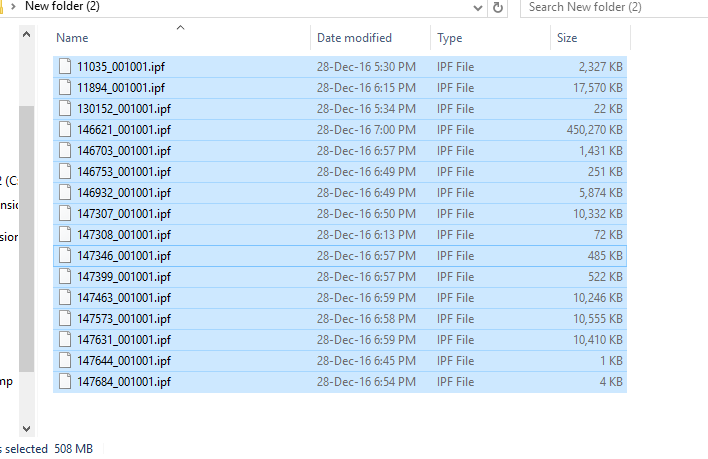
3.Paste the copied files to another folder so u can retrieve them anytime
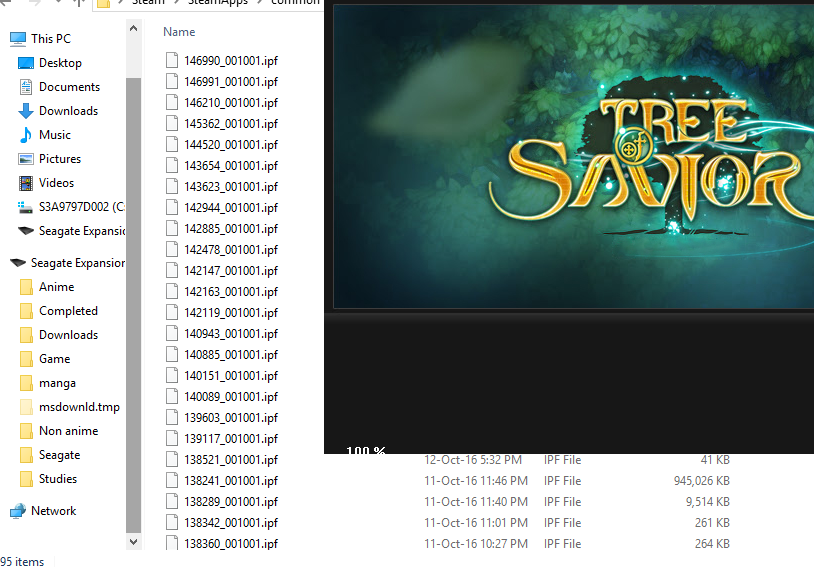
4. Start ToS, you will notice that the number of files have drop (in my case it changes from 111 to 95) After it reach 100%, paste the files you have previously copied back into this folder
5. You should now be able to launch the game without any errors.
6. Repeat step 4 the next time u start the game again.

5 Likes

@c.mindae811 @renato.gaticar @the_tolosa @masterblin46_9

1 Like

yep… this works for me too! tho its a bit complicated to start a game but hey… nice job! :heart_eyes: hopefully GM will fix this soon

sigh…hope they fixed this problem, too lazy to do that everytime ╮(─▽─)╭

1 Like

This is a stupidity as it is going to be possible that with a patch the solution is to paste folders before starting the game… I get the support of this game. They are incompetent…

1 Like