
Please tell me there’s an option to turn this off
It’s making my whole game look ugly, I can’t play like this
I love ToS but this is a game killer for me ;_;

In your settings, turn off “apply character silhouettes.”
go to your steam library, right click ToS on the list, and select “delete local content”.
this will solve every problem you have had while playing ToS.
(can’t have gameplay problems when there is no game to play, right?)
3 Likes
Hi, I don’t see this option, but setting performance to low mode seems to have got rid of them
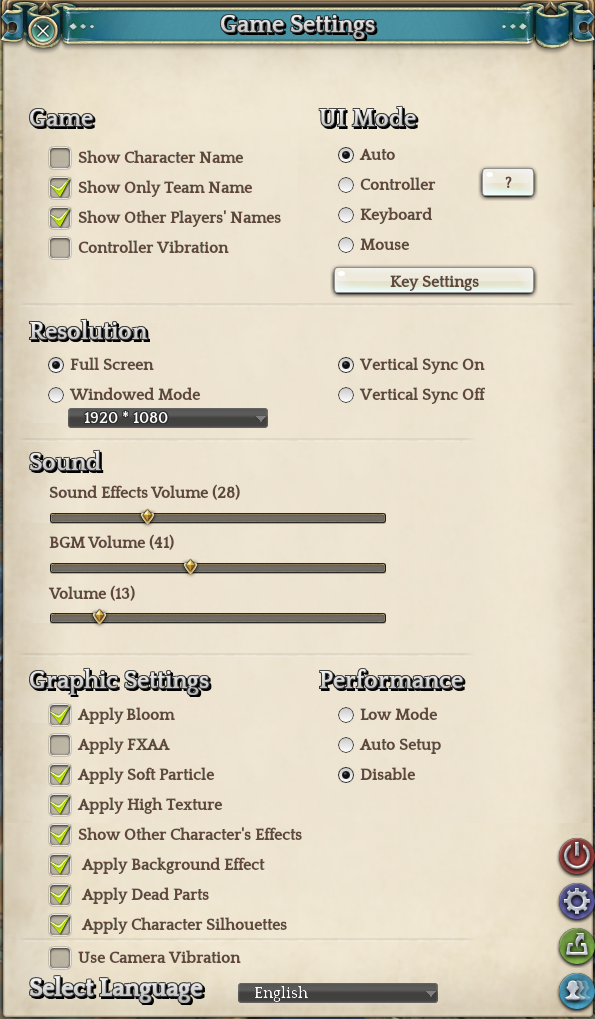
For reference, it’s the 2nd from the bottom (I have it checked) right above “Use Camera Vibration”  When you uncheck it, it completely removes the silhouette “shadow” when you’re behind objects.
I tried this a few days ago, but somehow it ended up reinstalling itself and one thing lead to another then I’m in a dungeon run on my priest.
ok I see it now, phew thank you
 Haha no problem. Hope it helps.
disabling that option will remove monster silhouettes as well when they are behind objects so you wont be able to see them.