
Tree of Savior Forum

Startup error: failed to download list file

Please fill in as much as you can :

****UPDATE
I tried to connect to VPN and the patcher started but it was so slow and it disconnected
IMC please look into this!

Date and Time : April 6 2016 12:13pm +8GMT

Bug Description : I lauched the game from steam. even running the exe as admin from the release or the release/patch folder did nothing
I tried to “verify integrity of game cache” and some files redownloaded but nothing changed

I don’t want to redownload the whole game as it would take me around 8 hours to download(I know it sucks)

Steps to reproduce the issue :

  1. Launch game from steam

Screenshots / Video :
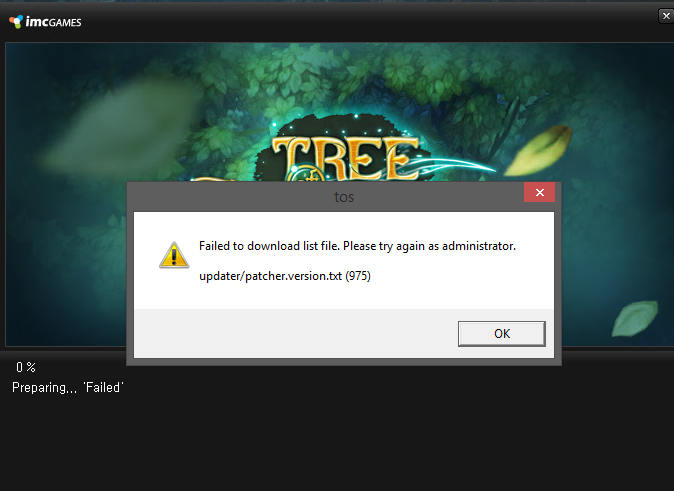
System

  • CPU : FX 6300
  • RAM : 8gb
  • Graphics Card : R9 270x
  • Mainboard :
  • Storage :
  • OS : Windows 8.1
  • Internet Connection : 1-2Mbps(yes small b, bits)
  • Country, Region : Philippines

Hello,

I have the same problem since maintenance, I try to verify integrity and redownload but nothing change.

Update
the patcher was able to connect using VPN but this was so slow and it disconnected a few times please IMC fix this issue

I have exactly this Issue, on a good connection (re-downloading game took 20mins)

Nothing has worked for me and so far I have tried;

Uninstalling from Steam Library and Removing the whole TreeOfSavior folder under SteamApps\common.

Reinstalling Tree Of Savior.

Run Verify Integrity of Game Cache… (All Files Verified Ok).

Replaced .xml files from Known Issues thread.

Run ToS.exe as Administrator.

Restarted PC.

No Anti-Virus Installed. (Manual Scan and Clean)
No Firewall Installed.

I was able to Play on Saturday the 2nd of April (02/04/2016) now suddenly i can not launch the Game. I have found running a VPN allows the patcher to run, This however is extremely laggy and unplayable. I was apart of the iCBT 1 & 2 and never encountered this Error. I am using the same PC and Internet Connection as when i participated in Beta Testing.

Pretty Frustrating, I have Purchased this game and am unable to play it.

we are in pretty much the same boat, last I was able to play was Sunday April 3rd, I think I was unable to play after the temporary maintenance or the official maintenance.

I think this only affects a very small amount of people that IMC is not looking into it, no staff reply, nothing

gosh I want to quit now

Yep no replies, raised two support tickets with detailed info and they are just marking them as Answered.

I went digging today and found the file that the error says it can not find.
I put it into my web browser and it downloads just fine. Seems like a bug with the Updater Client and not using a network connection (service/protocol)

link i found;
http://drygkhncipyq8.cloudfront.net/toslive/patch/updater/patcher.version.txt

god I’m going to quit if I can’t even play the game

So I managed to get mine working again.

Having tried everything I borrowed a Router/Modem, instead of the PPoE Connection (Windows Created) I was using. I can now get the Patcher Client to run.

This does not explain why it was working fine and then all of a sudden this error.

Had two errors and found out my firewall was not excited about the new TOS updater and decided to block it out. So, in addition to the other possible solutions, make sure you firewall is set to allow connections for tos.exe :wink: