
Tree of Savior Forum

Playing on steam, magnified screen issue

When i launch, the game is blown up to top left part of screen, i have tried everything to fix this, i re downloaded it and it worked for one time only, then logged out and in and it is zoomed in again. i cant keep re downloading to place once. Does anyone know how to un-zoom the game at all? i dont know why it is doing this… any help would be great!

cheers.
Try deleting the user.xml file in your ToS folder,then launch the game again.It should launch with the correct resolution.

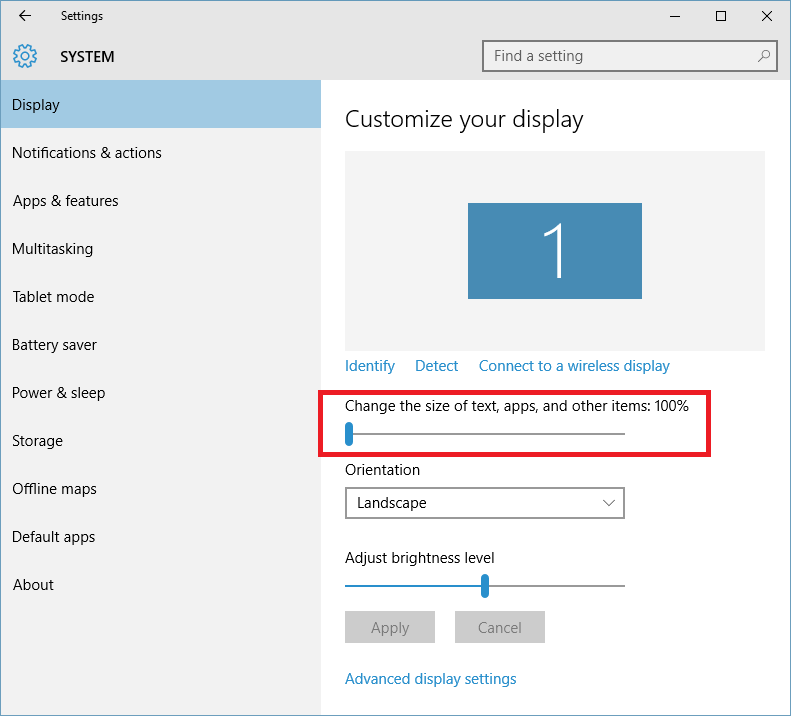
You might want to check your Windows display settings, for Win10, its Start -> Settings -> System -> Display. Or you could just right click desktop and select Display Settings. Ensure that the highlighted field is 100%. I think it is 120% by default or if you’re on notebook, some brand built-in applications will amend that.