
Date and Time(Please, specify the timezone) : 21/12/2025
Server Name: [North America] Zachariel
Team Name: Flash
Character Name: Malady
Bug Description :
Unlocking the 3rd row of notes causes the Play Flute notes to stop accepting inputs in most Game Control modes, and cannot be fixed by relogging. Only works by switching to Mouse mode.
Steps to reproduce the issue :
- Complete the quest “How To Use The Flute” with Stage 3, to unlock the 3rd row of flute notes
- Enter Rest Mode and select Play Flute
- In Keyboard/Joypad mode, inputs will not register for any notes except for ASDFG (refer to screenshot)
- Change controls to Mouse, and play notes using any accepted inputs (Number keys + Ctrl/Shift + Space)
- Switch back to Keyboard/Joypad, inputs now work as expected
Screenshots / Video :
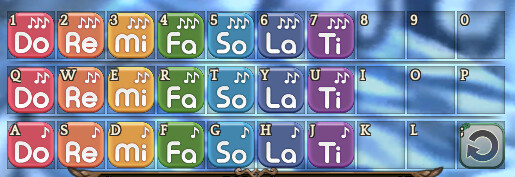
Game Control Mode (Keyboard/Joypad/Mouse) : Joypad/Keyboard
System
- CPU :
- RAM :
- Graphics Card :
- Mainboard :
- Storage :
- OS :
- Internet Connection :
- Country, Region :