
Tree of Savior Forum

Laptop stops charging while Tree of Savior is running

Title says it. My laptop battery stops charging (even though it is plugged in) when the game is on, and resumes charging as soon as the game client is closed. I don’t know if anyone else is having this issue, but it is really annoying to have to close the game every ~30 minutes, especially when you are trying to play with friends. It’s a really weird problem too, can the game code even affect a process as basic as charging?

I really hope someone can tell me what is going on over here. Thanks in advance.
Hardly, or many, including me would be having issues.

What can be happening is some bloatware that the manufacturer of your laptop install with the system or some setting that was changed sometime that could be causing this.

My suggestion, call their support if you still have it covered.

Possible causes:

https://duckduckgo.com/?q=my+laptop+stop+charging+when+I'm+playing+a+game.&t=hf&atb=v96-7&ia=web

Thank you for the reply.

It appears the cause was that the game’s power consumption was more than my laptop’s charger could supply. Unchecking most of the game’s graphical options and closing all other applications seem to have lowered the game’s power drain to a point where the charger could keep up. It kinda sucks for the eyes, but it beats having to bail in the middle of a party dungeon run any day.

I will post again if the problem resurfaces.

1 Like

When I used to play TOS on a laptop before, I would turn power-saving or something similar off, and turn on performance mode or something on.

@haminhk5 one thing you could try too is change the power supply from one wall plug to another, sometimes wires get deteriorated with time losing some of it’s conductive properties.

@ZeroFoxGiven That could help or make things worse tho, in the search I did on the link above I saw some reports of people in High Performance and this issue still happening, also, if in High Performance, it will force the laptop to be more power hungry, hence, increasing the incidence of the issue.

Then again, I forgot to ask @OP if it does happen on other games, if he have any installed aside from ToS.

1 Like

@Nirimetus It only happens with ToS. I’ve played games like DOTA 2 or Overwatch with no problem at all. Then again, ToS is clearly heavier than those games at 14.4GB.

That have nothing to do with the issue tho, it’s just the game size.

Then again, last patch IMC did change the way things are rendered and draw in-game, so it will force the machine to work a bit more.

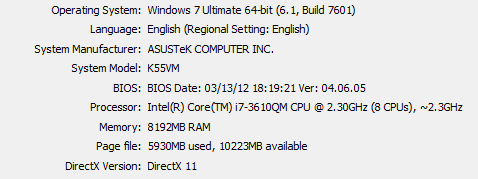
Btw, what is your laptop specs?

Capture

I have a GeForce GT 630M card.

Go on NV Control Painel > Manage 3D Settings > and set Preferred Graphical Processor to use the 630.

Never let that option in automatic, in case it is, because ToS will end up using the Intel built-in on the processor. And since it’s a low-end GPU (the intel one) it will force the machine to consume more energy.

Also, in the same page on the NV Control Painel, you might find a couple of options set as High Quality, if yes, then change them all to High Performance, this will lessen the burden on the Nvidia too.

Another thing, turn off Shader Cache, if your laptop have an SSD, using that will lower even more the lifetime of the SSD due to writing every time something change in the graphics.

After that, go on the PhysicX Settings (it’s on the list in the left) and set it from CPU or Automatic to Nvidia.

Remove the laptop battery and plug in the ac adapter, so it will drain power straight from power outlet. If the laptop shuts off while playing tos then there’s a problem with your charger.

Check your batter or charging port which is need to charging your laptop. It may be Your RAM issue.Visit the URL https://babasupport.org/hp/hp-laptop-touchpad-not-working/ for better help for your laptop issue