
It sounds interesting to hear japanese voice on TOS, however are we allowed to change it in our server? And if it’s allowed how to do it?
@DrRM
u 2 can be friend… huehuehue
1 Like
Open the file user.xml in the release folder and change the option:
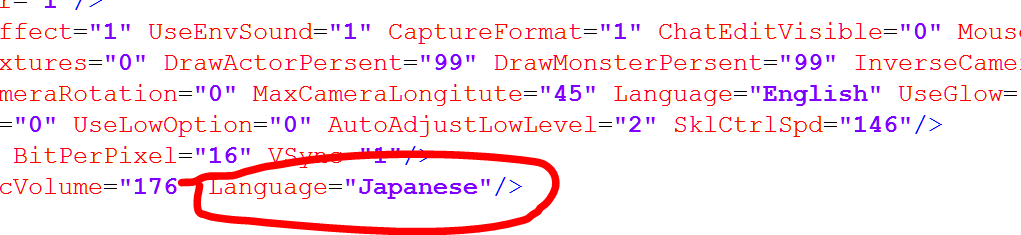
Don’t change both Language or the game will crash.
2 Likes
Thanks guys! And one more, how to put the addon manager (excrulon) seems like my past add ons does not work already…then I downloaded Excrulon add on managwr but it seems like it doesnt work. It cannot be installed.
I like the original voices already but the Japanese voices are cuter 
The devs did ask if we wanted English voices before. The community didn’t want it. I’m now curious about how it would have been like.
Put it in any place on a separated folder, when you open the app, in settings you have to point this folder (note that mine is on a different HD).
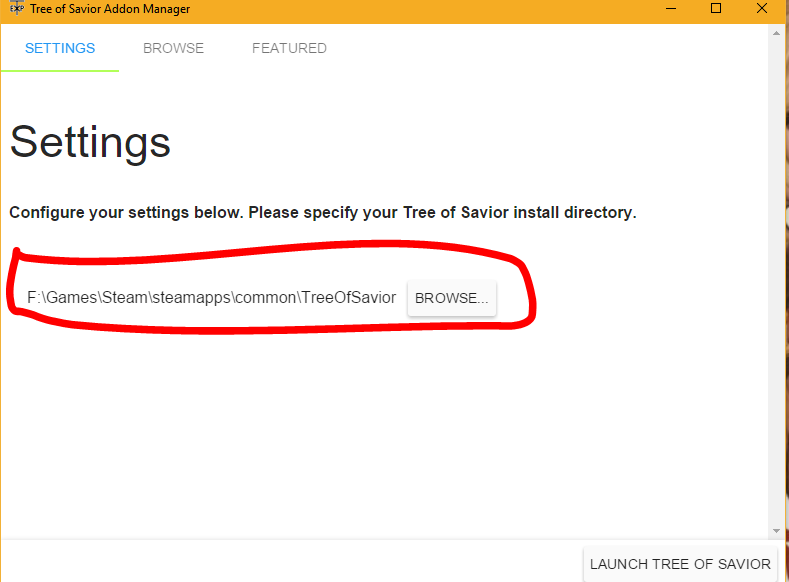
It has to be in the main folder (TreeOfSavior) not on the other (Branch) folders.
I don’t remember if you have to restart after the changes but do just in case, and you can’t use it with the game open or it will do nothing.
Also, after installing what you want, you don’t need to run the game through it, you can run through the normal shortcut. Just take a look every week to see if there is any update in the addons.
1 Like
japanese are way more kawaii
1 Like
careful not to hurt Mr Kim’s Korean Pride 