Tree of Savior Forum

[HELP] Unable to Start Game

I have been trying to play the game over the last two days.

Read the stickied guides to troubleshooting. Followed all the steps like reinstalling dependencies and drivers as well as fully re-downloading the game twice.

Problem:
1) Start Game; see white screen forever.
2) Force close game and validate files; 3 missing. Re-download those.
3) Start Game; see white screen forever. [I have tried waiting; 10 hours of ‘playtime’ on Steam just waiting after each test]

4) Force close game and validate files; 3 missing. Re-download those.
5) Change resolution settings in user.xml to 1920x1080 and fullscreen.
6) Start Game; see white screen forever.
7) Repeat above with the rest of the recommended troubleshooting tips…

Exception has been added to antivirus as well btw.

Always the three files are missing (no idea which) everytime I try to run the game. Any advice would be geatly appreciated. :cry:

EDIT:
Playing on Intel i7 laptop with a single dedicated GPU (980M) and a 1080p 75Hz display.

EDIT#2:
Laptop Model ASUS G752VY

Specify the model helps, or give the rest of the specs.

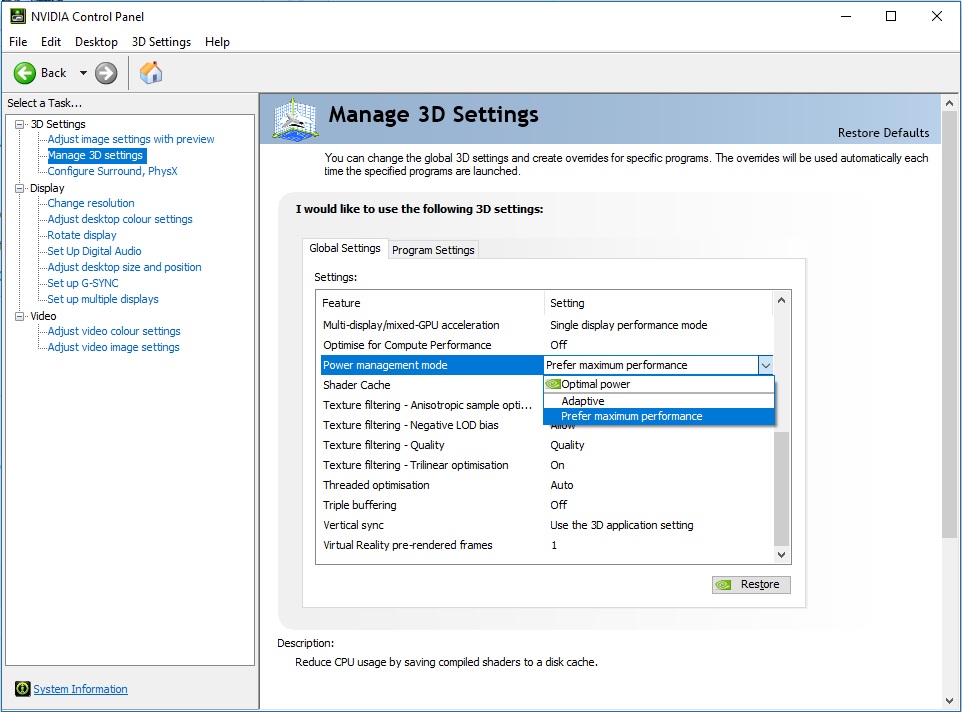
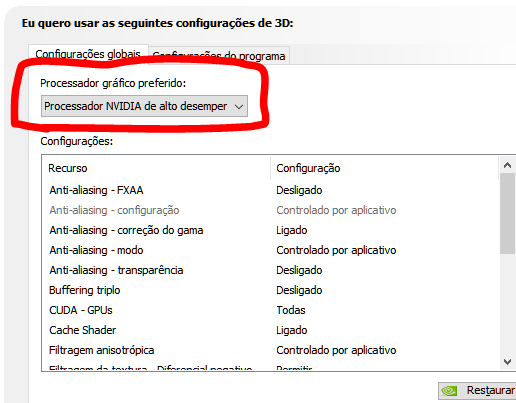
Anyway, I’m almost certain that the new generation processors all have built-in GPU so it’s not really a single card, anyway, to make sure, go into NV Control Painel and in Manage 3D settings make sure the option of Preferred GPU is set to NVidia Processor instead of Automatic.

Also, make sure to install VCRedist 2015 and DirectX 10 that comes with the game (Steam\steamapps\common\TreeOfSavior_CommonRedist).

1 Like

Bumping this! I’ve had this problem too. However if you close the white screen and the steam client, reopen the steam client and reopen TOS, you should be able to load. You will have a white screen again for about 30 seconds but then it should load the main page.

1 Like

Thank you for the help! :smiley:

Specs:
ASUS G752VY
Core i7 6700HQ
32GB RAM
Nvidia 980M

I have already checked the NV control panel for that option and set it to Performance which is the highest available. No alternate GPU options were visible.

Installed, uninstalled and reinstalled with hard reset all the dependencies (VCRedist 2015 and DirectX 10). No luck.

I was talking about this option but it seem yours don’t have any other built-in GPU (sorry mine is in portuguese but the position in english is the same in the window).

If you have Anti-virus/Malware or whatever kind of protection, try to add the game folder to the exception list.

What I can tell you to try, you probably already did but is to factory reset the settings, it’s that Restore button.

Lastly, not sure if this could help you:

1 Like

Sadly, closing both ToS and Steam and restarting does not solve it for me, but thank you anyways! (^_^)7

Thanks again! :slight_smile:

Already added to exceptions and also did the Restore button. No luck.

Also tried that link you gave, but same result.

I just don’t get how the game manages to lose 3 files every time I start the game and then verify. Sigh…

Apparently I am replying too quickly to this topic as well. :stuck_out_tongue:

Just to make sure, did you install any add-on from add-on manager? Try to remove if you did.

Also, if your machine have another HDD (slave) try move the game there through Steam or even outside of Program Files folder (it tend to block a bunch of stuff due to security) in the same HDD, for example: create a folder in the Drive C called Games and move the Steam folder there (following the guide bellow).

https://support.steampowered.com/kb_article.php?ref=7418-YUBN-8129

This last one is a bit extreme, but never know, I have mine on a secondary SSD in my laptop just because of these security restrictions from the OS.

1 Like

Try deleting your user settings:

  1. Navigate to the Tree of Savior directory
    For example: C:\Steam\steamapps\common\TreeOfSavior
  2. Enter release folder
  3. Delete user.xml and user_c.xml
  4. Restart Game

Files fail to validate at times due to discrepancies between Steam’s version and the TOS launcher which may have additional updates than what Steam has. It’s not always the case, but is frequently. It’s not necessarily an indication there is a problem.

1 Like

I am sad to report that I did get that desperate. I first installed the game on my D drive (D:\GAMES\Steam\steamapps\common), then thought it might need to run off the C drive (some games can be weird like that) so I moved the installation to C (C:\GAMES\Steam\steamapps\common). After that I uninstalled the game and re-downloaded it to C direct.

Don’t use any addons; never got that far. I must be cursed… Last time I tried to play they stopped making new accounts and now this.

Thanks again, anyways. Really appreciate you trying! :smile:

Ah, alright, yeah, unfortunately this game for unknown reasons decide to not work on certain machines.

I forgot to ask, did you tried to start the OS in Clean Boot?

Note: Don’t bother with the “You need register blah blah blah…” message lol.

1 Like

Thank you.

I did try this, but it helps none and the user.xml file is never generated again. :sob:

1 Like

AAAAAAAAAAAAAAAaaaaaaaaaaaaaaaaaaaaahhhh!! It worked! :smiley:

Before I tried the Clean Boot thing, I to Task Manager>Details and nuked as many of the non-essentials as I could find, especially the ASUS bloatware… and BOOM! Game loads! :smiley:

Thank you thank you!!! ~(^_^)~

1 Like

Nice, welcome aboard!

You may want to disable the bloatware from Asus, just disable, no need to uninstall for now (never know when something can break lol).

1 Like