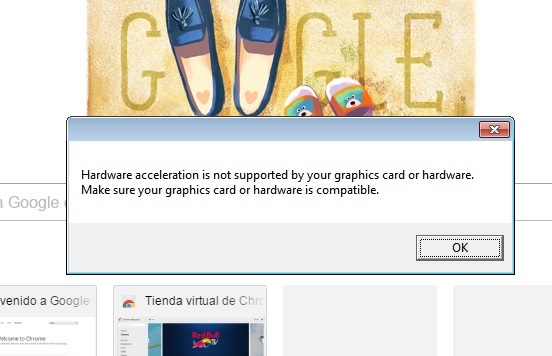
why this happend to me??
i have a lenovo ideapad z475

why this happend to me??
i have a lenovo ideapad z475
I am not sure but i think the processor of it is not really a good one.
CPU AMD A6-3400M (1.40 GHz, 4 MB L2 Cache up to 2.3 Ghz)
Then again, i am not informed of how AMD processors are doing now days, i don’t like their products.
You may have to install the DirectX 10, could be that he problem.
There is a copy into the game files at the folder: Steam\steamapps\common\TreeOfSavior\release\patch\DirectX10
If that don’t do the trick then i am not sure what is the problem, maybe something on the Catalyst CP.
You have a AMD Radeon 6520HD which definately supports hardware acceleration and directx… either u have another fullscreen app running/minimized, or your graphics card drivers outdated or crashed
i download the graphic card drivers from lenovos page… and i can see my desktop not at full resolution. I may thing it crashed… i hope not… how can i know that??
screen resolution only 2 options
1024x768
800x600
Generally windows tell you that the driver crashed and it is restarting it, check if your driver is properly installed, on Win8/10 right click on Start Menu at the task bar and go on Device Manager, on Video Adapter (Or Graphic Adapter not sure which one since mine is in portuguese), check if it is Radeon 6520 or it may be Radeon 6500 Series, if it is Standard Graphic Device or something similar then no, the driver is not installed, since it is a Lenovo, it might have come with a Lenovo Utility that do the update for you and check if there are problems on the system.
it say Standard Vga Graphic adapter… so its not install then… how can i repair that?.. thx for the help
You said you downloaded the driver from the Lenovo site, you got from the right model? If yes then just install it, but it require you to be administrator, if it is normal user it won’t let you install, after that it should work normally.
Uploading…
When im about to install Amd drivers… i can’t even read the letters… and i just format my pc… don’t know what to do… and yes i download from lenovo page and from this model drivers… =’(
Try to change the resolution to the native, it should be 1366x768, here is how to do on Windows 10:
If the actual account is administrator it should install no problem. Look for Lenovo ThinkVantage (i googled for Lenovo updater and it show me that name) it should do the job for you, unless you had format the original installation and put your own version of windows there, but even so you can download the software at Lenovo site and check if it update ir correctly.
nothing helps… i try everything… thx for your time… i appreciate it.
That is really weird, if it still on warranty i suggest you to take it there, if not, go to a local parts shop or technician you can trust and tell him what is happening. From here is hard to give some help, specially on these cases.
Hi if your still experiencing that problem
Download your graphics card drivers directly from AMD site
http://support.amd.com/en-us/download/desktop/legacy?product=legacy3&os=Windows+7+-+64
That should work with the AMD Radeon 6520HD (6000 HD series)

From the looks of that screenshot at the beginning of the topic I believe you have Windows 7 Basic x64 right?
I forgot to tell him that lol, good call, but i am wondering why the Lenovo driver is not installing. And i wonder if his OS have the Lenovo Control Painel installed, that thing is supposed to do all the updates.