
my computer have 2 graphic cards which is geforce gt 635m 2gb and intel HD graphic 4000. whenever I go to dxdiag it detects intel HD 4000. I searched about how to fix this a long time and what i answers i got was it changes to nvidia once I play a game, so i was like “ok fine” maybe even nvidia can only run TOS in 7-15 fps. and then i saw someone posting a lower graphic card. i got curious and tried disabling intel HD 4000 in device manager > display adapter, and it turns out I cant play the game which means my graphic card does not change to nvidia even though I set all my games to high in nvidia control panel. hope someone help.
Why the heck this is in off-topic?
As for the problem, update the drivers or OS, use the driver from nvidia.com not from your laptop manufacturer.
Go in the NVCP and create a profile for client_tos.exe, set the main card as Nvidia and try it again.
I just thought its not a TOS discussion xD.
anyway i already did all what you said.
Where is not ToS related? You are having problem with ToS right?
Anyway, on the NVCP profile for the game, change all the settings to performance settings, and turn off anything that decrease performance.
You have to force the driver and card to be used the least possible on ToS, the optimization have gone bad to terrifying.
1 Like
i set everything to performance in the nvidia control panel. it boosted my fps a bit. its now 25 fps in party. thanks 
1 Like
Hi there. I used to have a same problem. in DXDIAG, your PC doesn’t show the tab “Render” as mine, right?
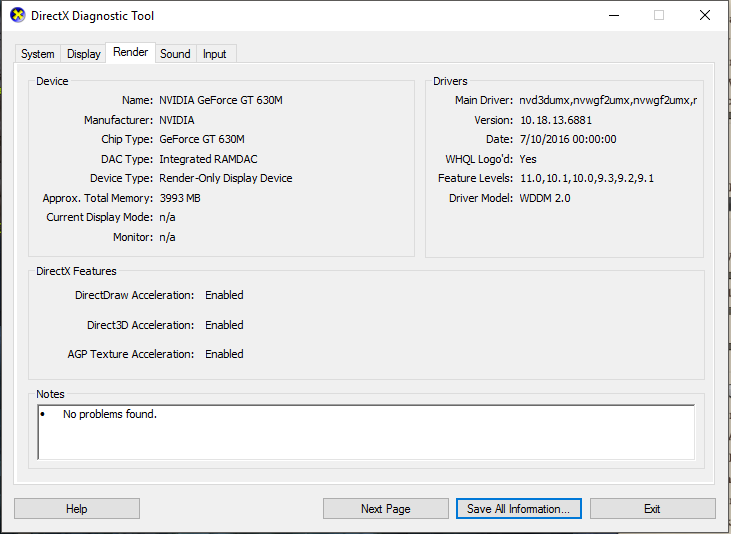
Then here is the solution.
First, you need to uninstall your current Geforce graphic driver by using this tool. Remember to download the installation file of Geforce Graphic Driver before doing.
Then open that DDU app, choose safe mode. Your PC will restart to safe mode automatically. Click uninstall and restart. Your computer will restart after uninstallation finishes.
Now you install the driver for geforce card and restart your PC again. Then check DXDIAG if it shows the render tab or not. Good luck!