Tree of Savior Forum

Game closing everywhere everytime

All day and everywhere

Server Name: [SA] Silute

Team Name: EzrealDoge

Character Name: Girl

Bug Description :
Game closing
(Every time I advance level or change map my game closes, since the open beta, help me i’m tired.)

Steps to reproduce the issue :

  1. Up level
  2. Change map
  3. Lot people in the screen

Screenshots / Video : I cannot print because the game closes.

Game Control Mode (Keyboard)

System

  • CPU : Intel Dual Core
  • RAM : 4,00 GB
  • Graphics Card :
  • Mainboard :
  • Storage :
  • OS : Windows
  • Internet Connection : 30MB
  • Country, Region : Brazil

Your ram is crazily low…

The support won’t be able to do anything for you, your only option would be to upgrade it, you can buy extra ram and just clip it into your cpu. This is as easy as playing with legos.

Edit : Nvm, you changed your ram. I even got the same amount and it’s not happening to me.

4gb is supposed to be enough to let the game run smooth at non crowded places. I have tested the game able to run without crashing with very old computers with only 2gb ram and only integrated intel card. Yes it lags like hell of course.

@lleo_lucas
You might want compare your revision number with others to check if your game is up to date. You can check your game revision number at
Steam\SteamApps\common\TreeOfSavior\release\release.revision.txt

If your revision number is different from others, replace the number then verify integrity of game cache in Steam. I’m not sure the current revision number as I havent updated my game for some time.

1 Like

windows 32 bit?

you can try this

open a CMD in administrador mode
type:
bcdedit.exe /set IncreaseUserVA 2800
close all app
restart win
solved

3 Likes

@silverx093 My game is updated.
@Checho3413 It has improved a lot, it does not close like it did before, thank you.

you can improved more unistaller all visual basic retistribuible only left the 2012

It now freezes sometimes and the loading is slower than before.
Is there anything I can do?

ok you can do something.

1:

  • Get true full screen mode (not windowed full screen, which is default for some strange reason). For that you need to go steam>steamapps>common>tree of savior>release>user.xml. Open user.xml with notepad and set “resolution mode” to 0 (it can be on 1,2 or even 3).

  • In the same file set UseEffectHigh=“0” (it is 1 by default)

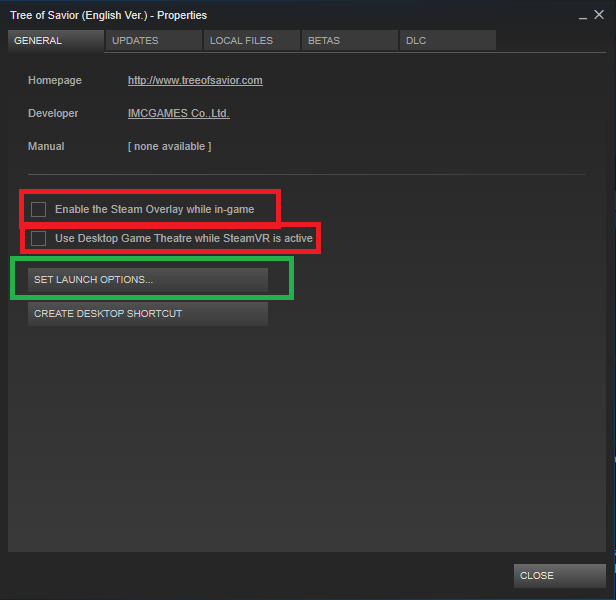
  • Right click ToS in Steam library and chose “Properties”.
    Go to “Set launch options” (green square) and write in “-dx 11” or “dx 12” or whichever directx you use.

  • After that - uncheck both boxes in red square.

2:
download

addon manager.


and install the addon names fpssavior and put in low mode
FPS Savior

Similar to adjv’s SFX Toggle however instead of changing settings based on your fps I made it so you can just toggle between 3 predefined settings High, Low, and Super Low. This is likely obvious but FPS Savior is not compatible SFX Toggle, use only one or the other if you use both they will conflict with each other.

Current Setting is displayed right below the FPS display’s default location. This display is movable.

FPS Savior UI

[High] Exactly how it sounds, everything is set to high.

[Low] Lowest settings except effects are still visible. Players drawn outside a certain range from you is limited to 15, and monsters drawn outside a certain range from you is limited to 30.

[Super Low] This is the lowest I could make the settings while still being able to see what your doing. Not recommended for PvP since some effects are not visible and well... you can't see the players attacking you :P. Players drawn is set to -100 which removes them all besides yourself, and monsters drawn is the same as low mode so as to not make bosses disappear if there are too many mobs or objects that are catagorized as mobs. I created this mode for world bossing, since you don't need to see anything except for the boss and your own aiming circles to dps it.

Slash Commands (Use the ingame macro system (f8) to use slash commands more efficiently.)

/fpssavior to toggle between High, Low, and Super Low.
/fpssavior lock to unlock/lock the settings display in order to move it around.
/fpssavior default to restore settings display to its default location.

1 Like

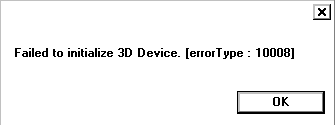
My FPS has greatly increased with these instructions, I just could not change the resolution mode because it is giving 3D error as shown in the following print

Is there anything I can do? :pensive:

Bonus: I’m very thankful that you help me so much. :blush:

skip the set lanch option or put -dx11 because you have directx 11, you can manualy change the resolution in steam>steamapps>common>tree of savior>release>user.xml

jaja me acabo de dar cuenta que hablas español XD

Jaja, Yo soy brasileño. Muchas gracias por ayudarme.