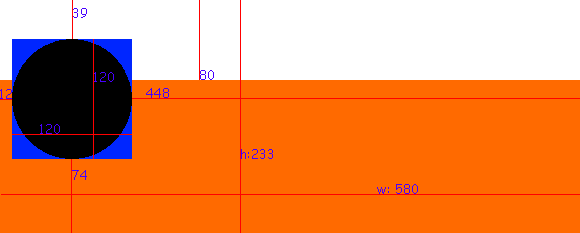
Well, i measured and compared around a bit, and if you want to mess around with the card, then here are the numbers (in pixels) which seem to be working without being stretched and/or moved around.
The settings will tell you only that the picture needs to be of 590 width, but it seems the actual value which does not get stretched or moved about is 580. Height is 233 and the region on the top of your card which has no overlay (shadow) is 80 pixels. For the position of your avatar picture (circle), refer to the picture above.
Have fun, and if you happen to find better numbers than this, dont forget to post them.
P.S.: As an example i put the guide lines over my own card. Click my avatar picture (top left of the post) and you can see it.
EDIT: As PoohVz pointed out, if you fill in more information, the card gets
expanded towards the bottom, This will only change the height of the card. The remaining values seem to stay the same, inclusive non shadow border on top (80p), avatar picture size (120x120) and position (refer to picture).