
If there is no flexible control setting in the game, and the developers do not want to solve the problem, then you have to invent something yourself, and here’s the result of how I did it, the space for skills has become much more convenient for me, the rest is just to get used to …
I wish that the skills were located horizontally, but I can not do this, so I did as much as possible.
I removed the direct control from the gamepad from the game and turned on the control from the keyboard. Then I installed the “Xpadder” program, and the gamepad tuned it to your taste. And to make it easier to navigate the panels, I drew an overlay on the panel for me.
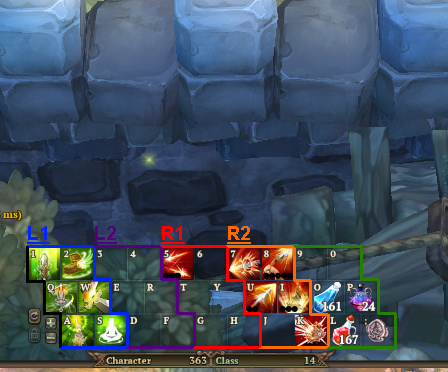
The controls are similar to the original, except that L1 + R1 and R1 + L1 are completely different combinations, which ultimately can be configured more than 30 different functions for the game!
This topic was automatically closed after 60 days. New replies are no longer allowed.