Tree of Savior Forum

Controller button scheme switch bug makes me want to quit

I can tolerate a lot of things like the DPK bug, temporary server instability, etc… but one thing that makes me want to quit right now is a controller scheme switch bug that has been occurring for me lately.

It has nothing to do with my computer itself as I have tested my controller with other applications to see if it was a background program changing the button scheme somehow. Nothing of that sort was occurring during the gameplay of other games and/or when Tree of Savior is in the background while playing a different game (basically wanted to see if the scheme was switching on my computer’s side).

It isn’t steam-specific or at least it doesn’t seem like it because I was able to play other games just fine with the exact same controller button scheme. It might be possible that it is specific to this game from steam, but I cannot figure out how to check that during gameplay from the steam console.

I’ve tried clicking the “Restore to defaults” button in the “Settings” -> “Key Bindings” sections and it has no effect on restoring the button scheme.

The controller is a Logitech F310 controller and I’ve used it with ToS for months with no issues until recently.

I’ll try to explain the issue to the best of my ability. Basically, in the middle of gameplay (after interacting with an interactable npc or object) the game will freeze for a few moments and then after unfreezing the controller scheme switches.

The start button becomes R2
The select button becomes L2
Left-analog clicking becomes the select button
Right-analog clicking becomes the start button
the “A” button becomes attack instead of the default jump
the “X” button becomes the interaction button for interacting with npcs/objects instead of attack
the “B” button becomes the jump button instead of the interaction button

I’m sure some other things were switched, but these are the most notable.

Simply turning off the game doesn’t fix this problem. It will reload with the same issue. Even if you log out of steam and log back in, or try changing characters.

The only way the problem seems to fix itself is when you interact with enough objects and the game freezes again and the scheme switches to the correct one.

The problem is, the scheme can switch to the incorrect one again, randomly.

Didn’t have this problem until a few days ago and I am seriously considering quitting because it makes the game unplayable to me as I have to recognize when the switch happens and adapt in the middle of gameplay, which is frustrating and discouraging to say the least.

I’ve searched for answers on the forums and it doesn’t seem like this problem is common and the solution for it was not clear either… so I think I’m screwed until IMC figures out what the problem is and fixes it somehow.

If anyone else has had this issue recently please let me know so I can make a good bug report. I’m only posting this in General to get some visibility and hopefully see if anyone else has had this issue before and if there’s a solution I couldn’t find.
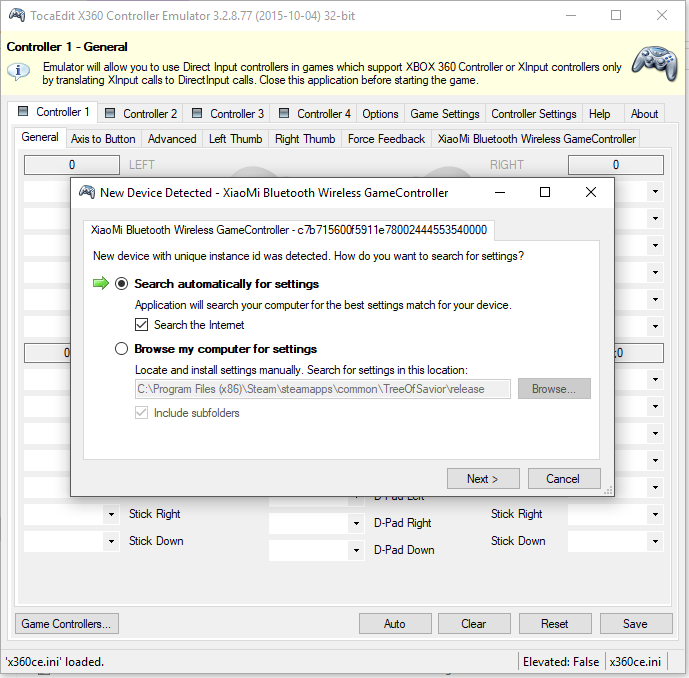
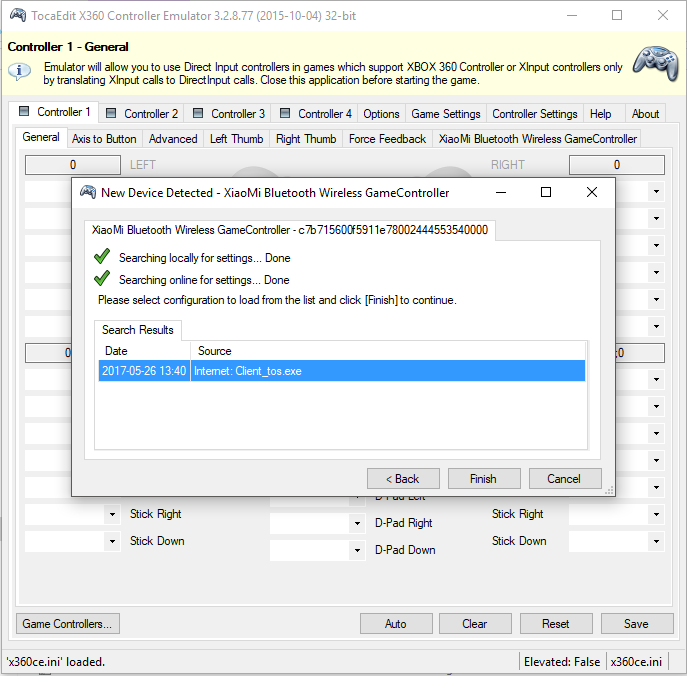
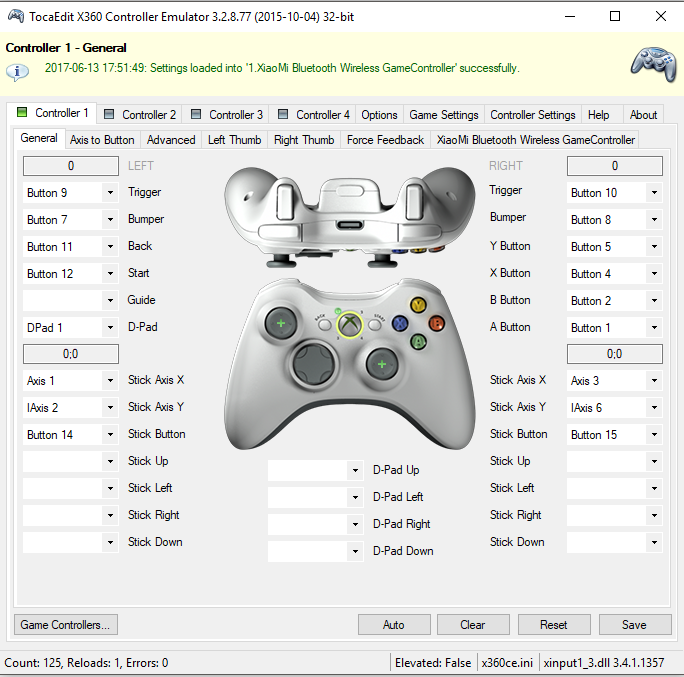
hi there, I had the same problem with my xiaomi gamepad then I used X360CE to re-config and it works perfectly now! You can download it from here

How to use:
1. Close the game.
2. Connect the gamepad to computer.
3. Download the 32bit version, extract it to Steam\steamapps\common\TreeOfSavior\release and open it with admin right. You will find the correct config profile for TOS.

then press Save and exit the program. Now you can play tos normally with your game pad :slight_smile: Hope this tip can help you.

2 Likes

You can try use steam bigpicture and map controller as default, steam BP controller setup override almost all games setups.
EDIT: try Krystal option first xD

this happen on other games too …and very randomly =.=;
didn’t f310 have dinput and xinput switch? …does the switch fix your problem? (I know mine did before)

I think I figured out the solution to the bug.

For some odd reason, when this bug happens, when I check Steam it has the

“Guide button focuses Steam” option selected.

When I turn this option off, the game freezes after it loads (at some point) and the control scheme is correct again.

Basically, I had to go to
Steam -> Settings -> Controller -> General Controller Settings
and uncheck “Guide Button focuses Steam”

Somehow this flags a fix, but for some reason this option keeps getting checked in the middle of gameplay but I’m unsure as to why it happens.

Edit: So the bug happened again, but this time I didn’t need to change the settings. The Steam base client was lagging/unresponsive but ToS was still playable. It’s possible that the controls were switched by Steam during gameplay due to the Steam client being laggy (most likely some kind of base configuration for their Steam controller).

This only seems to happen when I play ToS. I don’t notice this problem with other game through Steam, but then again I haven’t played many lately besides ToS.

2 Likes

Okay so apparently there is a short in my controller wire and I only noticed it during ToS since I was playing it recently. I didn’t notice it during other games because my posture is slightly different when playing them, and the wire didn’t short during those times.

After extended testing with other games I noticed my controller bugging out. I realized it was a short because the mode button on the Logitech F310 sometimes wasn’t responding to my input for it (the LED light next to it normally turns on/off when the button is clicked, but it wasn’t happening sometimes).

Chances are extremely high that my controller went into an “undetected” state when the wire shorted, and when Steam realized this it would “think” I have no controller. Then, upon finding my controller via polling the joystick ports, it finds one but it doesn’t immediately map it to an XBox360 configuration, meaning the buttons will be read as-is from the manufacturer’s standpoint, which is why the bindings changed. Only after some time when the controller is connected for a long period of time will Steam finally notice that it is an XBox360 compatible controller and remap the controls.

So I guess I need to buy a new controller. False alarm about the bug, sorry guys.

TIME TO USE DS4 controllers

Scroll down to my reply

This topic was automatically closed after 60 days. New replies are no longer allowed.