
IMC posted a report on new optimization measures here: https://treeofsavior.com/news/?n=667 It’s about time; this is the kind of work we’ve been requesting. Now let’s get into the details of what’s happening and what else needs to be done.
Unbelievable. Well, it makes sense since this explains how the game works, but the biggest performance problems have always involved groups of players.
A test like this was desperately needed, and predictably, it has already brought good results. However, you’re still missing a lot: The players in the city are not engaging in combat. I’ll describe two scenarios you need to make replays of for performance testing:
1. 15v15 GBL
A Guild Battle League match begins. Team A defends their tower and all 15 players are on the platform with the tower. They have many dievdirbys statues and magic circles scattered around their tower. Team B gathers together and attacks all at once. At this point, all 30 players are on the same tower platform fighting each other and using lots of skills.
Team B has 4 cryomancers cast lv15 Ice Wall at the tower and a monk uses Energy blast on the ice walls as shown below. This skill combination has a history of causing problems, so it’s good for a stress test.
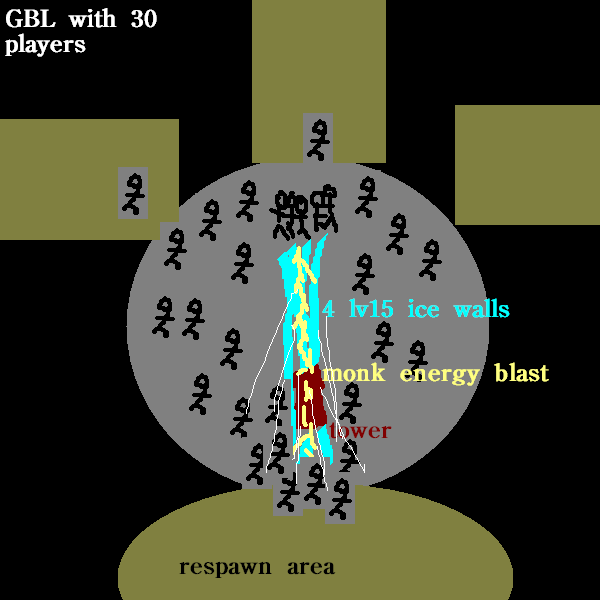
Of course, there should be lots of other skills being used at the same time, but that would make the drawing confusing. Other classes and skills to include in the test are sorcerers with lv15 summon familiar, quarrel shooters with lv15 caltrops, necromancers with lots of minions, elementalists using electrocute on ice walls and placing frost clouds, zaibas, revenged sevenfold, haste, large numbers of buffs cast with max daino making room for them, and of course, melstis keeping everyone’s spells active longer.
2. World Boss
A demon lord spawns somewhere, and 50 players show up to fight it. All 50 are clustered closely around the boss, spamming their spells as fast as they can.
We told you so. Multithreading has been the subject of a lot of discussion here and it’ll make a huge difference.
Slight? I’ve been in GBL matches where loading in the other team froze the game up for so long I was dead before the game started updating again. I have to set DrawActorPersent in user.xml to a low value like 12-14 (but this causes graphical errors). In open world situations where there’s many more players, resource loading has even caused players to freeze so long they get disconnected. Measures such as pre-emptive loading, asynchronous and multithreaded loading, and placeholders could allow the game to stay playable and keep drawing frames even when there’s a lot of stuff to load all at once.
Some other things to investigate:
-
Video cards aren’t being used properly. For example, someone I know had a good video card, it broke and had to be removed, he ran the game without the card installed, and framerates were about the same. My own card’s drivers may report low activity even during graphics-intensive scenes with low framerates.
-
It seems like the whole game can get stuck while waiting for data from the server. Multithreading should allow the game to keep rendering frames while collecting data. Make sure to do some performance testing over long distance using the regional servers at peak times instead of doing all the tests within your office. Is the chat bug, where the whole game freezes when lots of chat messages load at once, related to this?
-
Low Mode in the Settings window is good, but you could add an emergency mode which takes drastic measures when framerates get extremely low. For example, if my framerate drops down to 2, you could sacrifice graphics quality temporarily to bring the fps up. Also, I’ve seen players get confused over “Disable” since it sounds like that’s turning things off, so rename Disable to Full Quality or something.
In conclusion, there’s a lot of work to do, but it’s encouraging to see IMC is making progress now.
