
I actually just ran CC cleaner just now just for added safety. Lets see if it works. If I crash again Ill do the delete sumani and addons ipfs + cc cleaner. Im also gonna attempt to instal add on manager and get the exp card viewer, map fog viewer add ons to see if this really is add on related.
Good luck man… but a lot of people tried uninstalling/reinstalling the game but it didn’t work. Hope it works for you though.
Keep us posted so that we can check if it’s a solution for everyone. Let’s try to help those who are itching to get back in the game but couldn’t.
Nothing, the re-installing doesn’t work at all…
It’s something not addons-related since I played from the time of the founder’s server up until now without using any of those.
Seems that today I’ll not be able to play… I’ll miss even the scavenge and mystery event.
I reinstalled it the second time, and it worked this time…I have no idea why…
Sorry for the late report about the problem, in the yesterday’s evening I managed to get it to work.
I simply checked the support area of the forum under client-related problems.
So I did this way:
delete local content (steam) >close steam>opened hd where files of the game are stored>Steam>Steamapps>common> deleted the folder “tree of savior”>deleted folder of screenshot (steam)>run antivirus(nothing found)>reinstall ToS 
The game works as before (maybe even better), I did even the questing for daily events… ONE strange thing is that even if it’s working, when the client updater almost ended its loading I got this error :
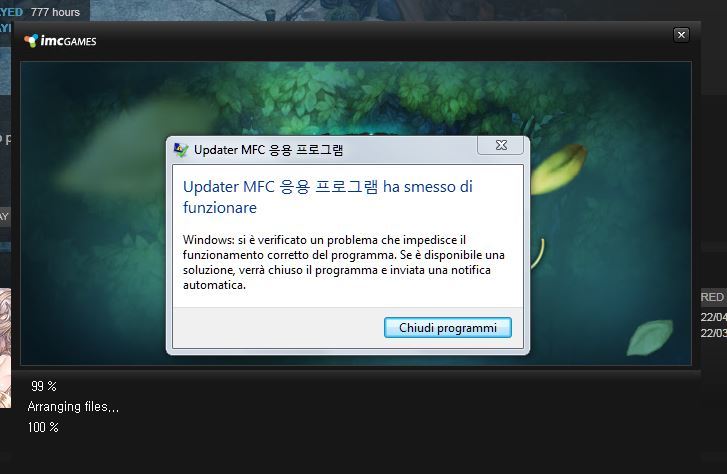
I don’t know what to think 
Guys, I managed to get the game working, hope this helps:
- First, I had to delete all the addons, not the addon manager, just the addons.
- Then I deleted all the XML files in the release folder (the user, the hotkeys, etc).
- Then I deleted some of the files I knew could interfere with the updater (release txt files and so).
- Then I checked file integrity through Steam, it detects some files and re download them.
- Download all the files, then run the game, it does some kind of unpack or repack and finish with a “patcher has been updated, please run again” or something like that.
- Then connect through VPN, I used OpenVPN. The patcher starts from 0% to 99% and get stuck, then it shows a window “Updater has stoppped working”. Just ignore it.
- Then I re-run the game and everything works fine, now I can connect even not using VPN.
Good luck with this stuff!
Seems that a lot of people are getting the issue fixed. Maybe the devs did something they’re not announcing? Maybe? But ever since I got it working, I never came across that error so far. Crossing fingers. 
I deleted all addons, i reinstaled the game and the error is still there, cmooooom i wanto to play 
This post was flagged by the community and is temporarily hidden.
Same here, but it’s weird because if I use another account I can login and play but with my main account I can’t… ._.
what did you do? how do you fix it?
Ok, now it work for me, I’ve uninstall ToS & Steam and now It’s fine I can play.
But if you uninstall the game only it won’t work you need to uninstall steam too.
Hello Saviors! Please let us know through Support ticket if you are still experiencing this error so we can assist further. 
Have same issue cant play for 3minutes gets error shut down… reinstaled removed all add ons made it worse i think…
Dear sir/maam,
I am experiencing the crash while running the client. it seems it wont open after the -SERVICE. i don’t know how to amend this thing i tried the instructions of the others and sad to say it’s really not fixing the issue. Can you kindly assist?
ooooooooooo GM sighted! Assist further huh? like, your lot h@s been very helpful /s
Hi Sir/Ma’am,
I have encountered the same error mentioned above yesterday, I did the verify of integrity of game cache and downloaded the broken files, however the error still persist every time I enter TOS.
Thank you.
HI I’m experiencing the same problem too… I played TOS and the screen blacked out and my laptop did an auto restart. i tried accessing the game after the restart and an error always pop up, the same error mentioned above. can someone from TOS assist me please…