Tree of Savior Forum

Changing the key bindings for druid transform... Can it be done?

I don’t like having ASDF taken up for skills i could be more comfortably casting on those keys. I only want 1 skill from the monster I’m transforming into. If I could move the default keybinds for transform mode attacks, that would be great. Is it even possible?

EDIT:
I think you guys misunderstood. I’m talking about the actual transform skills when you’re transformed. They’re fixed to ASDF. You know, the green and red buttons which are that monster’s skills you can use? Those are the ones I want to move to other keys.

1 Like

Accidentally deleted my own post because my hand spazzed. LMAO

Well, you could change the default ‘A’ ‘S’ ‘D’ ‘F’ bindings to something else. Like Changing A -> ‘Your preferred keybind’. But sadly, for now, the first 1-5 Transform Keybindings are fixed. Hopefully, the future rework will bring that issue to an end.

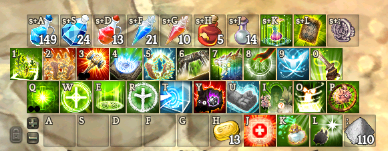
I’m not on my Druid ( or on my PC in general because I’m outside ) but this is what I did. I removed I,O,K,L and changed it to A,D,S,F

image

You can see my hotkeys here.

I have 1 - 5 for Lycan skills.

edit: I use Mouse Mode

Summary: Keybinds can be changed to pretty much anything, feel free to move then around even if it takes a bit to get used to. You will feel less stressful to play on keybinds that fit your hands and keyboard

2 Likes

The fact that your other characters need to re-adjust as well just because you have a Lycan druid in your lodge. :tired:

Once you get used to the binds, its not so hard from char to char xD

Off-topic: I actually want to stab myself because I’ve been a Cleric ever since the dawn of time and I just realized you can actually put toggled attributes in Hotkeys… Oh my god.

It’s an addon:

1 Like

I think you guys misunderstood. I’m talking about the actual transform skills when you’re transformed. They’re fixed to ASDF. You know, the green and red buttons which are that monster’s skills you can use? Those are the ones I want to move to other keys.

We didn’t, we just provided a solution. I’m pretty sure you could move them temporarily BUT it’ll go back to ASDF once you retransform.

Yeah sadly they’re locked in place. Was just hoping to see if anyone had a solution or addon that unlocked them.

I know how you feel. Is even worse on an Xbox controller, as there is hardly any real-estate for your skills to begin with. But Alas I no longer have a Druid and have to put up with that headache. :roll_eyes:

Not only it eats 5 slots but the l2 + r2 is so buggy that it does not work most of times and reverts back to set 1 xD

Currently there is no way to change the keybinding. Making a druid alt kind of forced me to change all my skill positions of all my other clerics since I was used to having heal and cure on A and S previously.

To make matters worse, the keyboard I’m using is ergonomic (the keyboard is split in the middle between G and H).The entire 1st row of 5 keys just can’t have anything (besides lycan transform button).

skillyncan

im worried about rank 10, new class means ima need to use shift + key for casting them lol :smiley:

i see your pain, ive been making more simplist skill distribution, focusing more in skills that i use for an purpose and negleting others to short my skills, still my cleric have like 20 skills to cast >.<, ive been studiyng to reduce to at least 15 skills

Yeah I’m a bokor and miko too so my keys are pretty much all filled up. I use the shift keys though and tend to putting anything past 7/I/K except for teleport scrolls and potions.

Transformation skills always go into slots of the bottom hotkey row.

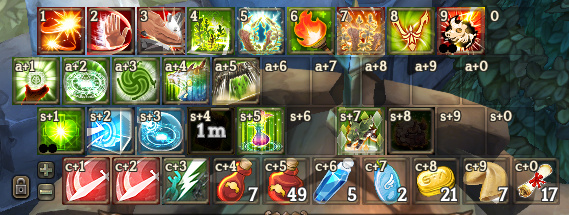
What I did was swapping all my hotkey rows in keybinding options.
You normally put your most used skills in the bottom row. Mine are in the top row now. Bottom row is dedicated to transform skills (or any other skills I want on those hotkeys).

Here’s how it looks:
obraz
I use only digit hotkeys.
You can see that 1-9 keys, which I use frequently, are at the top.
At the bottom I have transform skills on ctrl+1-9 keys.