
Tree of Savior Forum

[ADDONS] jTOS -> iTOS Translation

Hi. I noticed that some jTOS addons from jTOS manager doesn’t have english translations:

I’ll be translating some of the addons (based on requests or whenever I need to use them) on their latest released version from the manager, you can find them in my GitHub account: https://github.com/librarianrabbit/tos-addons/tree/master/translations

DISCLAIMER: I do not own any of these addons, if you have anything against any addon listed here I’ll remove or adjust this post accordingly. I am just trying to bring some useful tools from jTOS addons into iTOS if they don’t have the english feature by themselves. All translations are adapted translations from Google Translation service.

Available translations:

[details=1. barrackitemlist]Original source: https://github.com/writ312/myTosAddons/tree/master/barrackitemlist
-> Translation source: https://github.com/librarianrabbit/tos-addons/tree/master/translations/barrackitemlist
-> Translation download: https://github.com/librarianrabbit/tos-addons/raw/master/translations/barrackitemlist/_barrackitemlist-⛄-v1.1.5.ipf
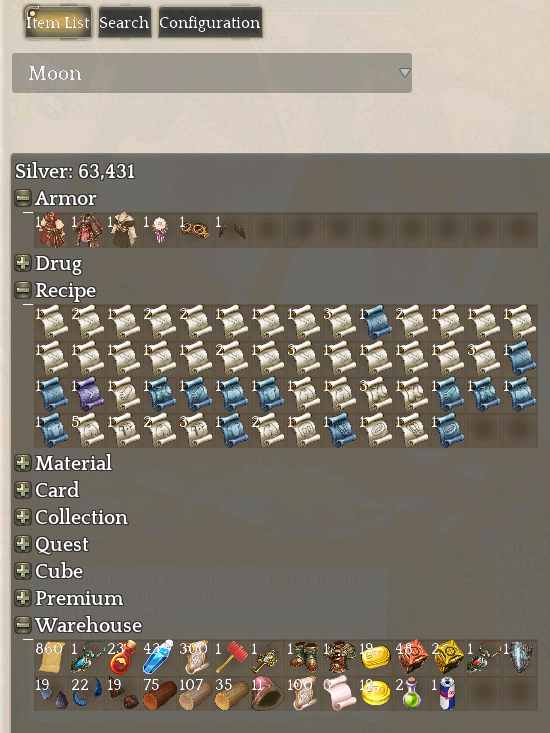
-> Addon info: Works in a similar way to indunplus, saving all your inventory when you leave the game on a character and Team Storage when you close it.
-> Commands; /itemlist or /il
-> Screenshot:

[/details]

Any suggestions, request for translation etc. are welcome. I’ll try to answer to all requests I can if I have the free time to do so.

Notes:
1- I don’t want to be the person “responsible” for translating addons jTOS -> iTOS, that’s why I’m not putting them on manager. I don’t want to demotivate jTOS developers from adding english version to their addons, I just want to help iTOS players when they want one of these and it’s japanese-only.

2- Make sure you install the original addon first with the jTOS Addon Manager to have everything working correctly, then overwrite it with the translated version.

[details=3- If you don’t want to install the original addon from jTOS Addon Manager.]
You will need to create the directory for the addon settings automatically such as I explained here: https://forum.treeofsavior.com/t/addons-jtos-itos-translation/349777/9[/details]

@pulquerio12 is also translating some addons, you can find his post here:

14 Likes

Wow. Thanks @LunarRabbit

1 Like

Thanks for the work Lunar.

Just wish they put up again the chat functions add-on.

1 Like

Which addon was that one? Do you have the IPF? I prolly can add it here/translate/fix/whatever :V if you have. Or if you can explain how it worked I can try remaking it from the features if they’re not too time consuming.

EDIT:
@phreakerz13 I’ll will take a look on it. adds to to-do list

1 Like

How about the chatextend addon … it only worked on Jtos not Itos

2 Likes

It was that one we had, I don’t have anymore unfortunately, that we could report and clear the spam lines from a char.

I think it’s the one @phreakerz13 is referring to.

Edit: No it’s not that one lol.

1 Like

chat addon that we use to have is LkChat n Classic chat if i remember correctly … the one that i said ( chatextend ) its new one from Jtos @Nirimetus

2 Likes

barrackitemlist doesnt seem to work for me, ive installed it but the game doesnt seem to register it.

@Nirimetus and @phreakerz13, I just checked a bit chatextends addon and the feature which is not working is the whisper tabs.

It isn’t something such as only translating something (well, maybe the fix is) as well the addon detects which language to use between Japanese and English automatically.

It really needs some testing and digging to find up which part of the code breaks for iTOS and I’m not really in mood to put time on finding/fixing those problems, thanks “new GvG format” “rewards”. I’ll look it up later because I want to use that addon too.

Also, the lua source is quite long, I’ll need to spend a bit of time to follow the logic and I never looked on chat code on TOS so I can’t guess where the broken code is to make it faster.

@motoxkid2005 I sent you a PM asking how are you installing the addon, I followed the same name as on the jTOS manager so you can simply copy and paste it into the data directory. The downloaded file should already contain the unicode characters used to prevent the file deletion. For further support please answer my PM and I’ll add details on this post if we get a new problem/solution/tip that can be useful to others.

P.S.: I just remembered something. I’ll assume that you simply downloaded the addon and put it in the data directory. But the directory which the addon saves its settings isn’t created automatically.

You have to create it manually if you don’t install the addon first with the manager. This is the path for the directory on my computer: “D:\Games\Steam\steamapps\common\TreeOfSavior\addons\barrackitemlist”

You simply need to either:
A. Install the addon first from jTOS manager and put my file there so you can install updates and etc.
B. Create that directory manually on steam/tos directory on your computer.

1 Like

Wow I was doing a sheet (google sheets) for keeping my storage up to date, that will be more than welcomed x3
Tks for sharing it!! :3

1 Like

I’ll be translating too. Take a look.

Already translated one.
Need to upload the other. :wink:

1 Like

https://github.com/Toukibi/ToSAddon that guy make really nice addons just need translation.

1 Like

I will already translate the MapMate as someone asked. I’ll add DurNoticeMini to my list.

Also, ShopHelper already have command for translation:
/sh en

2 Likes

mapmate seem not working anymore sad

This topic was automatically closed after 66 days. New replies are no longer allowed.