
I used to play tree of savior with addons, but since the 2017 patch my game is buggy, I cannot change channels, my marketplace don’t let me sell items and my map don’t work properly. Recently I changed my computer, I was hoping that it would fix the issues since I had to download the game from scratch, but when I started the game the effect of the addons were still there, can some one tell me how to bring my game back to the default state so I cam play it right?
If you mean to manually remove addons, here :
-
go to Tree of savior local files, its …\Steam\steamapps\common\TreeOfSavior
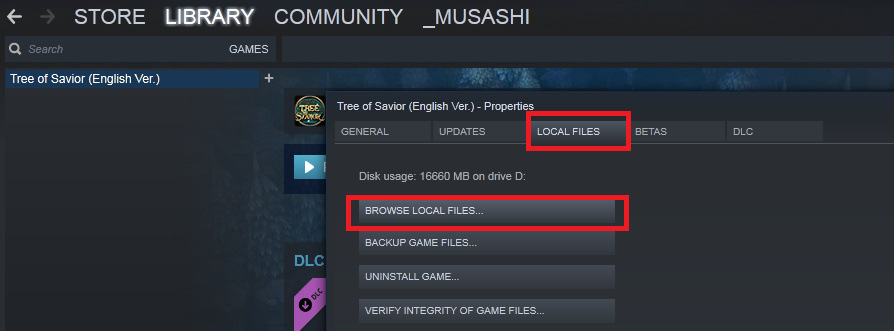
or you can open you steam library, open Tree of Savior Properties, in Local Files tab, choose "Browse Local Files"
-
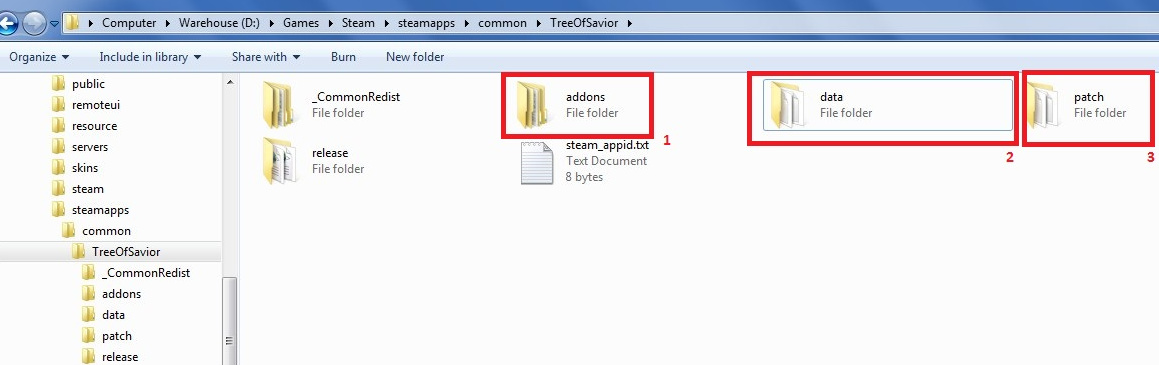
there you will see these folder’s structure
-
First, delete any file or folder inside /addons
-
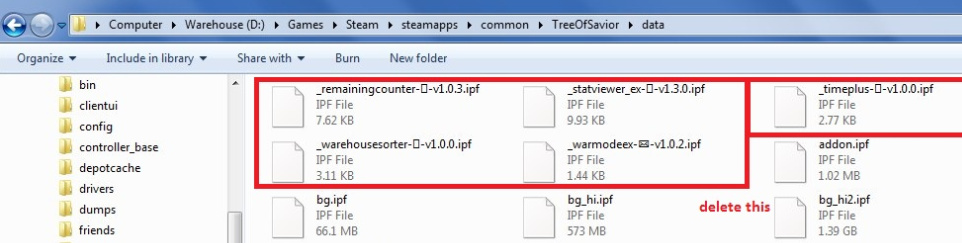
Second, browse inside /data, find any file with special character in front of its file name, delete those files
-
Most addon installed from addon manager will go to /data, but you might also want to check /patch folder for any ipf files with special char too, incase you installed some addon manually
-
Run File Integrity Check to repair any missing files
-
and last, you might want to wipe Addon Manager preference setting, open Run Dialog (Win+R) type %appdata% then run it , delete “tree-of-savior-addon-manager” folder
Hope it helps 
2 Likes
This topic was automatically closed after 60 days. New replies are no longer allowed.