
Tree of Savior Forum

A question regarding Gamepad targetting

Hello saviors,

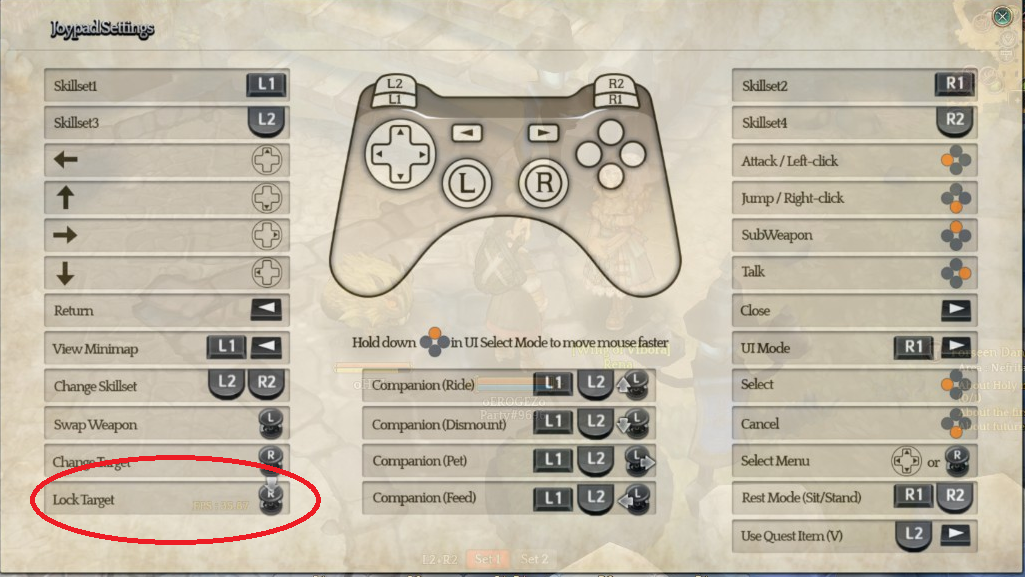
I’ve played through the iCBT solely on the Gamepad/controller, and I noticed it’s possible to lock on your target, but not possible to focus on it, did I miss something or it’s not a feature for the gamepad? I didnt take notice if pressing that button turned my character or something(but I’m kinda sure it didn’t) .

Here’s the gamepad interface guide:
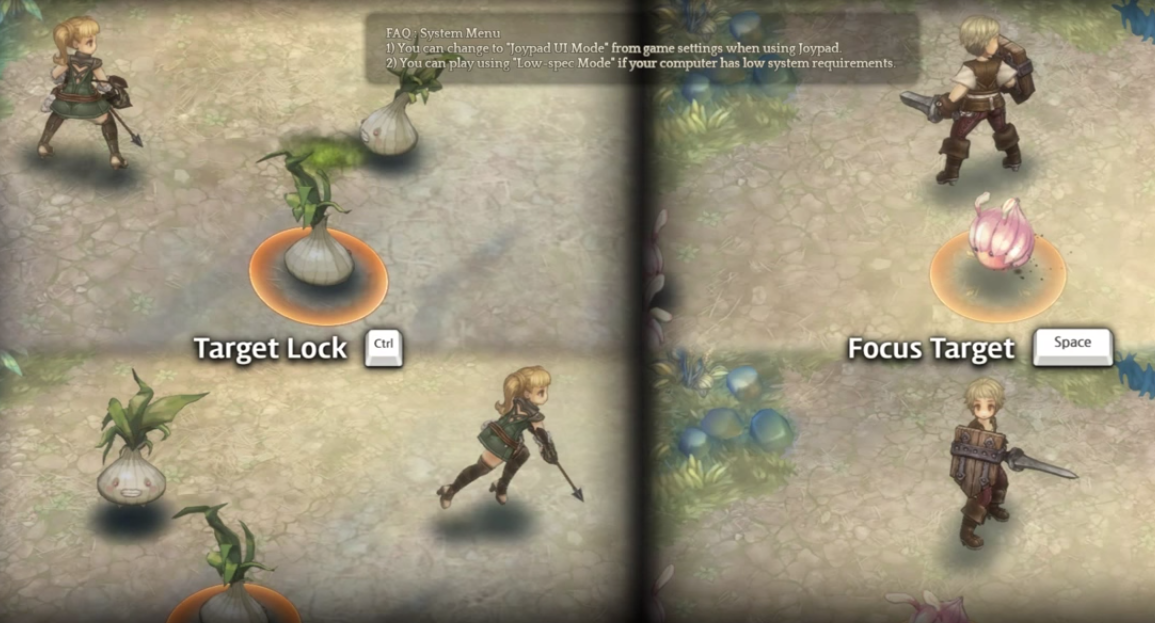
And an in-game tip on focusing targets(Screenshot from a youtube video):

<img
Any answers regarding this are appreciated,

See you in game,
Stay awesome!

1 Like

I tried messing around with this too, as I was an archer and it felt necessary. I, too used a gamepad and noticed that the button didn’t work. In the end I realized that the attack button could be held down and auto attack the monster you targeted without it changing targets. It would still be helpful if this worked though.

Perhaps this just hasn’t been implemented yet, despite there being a splash screen for it?

Yep, this useful feature didn’t work… I’m sure this will be fixed for the next CBT. Don’t worry too much :wink:

I used lock target with the gamepad and it worked fine. (usefull for bosses)
Focus target on the other hand I had no idea it even existed…

1 Like

Alrighty, thanks for your replies! Hoping the key they set it to in the future is comfortable to press~
(considering it not to be some sorcery of multi buttons xD)

uhh it worked fine when i press R3 with my ps3 controller xD

1 Like

It seemed to work fine for me, during boss fights i would lock target onto the boss and be able to auto-attack it while i ran around dodging the mobs it spawns. I tried this with both Archer and Wizard classes.

I had no problems with my PS4 controller, everything worked fine, maybe you should test another gamepad.

gamepad too expensive to get another one xD

Besides it looks like it’s only working for those on the PS3 and PS4 controllers? Could be something with the xbox ones, mine only worked to lock targets(which didn’t do much…ehh) :confused: I used xbox model.

This was good info, thanks! Do you guys who use gamepad prefer it over keyboard?

1 Like

Odd. I used a X360 gamepad, and the lock targeting feature didn’t work… :confounded:

@Azethine Not fond of the full keybord controls… I prefer the good old mouse. And the gamepad is really great, one of the best use for a MMORPG :slight_smile:

when I pressed the R3 only thing it did was select my target and nothing else, probably I was switching targets?? (this is starting to confuse me ;w; Edit: even more)

@Azethine Out of the long 10 minutes I spent on keyboard I can say it was way more comfortable on the controller :3

i think the controller targeting was buggy /not working for me.

Just to make sure that people aren’t confused by what lock-target is supposed to do: Things like Archer/Wizard basic attack will always make you face the monster you’re locked on to once you attack. Skills like Quarrel Shooter’s Stone Shot and Wizard’s Energy Bolt work like this as well.

Now, here’s what lock-target doesn’t help you with: there are a bunch of skills that fire in the direction you’re facing. For example, Wizard’s Earthquake, Cryomancer’s Ice Pike, Priest’s Aspersion, Swordsman/Cleric basic attack (if I recall correctly). For those things, even if you have a target locked, you will still fire in the direction you’re facing

Lock = will make you mark that target untill you kill it, change target or move far from it.
Focus = just by pointing out char to a target you will see the circle around it (no need to press keys/buttons)indicating that you are focusing the target.

Pretty much is working fine, as i used focus mode even on bosses (gave me a feeling of freedom :stuck_out_tongue:)

Yeah that’s nice. It literally didn’t do anything for me.

Same here. Maybe if I switched my controller to direct input it would’ve worked?

I was surprised to find that the gamepad controls felt more comfortable and fun to use than the keyboard and mouse. They did a good job with it, I think.

1 Like

@Tekmoti @pseudo I agree with the keyboard, it was super clunky so I was deliberating on buying a controller just for TOS so your answers helps me out a lot, thanks! I have been using the mouse but it kept saying that it is not ideal for swordsman/cleric which is probably what I would use in this game.

I think I heard this in another thread but Archers have auto targeting? I really regret not trying out a broad range of classes instead of getting to C3 like I originally planned to. I played as archer, and maybe that makes a difference here for whether the button does anything…

I think its something similar, when i was playing with Knee Shot my archer aimed to the closest monster, but in a 90 degree range i think, didnt aim the targets at my back.

I played a melee class and for me, honestly, my targeting was all manual lol, only thing locking did to me was show the HP bar of the monster.

Archers have their aim when they shot so you don’t miss like 90% of the shots because you’re angled 10° to the side wrong, and when I was playing, with a melee class, it did happen of me being turned to the wrong side and hitting the wind ferociously. so I had to manually turn my character and sometimes I would not turn perfectly and miss the mob again. And I believe that’s what the focusing should do >.< turn my character to the right side(that’s what the screenshot above shows, at least)

e.g: Lock your target(via gamepad keys), press focusing button(which doesn’t exist for the gamepad I guess), and maybe holding down the focus button would make you face your target even when moving.