Tree of Savior Forum

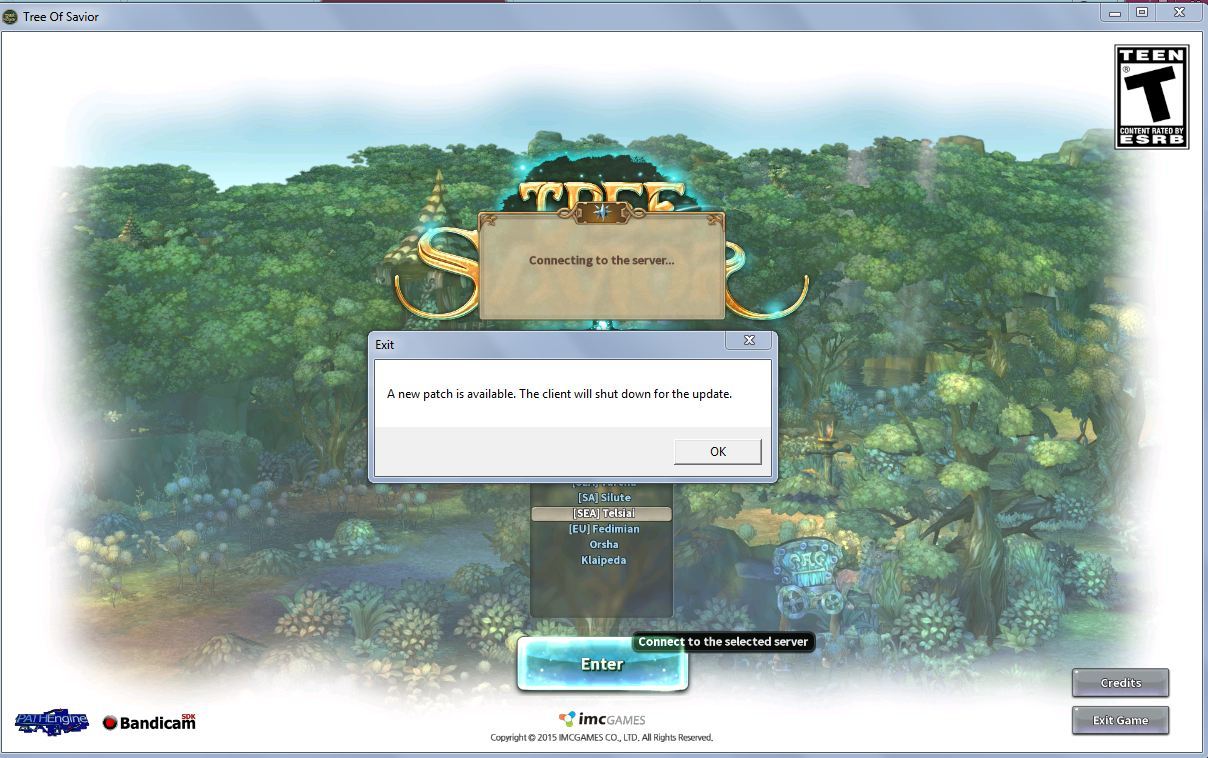
A new patch is avalible the client will now shutdown for the update

Please fill in as much as you can :

Date and Time :6.07 17/may/2016

Game Control Mode (Keyboard/Joypad/Mouse) :keyboard

Bug Description :non stop pop out even i restarted 3 time my pc and steam
had verified file 3-4 times after start up still pop up the same error
(letting us know what you were doing before, during, and after the bug happened will help us a lot)

Steps to reproduce the issue :
1)
2)
3)
4)

Screenshots / Video :
https://forum.treeofsavior.com/uploads/default/original/3X/a/a/aa9451125c80545a33c4a74b75960bc526770397.JPG
(attach screenshots or videos regarding the bug)

System

  • CPU : i5-3337
  • RAM : 4
  • Graphics Card :radeon
  • Mainboard :
  • Storage : 500gb
  • OS : win 8
  • Internet Connection : unifi
  • Country, Region : malaysia

i got the same problem.

this is not first time happened to me
after download the path but show the same error
last time i was delete the game and download it again
how can i do this every week?

hope you would open the game path for us update manually

@STAFF_John @STAFF_Ines @STAFF_Max @STAFF_Ethan @STAFF_J

Same. Cmon IMC same bug last week :confused:

after download the .pak file then i search in file it is disappear

i think we need to change the release.revision number to current patch.
since its “11753” for me inside.
you can find it in " \Steam\steamapps\common\TreeOfSavior\release "

than release.revision

we need the updated number so we have to change it.

Ohh god not that bullshit again

This post was flagged by the community and is temporarily hidden.

me and my friends have the same problem

This post was flagged by the community and is temporarily hidden.

hahaha good one, when is the fix? still cant log coz of the update problem

any ETA on when is this going to be fixed? the second maintenance already ended and I’m still having this issue.

Here’s a fix that worked for me, and worked since patch of May 17, 2016.

1.) Verify the cache on steam and let it download the update.

2.)Don’t open the game yet, you need to go steam folder:

X:\Games\Steam\SteamApps\common\TreeOfSavior\patch

copy the file “11781_001001.ipf” as backup to different location

3.) You need to change the value of “release.revision.txt” located at

X:\Games\Steam\SteamApps\common\TreeOfSavior\release

check the value, should be “11781” or change it if not.

4.) This is important, need a little quick on this.

Ready your backup file “11781_001001.ipf” and copy it, open up the folder

X:\Games\Steam\SteamApps\common\TreeOfSavior\patch

Press play, while loading, or before the loads, copy the backup “11781_001001.ipf” file from other folder then paste it here. You should be able to login to your lodge.

Observation: This happens because everytime you hit play, for some reason, TOS delete the update file “11781_001001.ipf” and don’t update the file “release.revision.txt” automatically. Please share if it works to you and let Devs team about this.

2 Likes

i have a crude way to settle this…

go to the file “11781_001001.ipf”

right click, select properties, click security tab, deny modify…

hope this help…

1 Like

ok looks like they dont give a single … for community :slight_smile:

i posted my error on the morning… after maintence ends… and… as u can see

1 Like

“release.revision.txt” have nothing in it for me, all blank, what should i do?

I dont even have this file “11781_001001.ipf” …

edit and type 11781 and save it