
Tree of Savior Forum

**True** fullscreen mode

Hi,

I seen that the current “fullscreen” mode is, in fact, a borderless windowed mode. That’s important because a lot of computer would benefit of a true fullscreen mode.

Also, NVIDIA Shadowplay on laptop requires a true fullscreen mode for recording the game and this powerful screen capturer is practical: we don’t feel input delay or any lag when we’re recording.
2 Likes

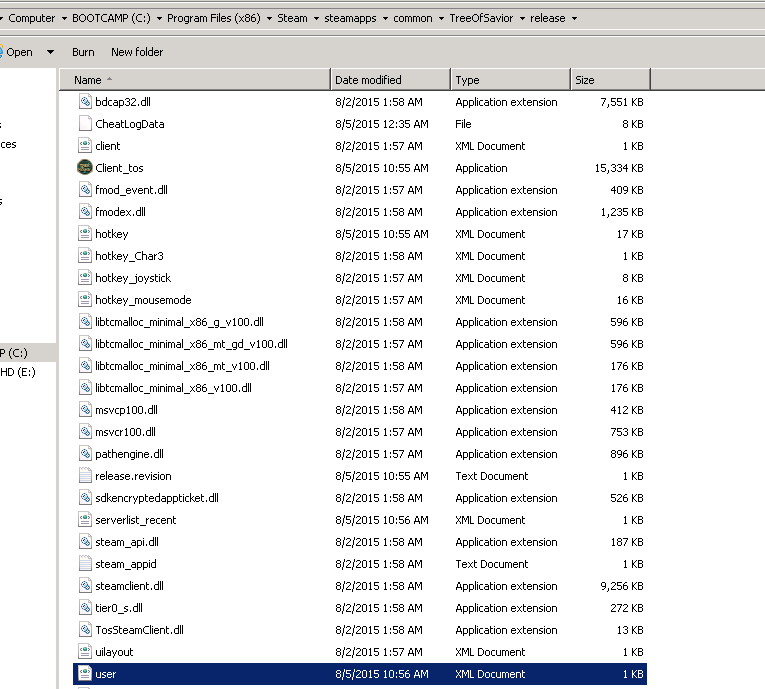
If you go into your user.xml file with notepad:

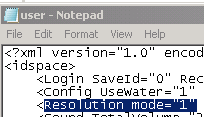
You can edit resolution mode:

I believe setting this to “0” will enable true Fullscreen, “1” is borderless windowed, “2” is bordered windowed. Hope this helps.

2 Likes

I’ll try it, thanks @meanie! :slight_smile:

EDIT: Tested it, it works. But there is a weird downside: I can’t alt-tab (or winflag-tab) when I’m in the -true- fullscreen mode. Maybe that’s why we haven’t this mode in the settings…

EDIT2 : And Shadowplay still doesn’t work. But I see a FPS boost.

Well, I don’t usually use fullscreen because of that exact reason, not easily being able to Alt-tab out of any game easily. But I was never completely unable to so that’s weird… I think the FPS boost might come from the forced v-synch and the fact that youre now in fullscreen. Could be wrong though, not sure what’s up with shadowplay.

I do know there is the bandicam if you use f12 but maybe you’ve had trouble with it since you mention input delay…

The input delay is a general issue I see in some games (and it’s due to v-sync I think), not really here. And V-sync stuck the game with 60fps (now I get around 110~120fps in fields).

Yeap, that’s weird, I really can’t alt-tab. More weird: If I use CTRL+ALT+DEL and launch de task manager I… Don’t see it. But My cursor change from the game on to the Windows one. It’s like the game wants to be on the top of everything but if I see the Windows cursor, it means that i’m not in the game and trying to moving my character doesn’t work. I had to blindly search the game with numerous alt-tabbing.