varena, i ping 48ms working fine
thanks for the info anw, ill just take a break from tos for a while haha

varena, i ping 48ms working fine
thanks for the info anw, ill just take a break from tos for a while haha
I try later…thanks for sharing…i have another comp can play … Only my main comp can’t…maybe I try dele whole steam and redownload all again
same issue for me. was working fine earlier today and last night after the maintenance. but after restarting my pc, it wont work anymore. tried almost all of the things mentioned within the thread as a solution, but still nothing . :C
ok i just try this technique with my 2nd computer, the trick is to keep verify interity until it pop up the all files are up to date and there’s nothing else to verify. apparently something keep broken down during the download. after u receive the popup said all files are up to date, just start the game and wait a bit. it will work. it work on my 2nd computer too
just hit play via steam , and leave ur computer there while doing something else, it take a bit long but it will log in,
oh you can ping varena server? can i ask for the ip ? i only know Telsia.
oh that one i ping telsiai lol i thot sea should be same
yeh i thought so too lol
this is true, after every update/maintenance it seems like new problems/errors arrives with logging in
anyway please investigate
[edit] i somehow solved mine (see below) but the patch files are sure strange…
i know mining the files isnt right but i checked the patch files and some are ‘suspicious’ (i might be totally wrong tho)
11072 ipf patches v11037 into v11072 but
11037 ipf patches v11034 > into v11035
11036 ipf also patches 11034 into 11035, both contains exact same file
128144 & 128143 ipf both exact same file, patches 128143 > 128143
some files also patches into version different from filename
[details=list].ipf = version to be patched > version of that .ipf
128145 = 12900 > 12900
128144 & 128143 = 128143 > 128143
11753 = 11726 > 11756
11702 = 11669 > 11703
11457 = 11373 > 11462
11346 = 11314 > 11347
11208 = 11139 > 11139
11307 & 11306 = 11034 > 11035[/details]
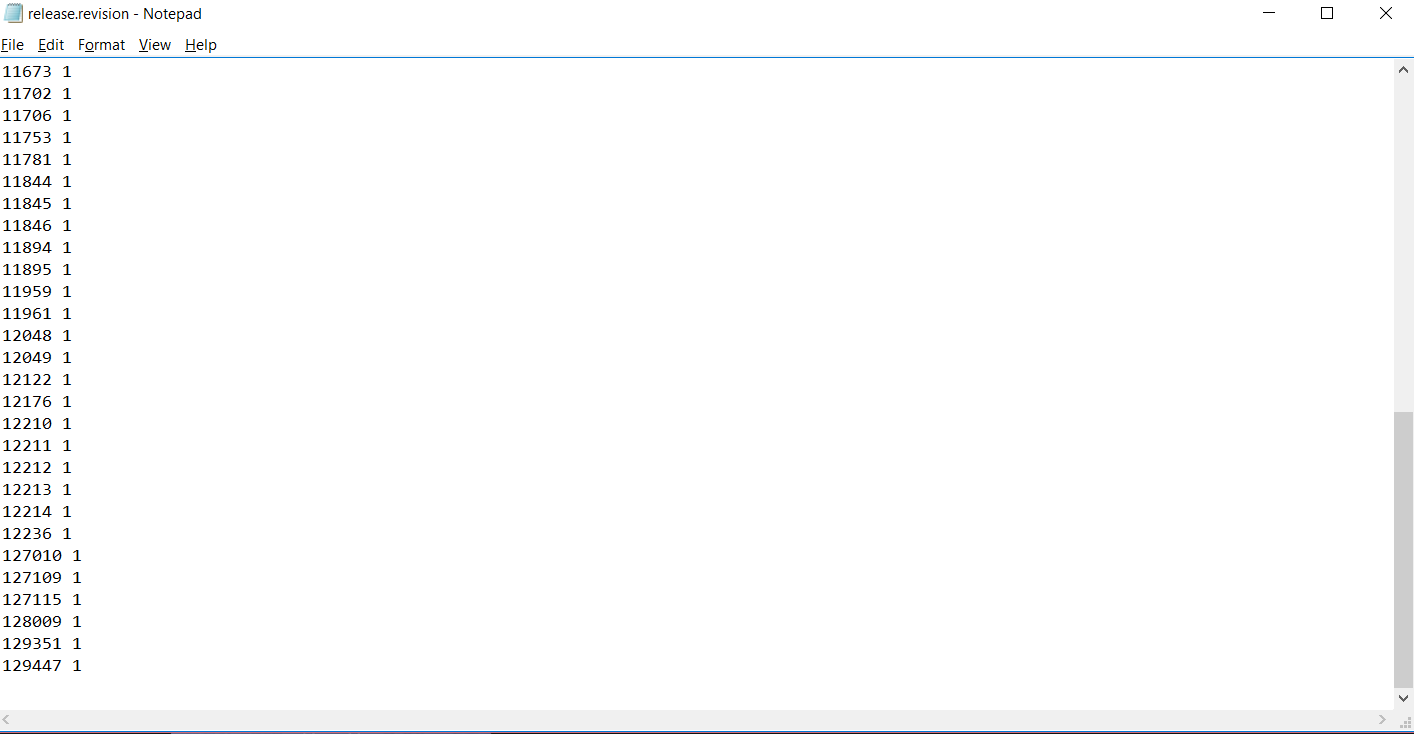
after a clean install, the launcher finally pop out an error. which is 128009_xxxx failed to download files. This case i solved it before which is u go to the release.revision to edit the text file. But the format of the text file seems to changed already. my release.revision appear like this.
and i do check my patch file and i found that 128009 ipf file is at there, but the latest is 129351.
I updated the game on my other pc and copy folders : commonredist , patch , release (replacing the old folders ) and it worked well .
I think the error is in any subfolder of the game better download and install on another PC and copy the patch / commonredist / release folders in C : \ Program Files ( x86) \ Steam \ steamapps \ common \ TreeOfSavior worked for me
[EDIT]
i try replacing my now-working-files with my backup and the game still work… so in the end i don’t know what solved my problem haha but maybe u can still try what I last did that make mine work:
so i deleted (backup) some files from /data and let updater redownload them. i trial and error the smallest 25 files and somehow the game can run after that.
Thanks u guys helping…I try my self dele whole steam and game…download and install again…the problem is fix after install and download again…
.I’m playing…no more problem…u guys can try this…if ur line slow abit take long time to download again
I have the same kine of problem too It’s something about release.revision.txt last night I try to enter the patch name that casing problem and it’s work well. And now I try to reset number in that file to 0 and the patch stuck again. It seem like launcher try to download TreeOfSavior\release\patch\release.revision.txt over and over again…
I finaly solved this by validating cache and patching the game while using a vpn (pingzapper in this case). I can play normally now without the vpn, it was just for downloading the game data, thanks guys hope this helps.
afaik if u reset release.revision.txt, it will redownload patches inside /patch from version 0.
verify integrity shd do better job because it corrupt-check whole tos folder and redownload them. theoretically all files needed for the game to run shd be there on perfect condition…
i just remembered i did this too on my last not-working-effort. plus a shutdown & cold boot, plus cleaning all temp files on pc. then i delete/redownload some files inside /data and it somehow it works.
@mystletainn
Hello there could you help me too? I already tried verify integrity till it says that there are no more files left or something then I try and start the game via steam or by using the one’s at TOS’ folder itself but still nothing happens and afterwards when I try to verify again it says that there are 37 files “again”. I am saddened by this problem a lot