
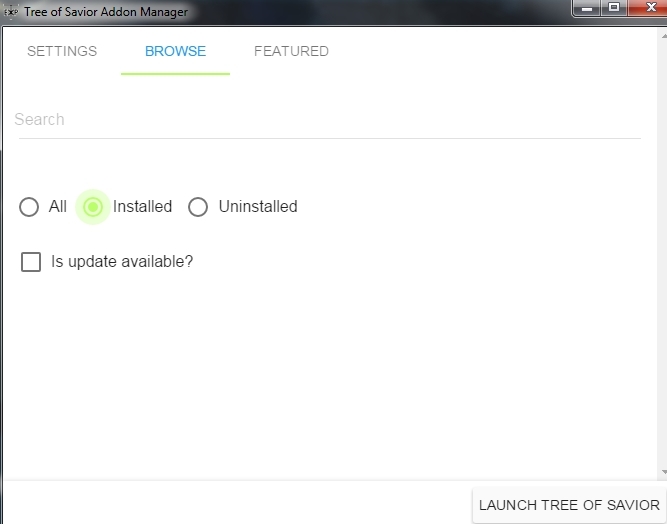
??? It’s blank, why? 
If you haven’t yet, click on [Settings tab].
Then click the [Browse] button within Settings and point the addon manager to the folder where your ToS is installed, normally it’s in Program Files (x86)\Steam\steamapps\common\TreeOfSavior.
Skip the above if it does not apply.
Click on the [Browse tab] above and click inside the circle that’s beside the label [All]. <—This is probably what you’re missing.
This should populate the current available list of addons in the manager.
1 Like
I should have mentioned that the addon manager worked earlier. 
Forgive me.
I don’t know what happened it’s so confusing… 
Thanks for your reply.
Use the JTOS addon manager: https://github.com/JTosAddon/Tree-of-Savior-Addon-Manager/releases
It includes the addons developed for the japanese client. Some/most of them works with our client.
Also, here’s some way clean up the addon database if it breaks:
I assume the addon manager lost track of the addons you have installed. (addons.json)
One way you could properly fix this is:
- Backup all addons on the data directory. (Move to another folder.)
- Install all addons you want from the Manager, so you can update them later and uninstall properly.
- If some addon was removed or can’t be installed anymore, get it in your backup directory and copy it into data directory.
- data directory: C:/Program Files/Steam/steamapps/common/TreeOfSavior/data/
3 Likes
Can someone help me to decrypt+unpack ipf’s? I’m trying to use IPF Unpacker, but I can’t manage it to run.
run it with bash terminal. for example: cygwin, git bash, msys2 and more.
1 Like
I figured out, I created a batch file with “ipf_unpack.exe %1 decrypt”.
Then I dragged the ipf to a batch file and it worked.
Now, the problem is, does the game auto-patch edited ipf’s? I downscaled some textures, changed some colors so I can see if the change are working, but the game still look the same. Don’t know how to make it read edited files. Maybe if I mark it as “read only”?
People still reporting a “disappearing UI” issue with indunplus at times. I suggest attempting to delete the settings folder found in /addons and restarting the game. Please post if this does or does not fix your issue.
I doubt Excrulon has any intention of working so extensively on his old addons, especially with his (completely understandable) sentiment leveled toward IMC. Hopefully someone will be willing to pick up the reins and make these changes.
Can anyone let me know what the working/alternative market addons are these days?
I used to use Marktioneer which was fantastic. I need at the very least something that tells me how much an item is on the market currently, preferably by hover over. Does anything do this now?
Marktioneer still does that, at least for me
Oh really? Thread is a little misinformed calling it broken in that case, I’ll give it a shot again then. As long as this feature works it’s worth having.
@TWLVII @Awoooo
Please confirm that Marktioneer works, as it was mentioned earlier in the thread that it was not working correctly. I have not confirmed this myself, as I don’t use it. If it does indeed work, I will revise the first post.
1 Like
Definitely still works. Stopped working for a bit after the HG update but it’s back again.
I can take some screenshots next time I’m in game
I’ll take your word on it. First post updated.
And which addon to track world bosses? I already have Boss Spotter but don’t know how it works!
When you walk onto screen of a boss, it puts a message in your party chat that gives a clickable coordinates link of the boss’s location.
Marktioneer was never broken, it only doesnt work simultaneously with other market addons.
2 Likes
Is “Guildmates” broken now? It was working just fine before this last “hotfix” about the instances reset, now it doesn’t display a thing in the guild window anymore.
1 Like
The “Assortment” addon in the Addon Manager does not work anymore.
When you press the sorting button in your inventory, nothing happens. You don’t even get the default menu.
I would love for it to be fixed as it was a usefull little addon.
1 Like